


Most american merchants discover that only about 3 percent of store visitors actually make a purchase. This simple fact highlights just how challenging it can be to turn online traffic into real customers. As online shopping continues to grow, understanding where your Shopify store excels and where it falls short can make a huge difference. By taking a strategic approach to redesign, you unlock the opportunity for more sales, better customer loyalty, and a smoother shopping journey.
Table of Contents
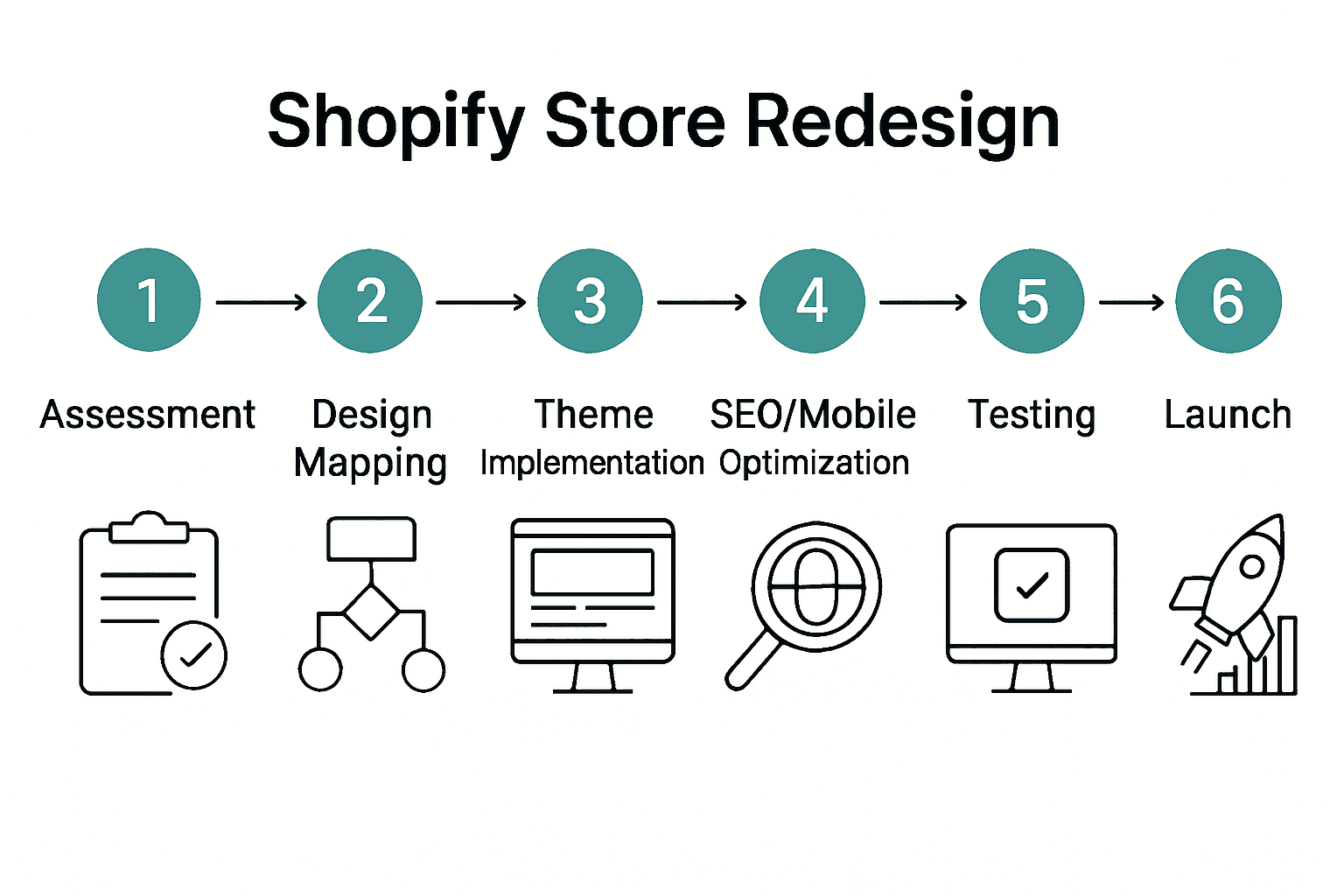
- Step 1: Assess Current Store Performance And Goals
- Step 2: Plan New Design And User Journey
- Step 3: Implement Custom Theme And Functionality Updates
- Step 4: Optimize For Seo And Mobile Usability
- Step 5: Test User Experience And Conversion Flows
- Step 6: Launch Store And Monitor Key Metrics
Quick Summary
| Essential Insight | Detailed Explanation |
|---|---|
| 1. Assess store performance metrics | Analyze key performance indicators like conversion rates and bounce rates to identify improvement opportunities before redesigning your store. |
| 2. Create a Customer Journey Map | Map the user journey through awareness to advocacy to enhance usability and satisfaction during the redesign phase. |
| 3. Choose a customizable theme | Select a theme that aligns with your brand and enhances user experience through clean navigation and responsive design. |
| 4. Optimize for SEO and mobile | Implement SEO best practices and ensure mobile responsiveness to improve visibility and user engagement across devices. |
| 5. Test user experience thoroughly | Utilize diverse testers to identify usability issues and make necessary adjustments for a seamless customer journey before launch. |
Step 1: Assess current store performance and goals
To kickstart your Shopify store redesign journey, you need a comprehensive understanding of your current performance metrics. According to Moldstud, tracking critical performance indicators is essential for defining success and identifying areas of improvement.
Begin by diving deep into your store analytics. Focus on key performance indicators (KPIs) from Shopify, which include sales performance, customer loyalty, and acquisition metrics. Pull reports on your conversion rate, average order value, bounce rate, and traffic sources. Look for patterns like which product pages have higher exit rates, where customers typically drop off in the purchasing funnel, and how long visitors stay on your site.
Pro tip: Don’t just collect numbers. Translate these metrics into actionable insights. If your conversion rate is low, it might signal design issues, unclear product descriptions, or complex checkout processes. Set specific, measurable goals for your redesign – such as increasing conversion rate by 20% or reducing cart abandonment by 15%. These concrete objectives will guide your entire redesign strategy and help you measure success after implementation.
With a clear performance assessment complete, you’re now ready to move to the next phase of strategically planning your store transformation.
Step 2: Plan new design and user journey
With your performance assessment complete, it is time to strategically map out a user-centered design approach that transforms your Shopify store. According to research from MDPI, shopping website design features profoundly impact usability, satisfaction, and customer loyalty, making this planning phase critical to your success.
Start by creating a comprehensive Customer Journey Map. As highlighted by JETIR, this approach allows you to dissect your user interface across five key phases: awareness, consideration, purchase, retention, and advocacy. Analyze each touchpoint critically. Where do potential customers first encounter your brand? What information do they seek during product research? How can you streamline the checkout process?
Pro tip: Focus on creating an intuitive, frictionless experience. Prioritize clear navigation, compelling product descriptions, high-quality images, and a simplified checkout process. Consider your target audience demographics and design with their specific preferences and pain points in mind. Every design decision should answer one fundamental question: Does this make the customer journey smoother and more enjoyable?
With your initial design blueprint ready, you are prepared to move into the detailed implementation phase of your store redesign.
Step 3: Implement custom theme and functionality updates
Now you are ready to transform your strategic design plans into a tangible Shopify store redesign. According to JETIR, effective UI design principles are critical in creating digital storefronts that drive user engagement and conversion rates.
Start by selecting a customizable theme that aligns with your brand identity and user journey mapping. As Medium highlights, Shopify offers seamless shopping experiences through customizable themes and strategic app integrations. Focus on implementing clean navigation, responsive design, and intuitive product categorization. Customize your color schemes, typography, and visual elements to create a cohesive brand experience that reflects your unique identity.
Pro tip: Test functionality extensively before full deployment. Create a staging environment where you can experiment with design elements, app integrations, and user flows without disrupting your live store. Pay special attention to mobile responsiveness, page load speeds, and cross browser compatibility. Every design element should enhance user experience and guide customers smoothly through their purchasing journey.
With your custom theme and functionality updates implemented, you are now prepared to rigorously test and optimize your redesigned Shopify store.
Step 4: Optimize for SEO and mobile usability
With your redesigned Shopify store taking shape, it is crucial to focus on search engine optimization and mobile responsiveness to ensure maximum visibility and user engagement. Leveraging the insights from our Shopify SEO guide, we will strategically enhance your store to attract and convert more customers.
Start by conducting comprehensive keyword research and implementing on page SEO elements. Optimize your product descriptions, page titles, meta descriptions, and image alt texts with relevant keywords that align with your target audience search behaviors. Ensure your site architecture is clean and logical, with intuitive navigation that helps both users and search engine crawlers understand your content structure. Pay special attention to mobile responsiveness, using responsive design techniques that automatically adjust your layout across different screen sizes and devices.
Pro tip: Page speed is critical for both SEO and user experience. Compress images, minimize code, leverage browser caching, and use content delivery networks to dramatically improve your store loading times. Mobile users are particularly impatient, so every second counts in keeping potential customers engaged. Consider running Google PageSpeed Insights to get specific recommendations for improving your mobile performance and search engine rankings.
With your SEO and mobile optimization complete, you are now prepared to implement advanced tracking and conversion optimization strategies.

Step 5: Test user experience and conversion flows
With your Shopify store redesign nearing completion, it is critical to rigorously test your user experience and conversion flows. According to research from MDPI, shopping website design features have a profound impact on usability, satisfaction, and customer loyalty, making comprehensive testing an essential final step.
Implement a systematic testing approach using the Customer Journey Map methodology outlined by JETIR. Break down your testing into five key stages: awareness, consideration, purchase, retention, and advocacy. Use tools like heatmaps, user recording software, and A/B testing platforms to gather detailed insights. Focus on critical conversion touchpoints such as product pages, cart functionality, checkout process, and mobile responsiveness. Simulate different user scenarios and analyze how easily customers can navigate from initial interest to final purchase.
Pro tip: Recruit a diverse group of testers who represent your target audience. Their real world feedback will uncover usability issues that automated testing might miss. Pay special attention to friction points like load times, form complexity, and clarity of product information. Consider implementing conversion optimization strategies to fine tune your user experience and minimize potential drop off points.
With your comprehensive user experience testing complete, you are now ready to launch and monitor your newly optimized Shopify store.
Step 6: Launch store and monitor key metrics
With your redesigned Shopify store ready, it is time to launch and systematically track your performance. According to Shopify, understanding key retail reports and performance indicators is crucial for evaluating your store performance and making data driven decisions.
Immediate post launch, focus on monitoring 19 critical KPIs across multiple dimensions. As detailed by Moldstud, these metrics encompass sales performance, customer acquisition, conversion rates, average order value, and customer retention. Utilize top analytics tools for Shopify to track these metrics in real time. Pay special attention to conversion rates, bounce rates, traffic sources, and customer engagement levels to quickly identify areas requiring optimization.
Pro tip: Set up automated reporting and create a dashboard that provides a comprehensive view of your store performance. Configure alerts for significant changes in key metrics to enable rapid response and continuous improvement. Remember that launch day is just the beginning of your optimization journey. Regularly review your analytics, test different strategies, and be prepared to make data informed adjustments to maximize your store performance.
With your store launched and metrics tracking in place, you are now positioned to continuously evolve and grow your Shopify business.
Elevate Your Shopify Store with Expert Redesign Solutions
If you are struggling with low conversion rates or a complicated shopping experience as described in the “Shopify Store Redesign Process for Higher Conversion” article you are not alone. Key challenges like unclear product pages, slow mobile performance, and inefficient checkout flows can silently hurt your sales and customer loyalty. The article highlights the need for a strategic redesign focused on user journey optimization, SEO enhancement, and thorough testing — all crucial steps that require expert execution.

At Blackbelt Commerce, we specialize in turning these complex challenges into growth opportunities. Our proven process covers consultation, custom theme development, and advanced eCommerce functionality tailored to your brand’s needs. We help you achieve goals such as boosting conversion rates and reducing cart abandonment through precise UX improvements and performance optimization. Don’t let a poor store design hold you back from your true potential. Visit our site to explore how our custom Shopify solutions can transform your store today. Start your journey to higher conversions now by partnering with true Shopify experts at Blackbelt Commerce and step confidently toward your business growth.
Frequently Asked Questions
How can I assess my current Shopify store performance before a redesign?
To assess your Shopify store performance, start by analyzing key performance indicators (KPIs) such as conversion rate, average order value, and bounce rate. Pull reports on these metrics and identify areas that need improvement, such as high exit rates on certain pages. This analysis will guide your redesign objectives.
What should I include in my new Shopify store design and user journey plan?
Include a Customer Journey Map that outlines every touchpoint your customers will experience, from awareness to advocacy. Focus on creating an intuitive design that addresses potential customer pain points and enhances usability, which will directly improve customer satisfaction and loyalty.
What steps should I take to implement custom themes for my Shopify store?
Select a customizable theme that reflects your brand identity and enhances user experience. Customize layout elements, color schemes, and navigation to create a cohesive look, and ensure that all functional aspects are mobile-responsive and easy to navigate to enhance customer engagement.
How do I optimize my redesigned Shopify store for SEO?
Conduct keyword research and optimize on-page elements such as product descriptions, titles, and meta descriptions. Implement a logical site architecture that improves both user experience and search engine indexing, which can lead to better visibility and higher traffic within a few weeks.
What testing methods should I use to evaluate user experience before launch?
Use methods such as A/B testing, heatmaps, and user recordings to analyze user interactions on your site. Focus on critical conversion points like product pages and the checkout process to identify friction points and improve the customer journey before launching your redesigned store.
What key metrics should I monitor after launching my redesigned Shopify store?
Monitor essential metrics such as conversion rate, customer acquisition, and bounce rates after launch. Set up automated reports for these KPIs to identify areas for further improvement and aim for specific goals like increasing conversion rates by 15% within the first month.
Recommended
- Maximize Conversions: E-Commerce Optimization Tips
- How to Increase Shopify Conversions: Proven Step-by-Step Guide – Shopify Experts: Grow Your eCommerce Revenue
- High converting websites: Master 5 Pillars
- Shopify CRO services: 3 Proven Steps to Boost Sales
Quick Answer: shopify store redesign process
A Shopify store redesign process should improve more than the look of the site. It should clarify positioning, improve navigation, strengthen product discovery, protect SEO equity, and create a cleaner path from visitor intent to checkout or consultation.
Want a sharper Shopify growth plan?
If this article connects to a current store decision, use the calendar to book a strategy call and turn the idea into a practical plan.
Key Takeaways
- Start with the search intent behind shopify store redesign process: the reader needs a clear explanation before they are ready for a service conversation.
- Keep the advice practical and specific so the post feels editorial, useful, and worth sharing.
- Use the topic cluster links to connect the article to related BBC expertise instead of leaving it as a standalone blog post.
- Add a natural commercial bridge only after the article has answered the reader’s main question.
- Use the same-page Calendly CTA so qualified readers can book a strategy call without being sent to a long form.
How this connects to your Shopify growth strategy
This article should remain useful for readers researching shopify store redesign process, but it also needs to show when the topic becomes a business decision. For the Shopify CRO & Store Design cluster, the commercial bridge is practical: once the reader understands the concept, the next step is deciding whether their current Shopify setup can support the desired experience, conversion path, and operational workflow. That is where expert planning, design, development, CRO, and SEO support can turn the idea into measurable store improvements.
Want a sharper Shopify growth plan?
Use this guide as a decision tool. Then book a strategy call when you want a practical roadmap for your store.
Related Shopify resources
These internal resources support the Shopify CRO & Store Design topic cluster and help connect this guide to stronger commercial next steps:
- Shopify CRO
- Shopify experts
- Shopify Plus agencies
- Shopify CRO — Parent service page for the reader’s next commercial step
- Shopify experts — Money-page link requested for expert-hiring intent
- Shopify Plus agencies — Money-page link requested for high-growth and Plus-agency intent
- Shopify custom development — Development service page for implementation and technical help
- Shopify checkout optimization — Related conversion article
- Shopify conversion optimization — Related CRO article
Questions store owners ask before taking action
What does shopify store redesign process mean for a Shopify merchant?
For a Shopify merchant, shopify store redesign process is about choosing or improving the store experience in a way that supports traffic, trust, conversion, and long-term operations.
When should a store owner get expert help?
Expert help becomes useful when the decision affects SEO, conversion, theme architecture, integrations, migration risk, or revenue-critical customer journeys.
How should this topic connect to a broader content cluster?
The post should link to a parent service page, related support articles, and money pages so Google and AI systems understand how the article supports a broader area of expertise.
What is the lead-generation goal of this article?
The article should educate first, then guide qualified readers toward booking a strategy call when they need help applying the advice to their own store.
What should be avoided during optimization?
Avoid filler, unrelated phrases, invented statistics, broken formatting, duplicated CTAs, and any edit that makes the article feel less helpful or less polished.
Future articles needed for topical dominance
To build deeper topical authority around this cluster, these supporting topics should be created later and linked back into this article:
- Shopify Store Redesign Process Checklist for Shopify Store Owners: Creates a practical support article that turns the Shopify CRO & Store Design topic into an actionable review tool.
- Common Shopify Store Redesign Process Mistakes and How to Avoid Them: Captures problem-aware searches and gives BBC a natural place to explain implementation risks without hard selling.
- When to Hire Shopify Experts for Shopify Store Redesign Process: Connects informational demand to the expert-hiring money page while preserving educational intent.
Want a sharper Shopify growth plan?
Ready to turn the advice in this article into an action plan? Open the calendar here and choose a time that works for you.

