


Quick answer
Custom Liquid is Shopify's template language — the code that pulls your store's data (products, prices, collections) into the page and lets you control how it displays. You add it in the theme editor's Custom Liquid section for quick changes, or in section files for full control. It is how you customize a theme beyond what the built-in settings allow.
Opening Up Your Store’s Potential with Custom Liquid Code
To make your online store stand out, understanding custom liquid code for shopify is essential. It’s the key to customizing your Shopify store beyond what standard settings offer.
- What is Liquid? It’s Shopify’s powerful templating language, used to build dynamic content and custom features.
- Why use it? To gain full control over your store’s design and functions, which helps improve customer experience, strengthen your brand, boost SEO, and increase sales.
Customizing your Shopify store is like solving a puzzle; every piece must fit perfectly. If parts are missing or misaligned, your store’s appearance and sales can suffer. Custom Liquid code allows you to create those missing pieces for a seamless result.
As Cesar A Beltran, Founder and CEO of Blackbelt Commerce, I’ve spent over 15 years helping businesses scale with high-converting online stores. My expertise in Shopify development includes using custom liquid code for shopify to open up unique functionalities and drive success. This guide will show you how to harness that power.
Custom liquid code for shopify word roundup:
Understanding the Building Blocks: Liquid Objects, Tags, and Filters
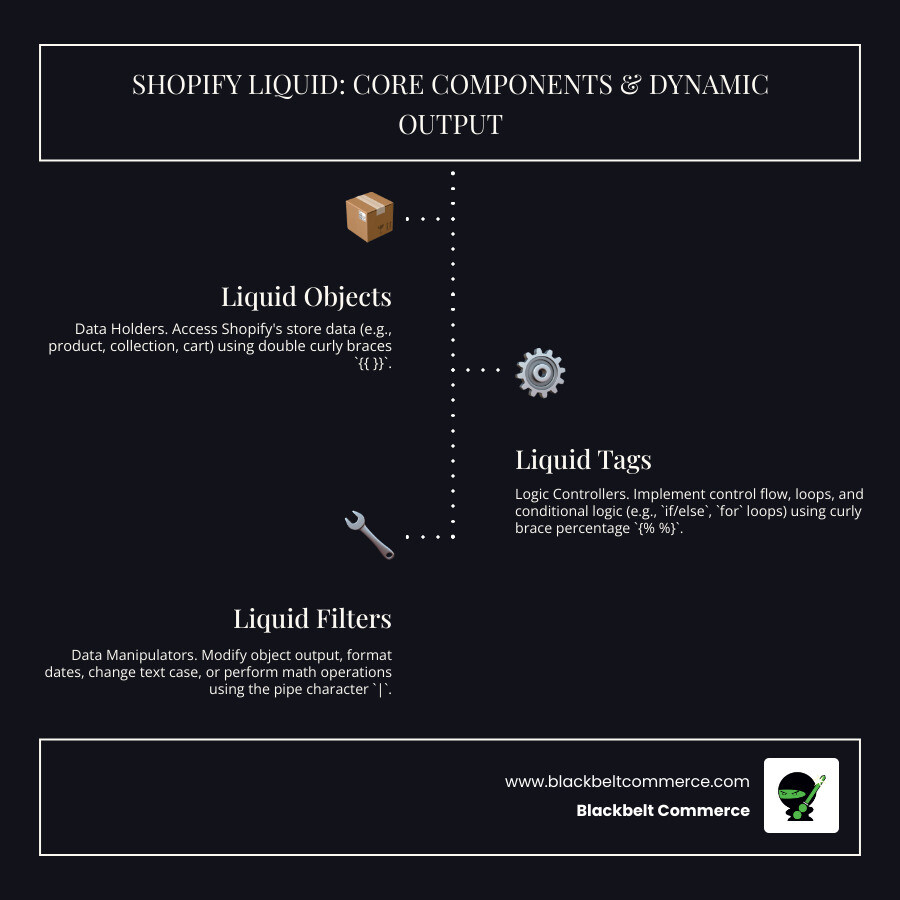
To make your Shopify store unique, you must understand Liquid, the language behind Shopify themes. Mastering custom liquid code for shopify means understanding its three core components: objects, tags, and filters.
Liquid is a user-friendly template engine created by Shopify’s founder, Tobias Lütke. It’s an open-source tool that pulls your store’s information and displays it dynamically. For a technical deep dive, refer to Shopify’s official Liquid documentation.
Liquid Objects: The Data Holders
Liquid objects are containers for your store’s data, like a product’s name or a customer’s details. They are wrapped in double curly braces: {{ }}. To display dynamic content, you point to these objects. For example, {{ product.title }} displays a product’s name. Key objects include product, collection, cart, customer, and shop. They pull live data from your Shopify admin, ensuring your site is always up-to-date.
Liquid Tags: The Logic Controllers
Liquid tags control the logic of your theme. They don’t display content themselves but tell Liquid what to do. You’ll recognize them by their curly brace percentage symbols: {% %}. Control Flow Tags, like if/else statements, let you show content based on certain conditions (e.g., show ‘Add to Cart’ if a product is in stock). Iteration Tags, like a for loop ({% for item in collection.products %}), are used to display all products in a collection without repetitive coding. These tags are essential for building dynamic and responsive layouts.
Liquid Filters: The Data Manipulators
Liquid filters modify the output of objects or variables. They act like formatting tools to ensure your data is presented cleanly. Filters are applied using a pipe character |. For example, {{ product.price | money }} formats a price with a currency symbol (e.g., “$10.00”). Other useful filters include capitalize, date, truncate (to shorten text), and math filters like plus or minus. Filters are crucial for a polished, user-friendly design. For more on how these elements impact your store’s appearance, see more info about Shopify design strategies.
Releasing Potential with Custom Liquid Code for Shopify
Now that you understand Liquid’s components, it’s time to open up their power. Using custom liquid code for shopify allows you to add unique functionality to your theme, especially with Shopify’s flexible Online Store 2.0 themes. This gives you complete control to create unique designs, integrate services, and build dynamic content that reflects your brand.

Step-by-Step: How to Add a Custom Liquid Section
- Access Theme Code: In your Shopify admin, go to “Online Store” > “Themes.” Click “Actions” on your current theme and select “Edit Code.”
- Create a New Section: In the “Sections” directory, click “Add a new section.” Name it something clear, like
custom-liquid-section.liquid. - Add Your Code: Paste your HTML, CSS, and Liquid code into the new file. This code will define your section’s appearance and functionality.
- Define Settings with Schema: At the bottom of your file, add a
{% schema %}tag. This JSON structure creates customizable settings that appear in the theme editor, allowing non-coders to update content easily. - Add the Section to a Page: Return to the theme customizer (“Online Store” > “Themes” > “Customize”). On your desired page, click “Add section” and select your new custom section.
- Customize and Save: Use the settings you created to adjust your section’s content and appearance. Click “Save” and “Publish” to make it live.
For more complex features, a deeper understanding of coding is necessary. For a complete guide, see How to Customize a Theme for Your Shopify Store.

Custom Liquid vs. Custom HTML Sections
It’s important to know the difference between “Custom Liquid” and “Custom HTML” sections. A “Custom HTML” section is for static content; you can add HTML, CSS, and JavaScript, but it can’t pull data dynamically from Shopify. Any product information would have to be entered manually. You can learn more about handling HTML sections.
In contrast, a “Custom Liquid” section gives you direct access to Shopify’s data via Liquid objects. This allows for dynamic content that updates automatically, such as a banner showing the current collection’s title. This capability makes custom liquid code for shopify powerful for building responsive, data-driven storefronts.
Sections vs. Blocks: What’s the Difference?
In Online Store 2.0, themes are built with sections and blocks.
- Sections are the main building blocks of a page, like a “Header” or “Product Grid.” They define the overall layout and can be reused across different pages.
- Blocks are smaller content units that live inside sections, such as an “Image” or “Heading” block within a “Hero Banner” section. They allow for fine-tuned control over specific elements.
This distinction is crucial when using custom liquid code for shopify. You can create a custom Liquid section or a custom Liquid block to fit within an existing section. The code structure must be adapted correctly for each format. For more details, Shopify offers a guide on sections and blocks.
Practical Applications: Elevating Your Store with Custom Liquid
The real magic happens when you apply custom liquid code for shopify to your store. The right customizations can transform an ordinary store into an extraordinary one. This includes dynamic banners, personalized content, and custom product showcases that highlight your products’ unique features.

Common applications include engaging product galleries, trust-building testimonial sliders, conversion-focused call-to-action sections, and seamless newsletter sign-up forms. These customizations can improve both the customer experience and your bottom line.
Boosting UX and Branding with custom liquid code for shopify
Your brand is the entire customer experience, and custom liquid code for shopify helps create a cohesive, memorable one. Imagine a collection page with a custom hero section that dynamically pulls the collection’s title and image. This feels polished and intentional.
We often build dynamic banners that update automatically for sales or seasonal campaigns, and testimonial sliders that build immediate trust. Another effective feature is a “Shop by Category” section, which guides customers through your product offerings naturally. This is especially useful for stores with large catalogs. Learn more in our guide on Showing Collections on a Page in Shopify: A Better Solution.
Improving SEO and Conversions
Custom liquid code for shopify is also a powerful tool for SEO and conversions. We use Liquid to create structured data that helps search engines better understand your content and custom canonical URLs to prevent duplicate content issues. These technical adjustments are vital for search rankings.
For conversions, we can create optimized call-to-action sections that appear at the right moment or custom newsletter sign-up forms that offer a discount. A well-designed promotional section highlighting your unique selling proposition can significantly increase conversion rates. For more strategies, check out these SEO best practices.
Adding Specific Features with custom liquid code for shopify
This is where you can add functionality your theme doesn’t offer out of the box. For example, instead of default dropdowns, you can create custom product variant selectors with color swatches or real-time size availability. This is a game-changer for products with multiple options. We cover this in our guide on Shopify Store Show Colours Product Multiple Colour Variants.
Other powerful features include customer notes fields for personalized products, which use line item properties to attach information to an order, and file upload fields for custom printing or artwork. The possibilities are endless, from custom size charts to interactive product configurators. For inspiration, see Shopify’s Liquid code examples.
Rather have an expert handle the setup?
We do this for Shopify merchants every week — done right, fast, and built to convert.
Best Practices and Advanced Customization
When implementing custom liquid code for shopify, it’s crucial to follow best practices to ensure your store remains robust, performant, and easy to maintain. This means writing clean, efficient code, maintaining design consistency with your theme, and conducting thorough testing across different browsers and devices.
Avoid common pitfalls like hardcoding values that should be dynamic, ignoring accessibility, or creating overly complex logic. Always consider theme compatibility, as not all themes support custom Liquid sections equally, especially older ones. For more insights, see these 3 Shopify Design Mistakes to Avoid.
Key Limitations and Challenges
While powerful, custom liquid code for shopify has limitations. Be aware of potential challenges such as:
- Theme Compatibility: Older themes may not fully support custom Liquid sections.
- Design Consistency: Custom sections can look disjointed if not styled carefully.
- Coding Expertise: Significant customization requires knowledge of HTML, CSS, and Liquid.
- Performance Impact: Poorly optimized code can slow down your store.
- Feature and Block Limits: Some native Shopify features may not work with custom implementations, and themes can have limits on the number of blocks per section.
These challenges highlight why expert help is often the safest path for complex projects.
Tools and When to Seek Expert Help
Shopify provides several tools for customization. Shopify’s Online Theme Editor is great for adding simple “Custom Liquid” sections. For larger projects, developers use the Shopify Theme Kit command-line tool to work on theme files locally.
While these can be useful for non-coders, they may not provide the same level of control or performance optimization as bespoke custom liquid code for shopify written by an expert.
Consider seeking professional help when:
- You need complex functionality like product configurators or custom integrations.
- Your custom code is causing performance issues.
- You need to ensure theme compatibility and scalability.
- You’re stuck on a troubleshooting problem.
For complex projects, the investment in a developer often pays for itself through high-converting, unique features. At Blackbelt Commerce, our Shopify Experts specialize in fully customized solutions, from theme tweaks to custom app development, ensuring your store stands out.
Conclusion
We’ve journeyed through the essentials of custom liquid code for shopify, from its building blocks—objects, tags, and filters—to the practical applications that make a store shine. The versatility of Liquid allows you to create everything from dynamic promotional banners and unique product showcases to specific features like custom notes fields and advanced variant selectors.
We’ve seen how these customizations can boost SEO, improve conversions, and create a memorable brand experience. However, the key takeaway is that using custom liquid code for shopify effectively is about more than just writing code. It’s about a strategic approach: knowing when to use built-in tools, when to build custom solutions, and when to seek expert help. The best stores are crafted with intention, a focus on performance, and a clear understanding of customer needs.
At Blackbelt Commerce, we’ve spent over 15 years mastering this balance. Every line of custom liquid code for shopify we write is designed to drive conversions, improve user experience, and solve business challenges. Your store has incredible potential waiting to be opened up. Now that you have a foundation in Liquid, you can start that journey.
Ready to see what your store could become? Explore our Shopify theme customization services and let’s turn your vision into reality.
Want this done right the first time?
Blackbelt Commerce is a family-run Shopify Plus agency. We have been building, customizing, and optimizing Shopify stores since 2012 — the kind of work in this guide is what we do for merchants every day. If you would rather have an expert handle it (and make sure it is fast, mobile-friendly, and built to convert), we are the team our clients trust to get it done.
Book Your Free 30-Minute Strategy Call
Prefer to talk now? Call +1 (516) 704-9890
Frequently asked questions
What is Liquid code in Shopify?
Liquid is Shopify's open-source templating language. It is the bridge between your store's data and what shoppers see — tags like {{ product.price }} output live values, and logic tags like {% for %} or {% if %} control what displays. Every Shopify theme is built with Liquid, so customizing a theme means editing Liquid.
Can I use custom Liquid code on any Shopify theme?
Yes. Liquid is the standard across all Shopify themes, so the same concepts apply whether you use Dawn, a paid theme, or a custom build. The exact file and section names differ between themes, but the language and the way you add sections are the same everywhere.
Will custom Liquid code slow down my store?
Well-written Liquid has almost no speed cost because it renders on Shopify's servers before the page loads. Slowdowns usually come from what the Liquid pulls in — large images, heavy loops over big collections, or external scripts — not the Liquid itself. Keep loops tight and assets light.
Do I need to know how to code to use custom Liquid?
For copy-paste snippets and simple output, no — you can follow a guide and paste working code. To write your own logic, debug errors, or work with metafields and complex loops, you need real familiarity with Liquid syntax. That threshold is where most store owners decide to hand it to a developer.
How do I edit Liquid code safely without breaking my store?
Always duplicate your theme first so the live store is untouched. Make one change at a time, preview it, and keep the original code commented out or saved so you can revert. Never test directly on the published theme — work on the copy, confirm it works, then publish.
What is the difference between sections and blocks in Liquid?
A section is a self-contained, reusable module you add to a page (a hero, a testimonial row). A block is a repeatable item inside a section (one slide, one FAQ item) that merchants can add, remove, and reorder in the theme editor. Blocks are defined inside a section's schema.

