


Add Custom Fields to Shopify Checkout: Top 5 Easy Tricks
Why Custom Checkout Fields Are Essential for E-commerce Success
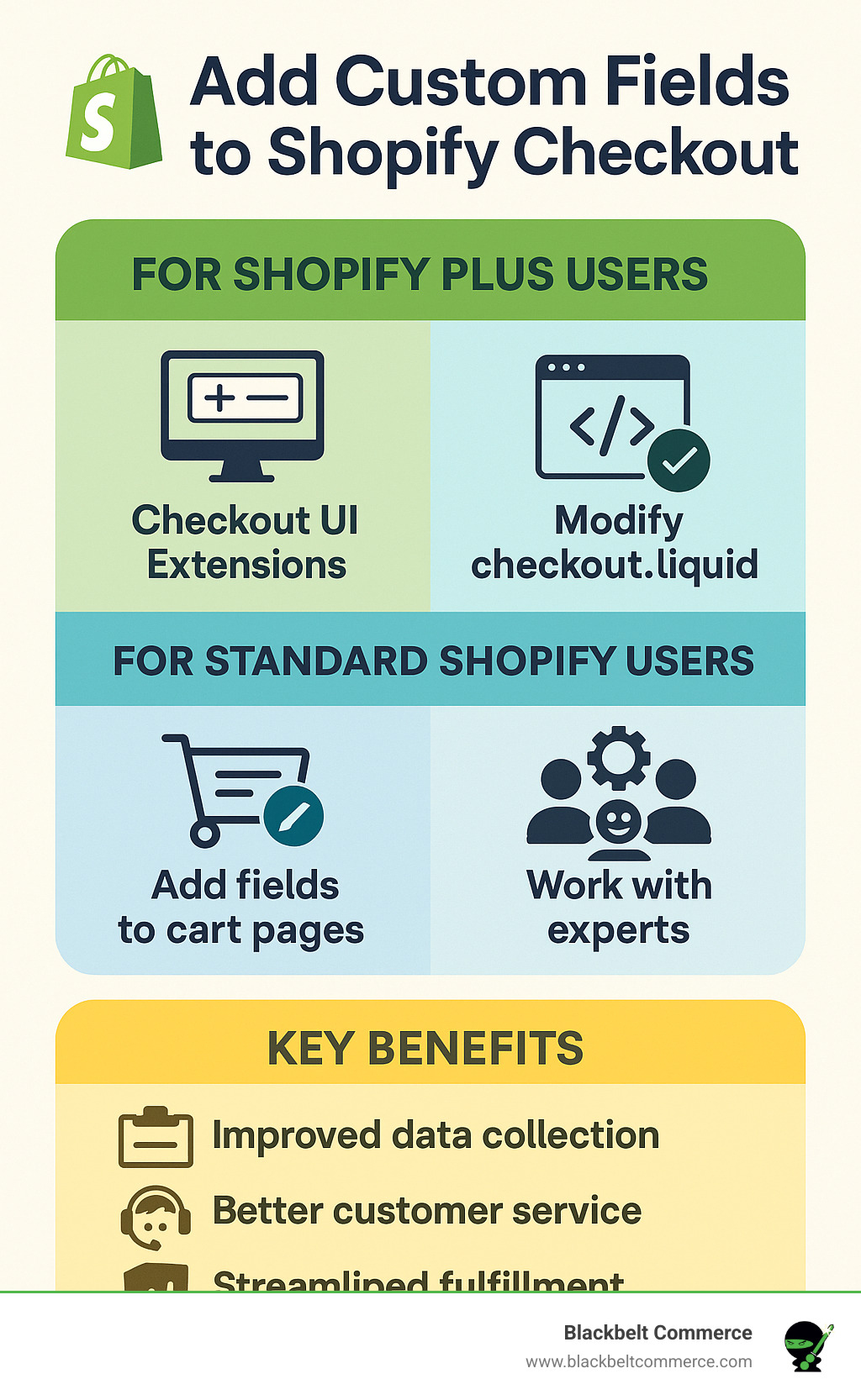
Add custom fields to shopify checkout to collect vital customer information that transforms your order process from basic to brilliant. Here’s your quick guide to getting started:
For Shopify Plus Users:
- Use Checkout UI Extensions (recommended method)
- Modify checkout.liquid directly
- Full control over checkout customization
For Standard Shopify Users:
- Add fields to cart page using line item properties
- Use cart attributes for order-level data
- Work with Shopify experts for custom solutions
Key Benefits:
- Collect delivery instructions and gift messages
- Gather personalization details for custom products
- Capture marketing opt-ins and compliance data
- Streamline fulfillment with specific customer requests
Picture this: A customer wants to add special delivery instructions for their anniversary gift, but your checkout doesn’t allow it. They abandon their cart, frustrated. This scenario plays out thousands of times daily across e-commerce stores that haven’t optimized their checkout experience.
The solution? Custom fields that capture exactly what your customers need to share. Whether it’s engraving text, delivery preferences, or gift messages, these fields bridge the gap between what customers want to communicate and what your store can collect.
As Cesar A Beltran, CEO of Blackbelt Commerce with over 15 years of e-commerce experience, I’ve helped 1000+ businesses add custom fields to shopify checkout to boost conversions and improve customer satisfaction. The right approach depends on your Shopify plan, technical resources, and specific business needs.
Basic add custom fields to shopify checkout terms:
Why Add Custom Fields? Key Use Cases & Benefits
Think about the last time you ordered something online and desperately wanted to leave specific instructions. Maybe you needed the package left with a neighbor, or you wanted to include a heartfelt gift message. If the checkout didn’t let you communicate these details, you probably felt frustrated—and some customers abandon their carts entirely over this friction.
That’s exactly why smart merchants add custom fields to shopify checkout. It’s not just about collecting more data; it’s about creating a checkout experience that actually works for your customers’ real needs.
Top 5 Use Cases for Custom Checkout Fields
Let me share the most impactful ways our clients use custom fields:
Delivery Instructions solve the “where’s my package?” problem before it starts. Simple fields like “Leave package with neighbor” or “Ring doorbell twice” can dramatically reduce delivery issues and customer service calls.
Gift Messages turn transactions into meaningful moments. When customers can add personal notes for special occasions, you’re not just selling products—you’re helping create memories.
Engraving Text is essential for personalized products. Whether it’s jewelry, awards, or custom items, collecting inscription details upfront prevents delays and ensures accuracy.
Age Verification keeps you compliant while maintaining smooth checkout flow. For alcohol, tobacco, or age-restricted products, custom checkboxes handle legal requirements seamlessly.
Terms and Conditions checkboxes provide legal protection for specific industries while keeping the process user-friendly.
The beauty of custom fields is how they transform potential friction points into opportunities for better service. When customers can communicate their specific needs upfront, everyone wins.
Improved Data Collection gives you first-party customer insights that paid advertising can’t match. This information fuels better marketing campaigns and helps you understand your audience on a deeper level.
Streamlined Fulfillment happens when your team gets all the details they need from the start. No more back-and-forth emails asking for clarification—everything’s captured at checkout.
Improved Customer Experience comes from feeling heard and understood. When customers can share what matters to them, they’re more likely to complete their purchase and return for future orders.
Regulatory Compliance becomes effortless for B2B businesses. Collecting VAT numbers, company registration details, or authorization agreements through custom fields keeps you legal while maintaining checkout flow.
Marketing Opt-in Opportunities are gold mines for future sales. SMS messages get opened eight times more than emails, and nearly three-quarters of customers have made purchases through marketing texts. Custom fields make capturing these valuable opt-ins natural and non-intrusive.
For more insights on creating personalized experiences, check out our guide on personalizing your store.
How to Add Custom Fields to Shopify Checkout: Methods for All Plans
The truth is, add custom fields to shopify checkout isn’t a one-size-fits-all solution. Your Shopify plan determines which doors are open to you, and understanding these differences can save you hours of frustration.
Let me break down what’s actually possible with each approach:
| Method | Shopify Plan | Technical Skill | Cost | Scalability | Upgrade Safety |
|---|---|---|---|---|---|
| Checkout UI Extensions | Plus Only | High | Development time | Excellent | Yes |
| Checkout.liquid | Plus Only | Very High | Development time | Good | No |
| Cart Page Fields | All Plans | Medium | Low | Limited | Yes |
| Expert Solutions | All Plans | None | $$$ | Excellent | Yes |
Think of it this way: Shopify Plus users get the VIP treatment with full checkout access, while standard plan users need to get creative with workarounds. Both approaches work, but they require different strategies.
For comprehensive theme customization guidance that complements checkout modifications, explore our article on How To Customize A Theme For Your Shopify Store.
For Shopify Plus Merchants: Open uping Full Checkout Control
If you’re on Shopify Plus, you’ve got the golden ticket. The platform gives you extensive modification capabilities that standard plans simply can’t touch.
Checkout UI Extensions: The Modern Approach
This is the modern, recommended, and safest method for deep customization, offering upgrade-safe, app-based control over the checkout experience. Using Shopify CLI and React, developers can create custom fields that integrate seamlessly with Shopify’s infrastructure.
Here’s why Checkout UI Extensions are the smart choice: Upgrade Safety means your customizations automatically update with Shopify’s platform changes, unlike older methods that break with updates. Performance Optimized architecture ensures faster loading times, while Scalable design can handle up to 50 checkout UI extensions in a single app version. Most importantly, they’re Secure by design, limiting access to specific UI components for security and brand consistency.
The process involves generating a checkout UI extension using Shopify CLI, configuring it through a TOML file, and using React components to create custom fields. Data collected through these fields is stored in metafields for easy access and management.
Legacy Checkout.liquid Method
While still available, direct checkout.liquid modification is like driving a vintage car – it works, but requires constant maintenance. This method involves accessing the checkout.liquid file through your Shopify Plus admin, adding custom HTML and JavaScript code, implementing proper validation and error handling, and creating killswitches for quick troubleshooting.
However, we strongly recommend using Checkout UI Extensions instead due to their superior maintainability and upgrade safety. Why choose the harder path when a better one exists?
For detailed guidance on maximizing your Shopify Plus potential, visit our Guide On Personalizing Your Shopify Plus Store.
For Standard Shopify Merchants: Smart Workarounds for Custom Data
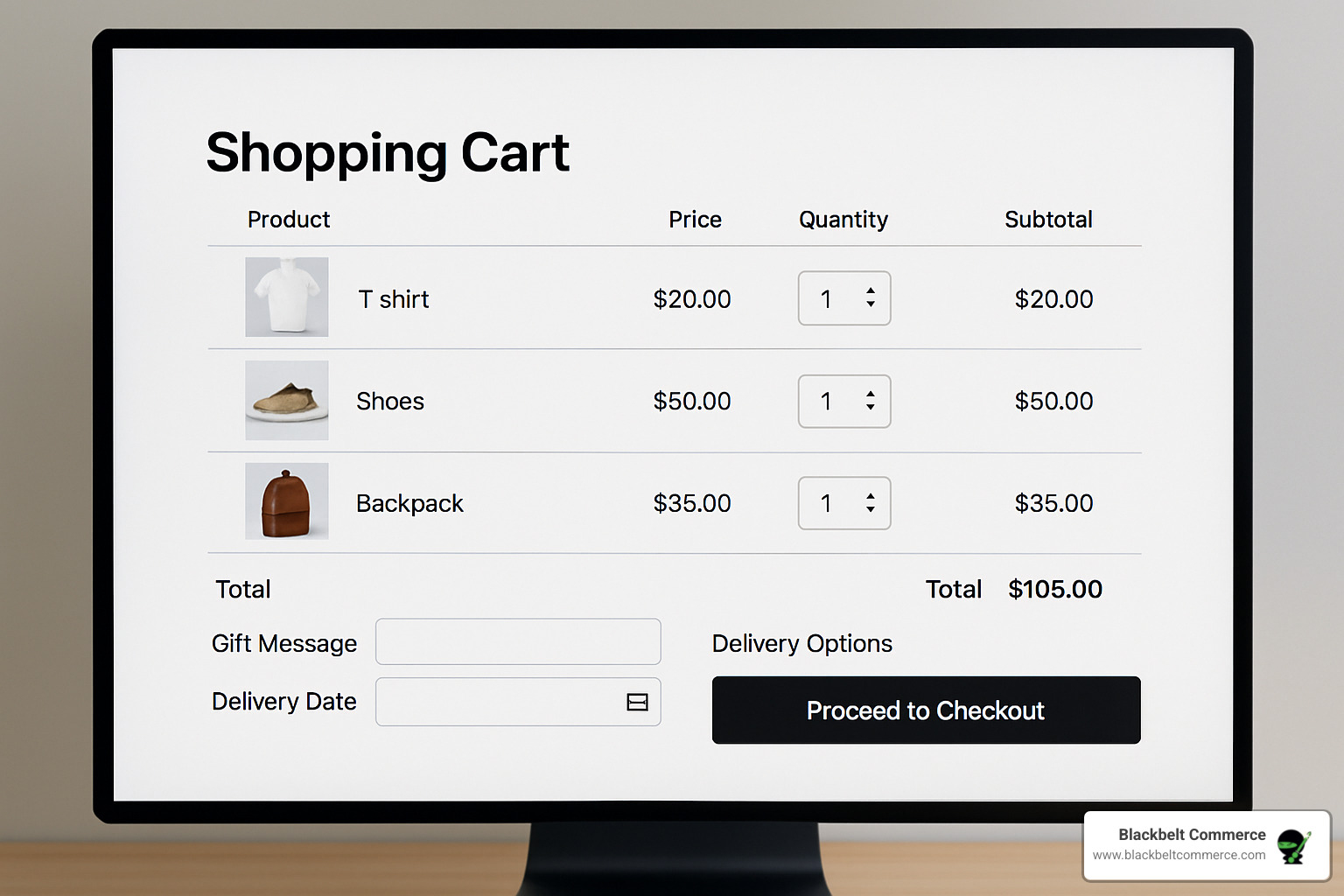
Don’t let the standard plan limitations discourage you. While you can’t directly modify the checkout page, several effective workarounds exist that work beautifully. This method involves collecting information before the checkout page and passing it along with the order.
The secret sauce is understanding that while you can’t add fields to the actual checkout page, you can collect custom data through the cart page and have it automatically included in the order details. Your customers won’t even notice the difference.
Method 1: Using Cart Attributes & Line Item Properties
This is a code-based workaround that adds fields to the cart page, which are then saved as order details. Think of it as intercepting your customers’ information before they reach the checkout finish line.
Cart Attributes work perfectly for order-level information like delivery instructions or gift messages that apply to the entire order. Line Item Properties are ideal for product-specific customization like engraving text or size preferences that apply to individual items.
The implementation is straightforward: access your theme’s code editor through the Shopify admin, locate your cart.liquid file, and add custom HTML form fields within the cart form. Use proper naming conventions (properties[Custom Field Name] for line items or attributes[field_name] for cart-level data).
Here’s a practical example that creates a delivery instructions field:
<labelfor="delivery-instructions">Delivery Instructions:</label><textareaname="attributes[delivery_instructions]"id="delivery-instructions"placeholder="Special delivery notes..."></textarea>This creates a text area that customers can fill out, and the information automatically appears in your order details. Use Shopify’s line item property generator to easily create the necessary HTML without manual coding.
Method 2: Leveraging Custom Development Solutions
For merchants seeking a hands-off approach, expert-built solutions offer the perfect balance of functionality and simplicity. Our recommended approaches include Custom Theme Modifications that seamlessly integrate with your existing design, Custom Scripts that add dynamic fields based on specific conditions, and Expert-Built Solutions that handle everything from field creation to data management.
No-Code and Low-Code Options provide user-friendly interfaces that allow you to configure and manage custom fields without touching code, while still providing the flexibility you need. These solutions often perform better than DIY approaches because they’re optimized for conversion and user experience.
For merchants seeking a hands-off approach, Blackbelt Commerce offers expert services to build and manage custom fields for your store. Our team has successfully implemented custom field solutions for over 1000 businesses, ensuring optimal performance and conversion rates while you focus on running your business.
Managing Your Custom Data: From Collection to Action
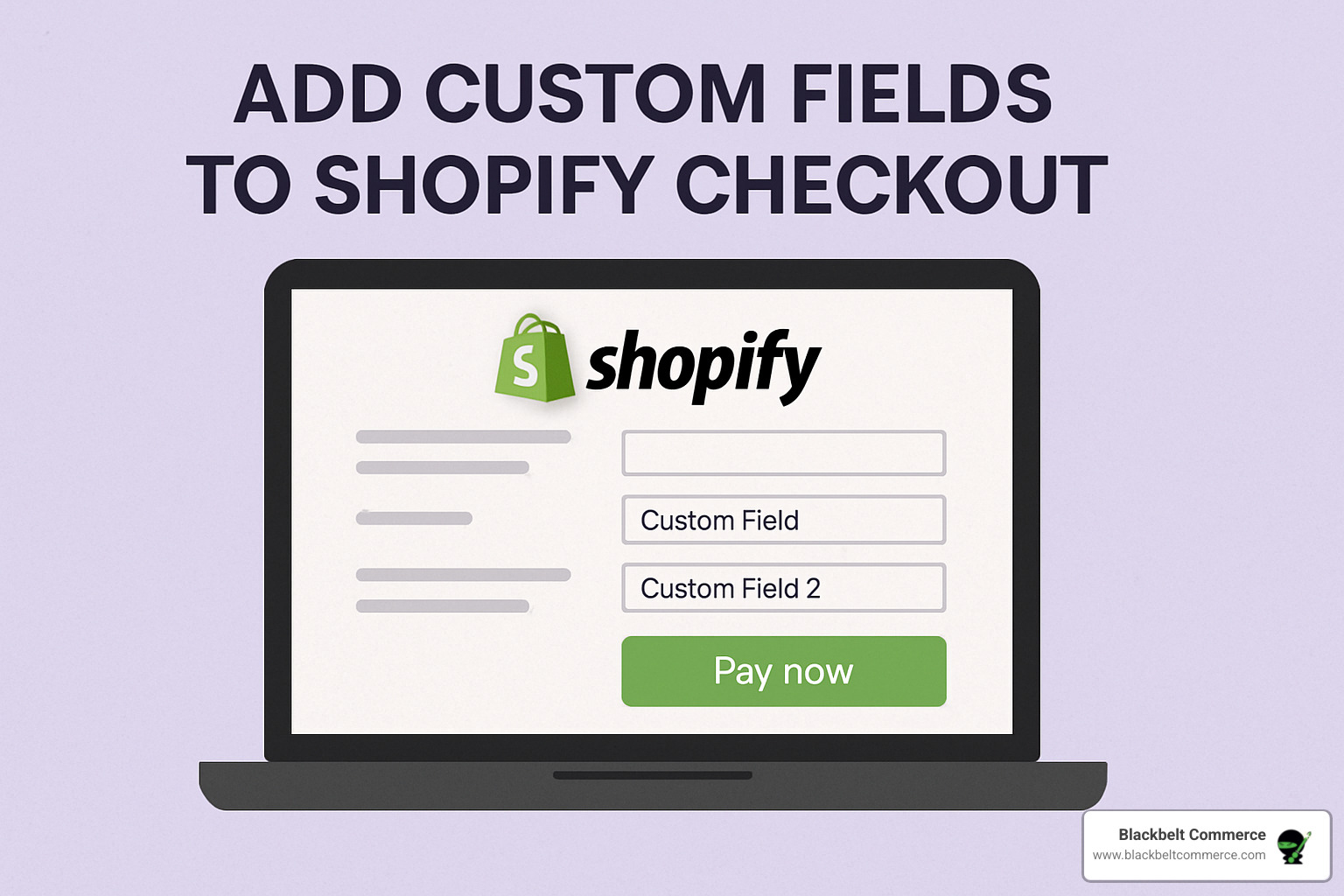
Congratulations! You’ve successfully learned how to add custom fields to shopify checkout. Now comes the exciting part: turning that valuable customer data into actionable insights that drive your business forward.
Think of your custom field data as a goldmine of customer preferences and requirements. The way you store, organize, and use this information can transform your entire fulfillment process from reactive to proactive.
Storing Data with Metafields
Here’s where things get really powerful. Metafields are Shopify’s modern solution for storing custom data, and they’re absolutely game-changing for businesses that want to scale their personalization efforts.
What makes metafields so special? They create a structured system that grows with your business. Instead of scattered notes or complicated workarounds, metafields organize your custom data into logical groups called namespaces (like “customfields” or “personalization”), with specific keys for each data point (such as “deliveryinstructions” or “gift_message”).
The beauty of this system lies in its flexibility. Your customer’s engraving request doesn’t just disappear into a text field—it becomes structured data that can be accessed by your fulfillment team, integrated with third-party apps, or even used to trigger automated workflows.
Here’s what makes metafields the smart choice: Your data persists across Shopify updates, integrates seamlessly with apps, and supports various data types from simple text to complex files. This means your investment in custom fields pays dividends long-term.
To display the data in your admin, you must create a metafield definition. This simple step makes custom information visible on order detail pages, empowering your team to act on customer requests immediately.
Accessing and Using Collected Information
Now for the practical magic: putting your collected data to work. When you view an order in your Shopify Admin, the custom field information appears right where your team needs it most—on the order details page. No hunting through separate systems or deciphering cryptic notes.
Automated workflows take this efficiency to the next level. Using Shopify Flow, you can create smart responses that trigger based on custom field data. Imagine orders with special delivery requirements automatically getting tagged for priority handling, or customers receiving personalized follow-up emails based on their stated preferences.
Your packing slips and customer emails become more personal and accurate when they include custom field data. The engraving details travel with the order from checkout to fulfillment, ensuring nothing gets lost in translation.
The analytics opportunity is equally exciting. By tracking patterns in custom field usage, you find which personalization options customers love most, common delivery preferences, and frequently requested services. This intelligence drives better inventory decisions and new product development.
The result? A seamless flow from customer request to fulfillment that makes your business look professionally organized and customer-focused. Your team spends less time clarifying unclear orders and more time delighting customers with exactly what they wanted.
Best Practices for a Seamless & Secure Checkout
Getting your custom fields right is like finding the perfect balance between collecting valuable information and keeping customers happy. Do it well, and you’ll see conversion rates climb. Do it poorly, and you’ll watch potential customers walk away in frustration.
The secret sauce? Thoughtful design that puts user experience first.
User Experience Optimization
Mobile-first design isn’t just a nice-to-have anymore—it’s absolutely essential. With most of your customers shopping on their phones, your custom fields need to work flawlessly on every screen size. Test your fields on different devices, and make sure they’re easy to tap and fill out even with thumbs on small screens.
Here’s something that might surprise you: too many fields can actually hurt your sales. Every additional field you add creates a small barrier between your customer and their purchase. Keep fields to a minimum to avoid friction and reduce shopping cart abandonment. Only ask for information that’s truly necessary for order fulfillment or your business operations.
Clear labeling makes all the difference in customer completion rates. Each custom field should have descriptive labels that tell customers exactly what you need. Use helpful placeholder text like “Leave package with neighbor” or “Happy Anniversary, Sarah!” to guide customers toward the right type of response.
For stores with complex customization options, progressive disclosure works wonders. Instead of overwhelming customers with every possible field at once, use collapsible sections or conditional fields that only appear when relevant. This keeps the initial view clean while still providing comprehensive options.
Security and Compliance Considerations
When you add custom fields to shopify checkout, you’re handling customer data—and that comes with real responsibilities. Data protection should be your top priority when collecting any customer information. Only collect data that’s genuinely necessary, and ensure it’s stored securely according to industry standards.
GDPR compliance affects more businesses than you might think. If you serve European customers (and many businesses do without realizing it), your custom fields must comply with GDPR requirements. This means clear consent mechanisms and the ability to delete customer data when requested.
Here’s a crucial security reminder: never collect payment card information through custom fields. Shopify’s secure checkout handles all payment processing for good reason. Your custom fields should focus on non-sensitive order details like delivery instructions, gift messages, or personalization preferences.
PCI compliance becomes much simpler when you stick to Shopify’s secure payment processing and avoid collecting sensitive financial information through your custom fields.
For more comprehensive guidance on creating conversion-focused designs, check out our Best Design Practices For An E-Commerce Store. By following our website’s privacy policy, you’ll ensure your custom fields meet industry standards for data protection.
The bottom line? Smart implementation of custom fields can significantly boost your conversion rates while improving customer satisfaction. Focus on collecting only what you need, make it easy for customers to provide that information, and always prioritize their security and privacy.
Frequently Asked Questions about Adding Checkout Fields
Do I need Shopify Plus to add custom fields directly to the checkout page?
Yes, direct modification of the checkout page using Checkout UI Extensions or checkout.liquid is a feature exclusive to the Shopify Plus plan. Think of it like having VIP access to a concert – only Plus users get backstage passes to the checkout page itself.
But here’s the good news: this limitation doesn’t mean standard Shopify users are left out in the cold. You can still add custom fields to shopify checkout effectively using smart workarounds. Cart page fields, line item properties, and expert-built solutions can provide similar functionality with proper implementation.
The key difference is where you collect the information. While Plus users can add fields directly to the checkout page, standard plan users collect the same data on the cart page or through custom solutions. Your customers still get the personalized experience they want, and you still get the valuable information you need.
Can I add custom fields to Shopify checkout without any coding?
Absolutely! You don’t need to be a coding wizard to add custom fields to shopify checkout. The easiest path for any merchant is working with Shopify experts who can implement user-friendly, no-code or low-code solutions custom to your specific needs.
At Blackbelt Commerce, we’ve developed streamlined processes that allow merchants to configure and manage custom fields through intuitive interfaces. Think of it like having a personal assistant who handles all the technical complexity while you focus on running your business. Our solutions provide the flexibility to collect exactly the information you need without touching a single line of code.
For those who prefer a DIY approach, Shopify’s line item property generator provides a no-code solution for basic custom fields. While it requires some theme modification to implement, it’s much simpler than building everything from scratch.
Will adding custom fields slow down my store’s checkout process?
It can, but the impact is usually minimal if implemented correctly. Using modern methods like Checkout UI Extensions or expert-built solutions is optimized for performance. It’s like adding a well-designed room to your house – done right, it improves the experience without compromising the structure.
The key factors affecting performance include technical implementation quality. Poorly coded custom fields can slow down page loading, while professionally implemented solutions maintain optimal speed. Field complexity also matters – simple text fields have minimal impact, while complex conditional logic or file uploads may require more processing time.
Mobile optimization is crucial since most customers shop on their phones. Ensure your custom fields work smoothly on mobile devices, where performance is often more critical than desktop.
It’s always a best practice to test your site speed after making changes. A 17% of shoppers abandon carts due to long checkout processes, so striking the right balance between functionality and speed is essential. For comprehensive optimization guidance, check out our guide on How To Optimize Your E-Commerce Site For The Maximum Conversion Rate.
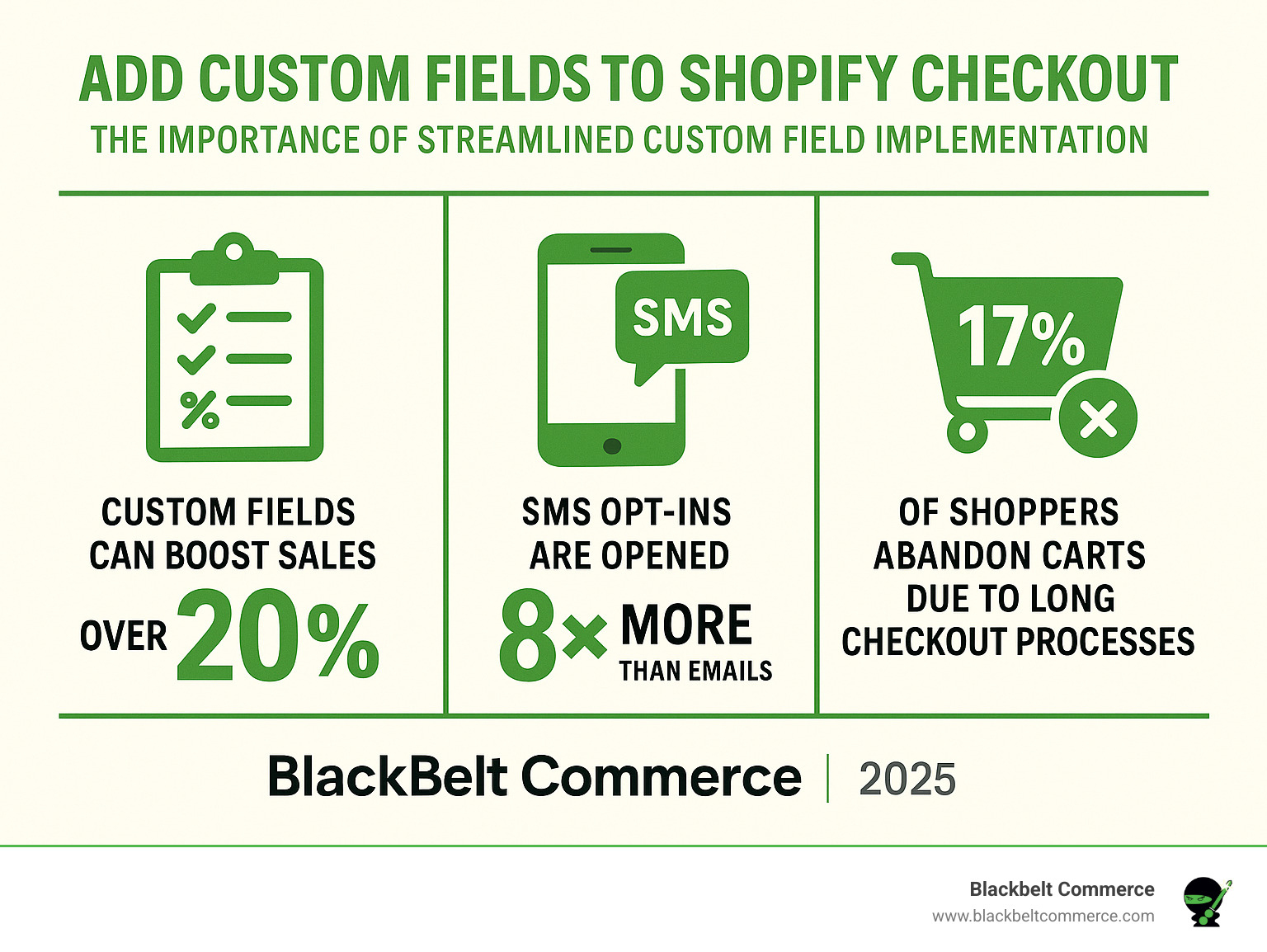
The bottom line? When implemented thoughtfully, custom fields improve rather than hinder the checkout experience. They give customers a voice in their purchase while providing you with valuable data to improve service and boost sales.
Conclusion: Lift Your Checkout and Boost Your Business
When you add custom fields to shopify checkout, you’re not just collecting more data – you’re creating a bridge between what your customers want to tell you and what your business needs to know. It’s like having a conversation with each customer right at the moment they’re most engaged: when they’re ready to buy.
Think about it this way: every abandoned cart tells a story. Sometimes that story is “I needed to add special delivery instructions but couldn’t find where to put them.” Or “I wanted to include a gift message but the checkout felt too rigid.” Custom fields help you capture those stories and turn them into completed sales.
The change goes deeper than just collecting information. Your fulfillment team stops playing guessing games about customer intentions. Your customer service team spends less time fielding “where’s my order?” calls because delivery instructions were clear from the start. Your marketing team gets opt-ins that actually convert because customers chose to share their preferences.
The path forward depends on where you are today. If you’re on Shopify Plus, accept the power of Checkout UI Extensions. They’re built for the future and won’t break when Shopify updates their platform. If you’re on a standard plan, don’t let that stop you – cart page customization and expert solutions can deliver amazing results.
Here’s what successful implementation looks like: Your customers feel heard and understood. Your operations run smoother. Your data tells you stories about what customers really want. And your conversion rates reflect the improved experience you’re providing.
The businesses we’ve worked with at Blackbelt Commerce often tell us the same thing: they wish they’d implemented custom fields sooner. The impact on both customer satisfaction and operational efficiency is immediate and measurable.
For merchants with complex requirements or those looking to fully leverage the power of checkout customization, partnering with a Shopify Plus expert is the best path forward. We’ve helped over 1000 businesses steer these waters, and we understand that every store has unique needs.
Whether you need simple gift message fields or complex B2B workflows, the right approach combines technical expertise with real-world business understanding. That’s where we come in – turning your checkout from a basic transaction page into a customer experience that drives growth.
Ready to see what’s possible? Visit https://www.blackbeltcommerce.com/shopify-plus/ to explore how we can help you create a checkout experience that works as hard as you do. Dyb Vekselheim
