


Blog updated with the most recent Shopify and eCommerce strategies on 05/02/2026.
Mastering Shopify Payment Processing Errors: Your Step-by-Step Fix Guide
When your Shopify store hits snags with payment processing, it’s not just about lost sales – it’s about eroding customer trust. This guide is your playbook for pinpointing common payment pitfalls, implementing swift fixes, fine-tuning your gateway settings, and building a shield against future hiccups. We’ll also show you when it’s time to call in the pros. Dive in to explore: (1) the usual suspects behind payment failures and their root causes, (2) clear, actionable troubleshooting steps, (3) how to nail your payment gateway configurations for rock-solid reliability, (4) smart strategies to fend off fraud, (5) the signs that signal you need expert intervention, and (6) proactive measures to keep your checkout humming. Along the way, we’ll sprinkle in real-world examples and highlight how Blackbelt Commerce’s Shopify mastery can get your transactions back on track and boost your conversions.
What Are the Most Common Shopify Payment Processing Errors?
Typical Shopify payment glitches often boil down to gateway declines, card validation hiccups, checkout page freezes, and those frustratingly vague error codes. Getting a handle on these main culprits is your first step to focused troubleshooting.
- Payment Declined by Gateway – Your transaction gets the thumbs-down from Stripe, PayPal, or Shopify Payments, usually due to bank issues or fraud filters.
- Invalid Credit Card Number – A typo or formatting error in the card number trips up validation before the transaction can even be authorized.
- Checkout Page Freeze – JavaScript conflicts or app clashes can bring your checkout UI to a grinding halt, stopping customers in their tracks.
- Generic Payment Processing Error – This catch-all message means something went wrong before authorization, and you’ll need to dig into the logs.
Each of these error types points to specific configuration points or data issues, setting the stage for the targeted solutions coming your way.
What Causes Payment Declined by Gateway Errors on Shopify?
When a payment gateway declines a transaction, it means the card issuer or processor has refused authorization. Common culprits include insufficient funds, mismatched billing details, an expired card, or aggressive fraud detection rules set by the gateway. Banks use these declines to manage risk, and gateways employ safeguards that can sometimes flag legitimate purchases. Understanding these patterns helps you know whether to reach out to the customer, update their billing info, or tweak your fraud settings in Shopify.
How to Troubleshoot Invalid Credit Card Number Errors?
Errors flagging an invalid credit card number usually happen when the card number fails the Luhn algorithm check or if the card type isn’t supported by your gateway. Start by checking the format: it should be 13–19 digits with no spaces. Next, confirm that the card network (Visa, Mastercard, Discover, etc.) is enabled in your Shopify Payments or third-party gateway settings. Finally, try processing a transaction with a known valid card number in your development environment to see if the issue lies with data entry or gateway restrictions.
Why Does the Shopify Checkout Page Freeze and How Can It Be Fixed?
Checkout page freezes typically occur when theme scripts, apps that interact with the cart, or custom code interfere with JavaScript execution. To fix this, try disabling third-party apps one by one to pinpoint any conflicts. You can also temporarily switch to a default Shopify theme to test the checkout flow. Once you’ve identified the problematic script, you’ll need to update or remove it. This restores the smooth, synchronous execution needed for your checkout forms to render and submit correctly.
What Are Common Shopify Payment Error Messages and Their Meanings?
Here’s a quick rundown of frequent Shopify payment error messages, what they typically mean, and what you should do about them.
Common Shopify Payment Error Messages
You might encounter messages like “Payment declined by gateway,” “Invalid credit card number,” or “Payment processing error.” These often stem from issues like insufficient funds, incorrect card details, or gateway misconfigurations.
How Can You Fix Shopify Payment Errors Step-by-Step?
Successfully resolving payment errors hinges on a structured approach: accurately identify the issue, apply the right fix, confirm it worked, and document your steps to prevent it from happening again. Let’s break down the key scenarios.
What Are the Exact Steps to Resolve Payment Declined Errors?
- Check the decline code in your Shopify admin under Settings > Payments and find the corresponding gateway log entry.
- Contact the customer to verify their billing address and card details.
- Examine your gateway dashboard (e.g., Stripe, PayPal) for any fraud rule triggers or specific reasons provided by the issuer.
- Temporarily adjust fraud filter sensitivity in Shopify Payments by going to Payments > Manage and lowering AVS/CVC requirements.
- Once corrections are made, reattempt the transaction and confirm success or ask the customer to try an alternative payment method.
Keep a record of each action and its outcome to refine your process for handling future declines.
How to Correctly Configure Shopify Payment Gateway Settings?
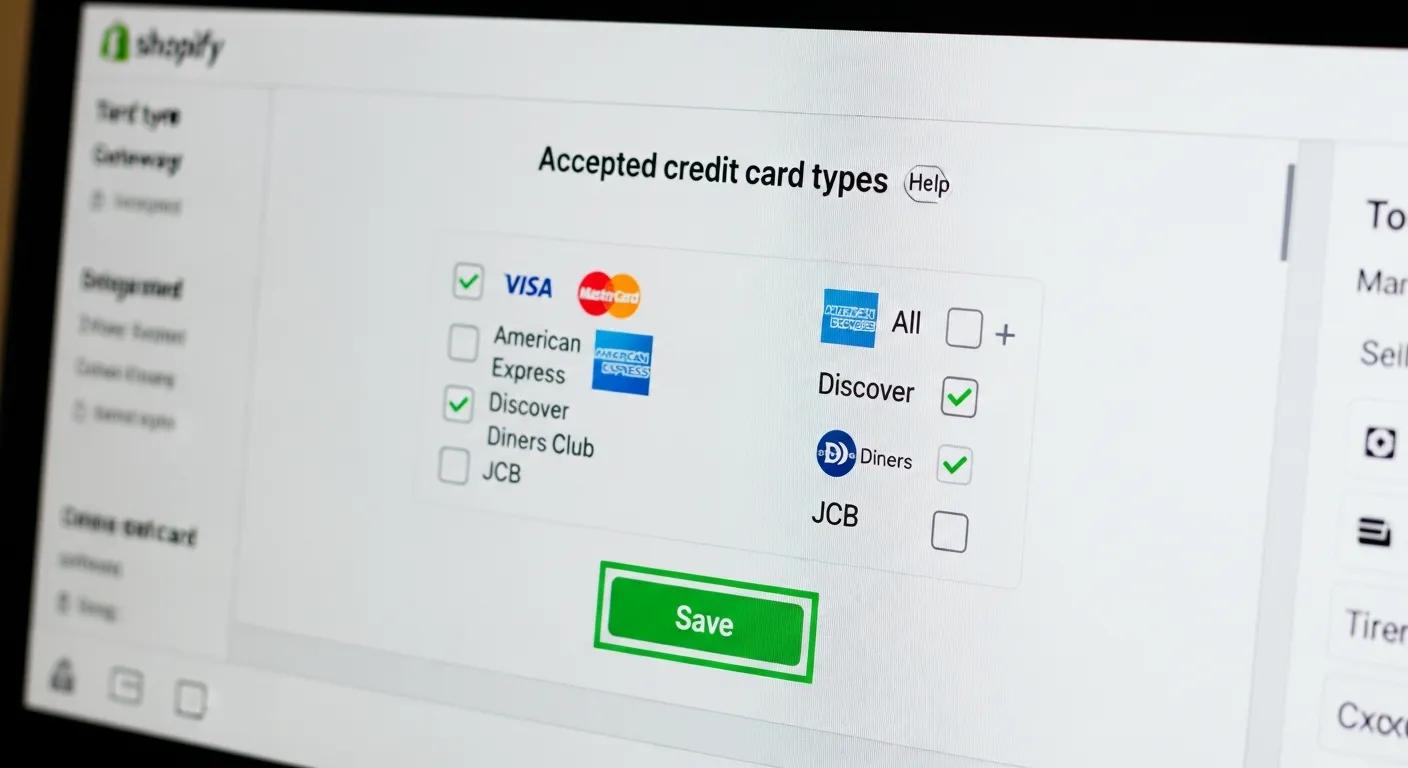
Getting your gateway settings right ensures you support the payment methods your customers use, handle currencies correctly, and manage fraud effectively. Head over to Settings > Payments, select your gateway, and double-check these points:
- Accepted Cards – Make sure you’ve enabled all major card networks like Visa, Mastercard, and American Express.
- Currency Compatibility – Verify that your gateway supports all the currencies your store operates in, both domestic and international.
- Fraud Protection – Configure AVS (Address Verification System) and CVC (Card Verification Value) requirements based on your store’s risk tolerance.
- Transaction Mode – Choose between “Authorize only” or “Authorize and capture” based on your cash flow management needs.
Saving these settings ensures your Shopify checkout works in harmony with your payment gateway, minimizing errors caused by misconfigurations.
How to Fix Apple Pay and Mobile Payment Issues on Shopify?
- Confirm your domain is correctly listed in Settings > Payments > Apple Pay and that the verification file is accessible at /.well-known/apple-developer-merchantid-domain-association.
- Ensure your SSL certificate is properly installed on your custom domain.
- Clear any caching or CDN rules that might be blocking access to the verification file.
- Test the integration on an iOS device using Safari to confirm the Apple Pay button appears and that test transactions process smoothly.
Following these steps ensures your mobile wallet integrations meet Apple’s security standards and function without a hitch.
What Should You Do When Shopify Payments Fail Due to Fraud Detection?
When Shopify’s or your gateway’s fraud detection system flags an order, here’s how to handle it:
- Review the order’s risk level and the specific fraud details provided in the order timeline.
- Contact the customer directly via email or phone to confirm their identity.
- Adjust your Shopify fraud filter settings by navigating to Settings > Checkout and modifying the “Require customers to” identity verification rules.
- For high-value orders that frequently trigger false positives, consider integrating a specialized fraud-screening app that includes manual review capabilities.
How to Optimize Shopify Payment Gateway Settings to Prevent Errors?
It’s always better to prevent errors than to fix them. Optimizing your gateway involves choosing the right options, following best practices, and conducting regular checks.
Which Payment Gateways Are Best for Shopify Stores?
Selecting the best payment gateway means weighing transaction fees, global reach, and available features. Here’s a look at some top contenders.
What Are Shopify Payments Configuration Best Practices?
- Enable Multi-Currency to cater to international shoppers by letting them pay in their local currency.
- Activate 3D Secure for an added layer of authentication, which significantly reduces fraud risk.
- Set Automatic Capture Delay if you need to manually review high-risk orders before capturing funds.
- Use Dynamic AVS/CVC Rules to adjust your fraud tolerance based on the order value.
Regularly reviewing these settings helps ensure your checkout is reliable and your fraud protection is balanced.
How to Integrate Third-Party Payment Processors Without Errors?
- Get your API credentials from the payment processor’s own dashboard.
- In your Shopify admin, add the processor under Settings > Payments and input your keys and secret tokens.
- Configure webhook endpoints to ensure your store receives real-time payment status updates.
- Thoroughly test the integration in sandbox or test mode, confirming that payment notifications are received correctly.
This methodical integration approach prevents issues like misdirected callbacks or incomplete transactions.
How to Perform Regular Shopify App Audits to Avoid Payment Conflicts?
- Create a comprehensive list of all installed apps that might inject scripts or alter your checkout process.
- In a staging environment, disable non-essential apps one by one and retest your checkout flow.
- Update or remove any outdated apps that are identified as problematic during testing.
- Schedule these audits quarterly to ensure your app versions remain compatible with Shopify’s latest updates.
Shopify App Audits
Shopify conducts audits on apps to ensure they meet specific requirements, which helps prevent conflicts that could lead to payment processing errors.
This information reinforces the importance of regular app audits for maintaining a smooth checkout experience.
What Are Effective Fraud Prevention Strategies for Shopify Payments?
Implementing robust fraud prevention not only cuts down on illegitimate chargebacks but also ensures a smoother experience for your legitimate customers.
How Does Fraud Prevention Reduce Payment Processing Errors?
By flagging and filtering out high-risk orders before they even reach the authorization stage, fraud prevention measures reduce the number of declines caused by manual or automated risk filters. Proactively verifying suspicious transactions helps prevent future gateway rejections and chargeback disputes. This proactive approach boosts approval rates while keeping your merchant account secure.
What Tools and Settings Help Detect Fraud on Shopify?

Shopify Plus merchants can leverage Shopify’s built-in fraud analysis, which flags orders with risk indicators like mismatched addresses, proxy usage, or anonymized email domains. For enhanced protection, consider additional apps like FraudBlock or NoFraud, which offer manual review options and machine-learning models to improve detection accuracy. Combining Shopify’s native insights with third-party tools creates a powerful defense against sophisticated fraud attempts.
Shopify Fraud Prevention Strategies
Shopify provides built-in fraud analysis tools and suggests strategies like limiting order quantities and using address verification systems to combat fraudulent activities. These methods help reduce payment processing errors by filtering out risky orders.
This source highlights how fraud prevention is a key strategy for minimizing payment errors.
How to Ensure PCI Compliance for Shopify Payment Security?
Shopify is a Level 1 PCI DSS compliant service provider, which means it handles the majority of the compliance burden for merchants.
Shopify’s PCI Compliance
Shopify meets the highest standards for payment data security as a Level 1 PCI DSS compliant provider, undergoing regular security audits and continuous monitoring to safeguard customer information.
Understanding PCI compliance is crucial for ensuring secure payment processing and preventing errors.
- Always use Shopify’s hosted checkout for card transactions.
- Never collect card numbers on third-party forms outside the Shopify environment.
- Implement strong password policies and two-factor authentication for all admin users.
- Stay informed by regularly reviewing Shopify’s official compliance documentation for any updates.
When Should You Seek Expert Help for Shopify Payment Issues?
Sometimes, complex payment errors require professional expertise to untangle code-level conflicts or intricate customizations.
How to Identify Complex Payment Problems Requiring Developer Assistance?
Persistent issues that remain unresolved after reverting your theme, auditing apps, and reconfiguring your gateway often point to deeper problems. Errors related to custom API integrations, recurring intermittent declines, or checkout script conflicts signal that you might need developer intervention. If you’ve exhausted standard troubleshooting steps and the root cause is still unclear, a developer’s debugging skills can be invaluable in resolving advanced conflicts.
What Are the Benefits of Custom Shopify Development for Payment Flows?
Custom development allows for tailored error-handling workflows, seamless orchestration of multiple payment gateways, and enhanced reporting dashboards. By extending Shopify’s native API with custom scripts and webhooks, developers can automate decline recovery processes, integrate alternative payment methods, and create detailed analytics for transaction performance. These custom solutions offer greater flexibility and control than out-of-the-box options.
How Does Blackbelt Commerce Resolve Complex Shopify Payment Errors?
Book a strategy call with us combines deep Shopify knowledge with advanced diagnostic tools to tackle challenging payment issues. For one apparel client struggling with high checkout failures, we revamped their checkout script bundle to eliminate app conflicts, fine-tuned gateway retry logic, and implemented a manual review workflow within Shopify admin. The outcome? A 35 percent reduction in checkout failures and a significant increase in completed orders.
How Can You Prevent Future Shopify Payment Processing Errors?
Proactive maintenance and adherence to best practices are key to keeping your payment systems robust as your business grows.
What Are the Best Practices to Avoid Payment Failures on Shopify?
- Keep your Shopify theme, apps, and Shopify Payments settings consistently updated.
- Monitor your real-time payment logs and set up alerts for any sudden spikes in errors.
- Educate your customers on entering card details correctly and prompt them to update expired information.
- Offer a variety of alternative payment options, such as PayPal, Apple Pay, and Google Pay, to maximize transaction success rates.
Following these guidelines minimizes friction and helps prevent recurring payment decline patterns.
How to Maintain Shopify Payment Gateway Health Over Time?
Schedule monthly reviews of your gateway dashboards to track dispute rates, monitor fee changes, and stay updated on any notifications. Ensure your API credentials remain valid and rotate your keys according to your security policies. Keeping up with gateway release notes means you can promptly adopt new features or comply with updated requirements, ensuring uninterrupted transaction processing.
What Role Do Customer Data and Checkout UX Play in Payment Success?
Accurate customer data entry—including complete billing addresses and correct postal codes—along with a streamlined checkout user experience (UX) directly impact authorization rates. Simplifying form fields, enabling auto-fill features, and providing clear, helpful error messages guide shoppers toward submitting valid information. An improved UX reduces input mistakes, which in turn leads to fewer card declines and less cart abandonment.
Optimizing Checkout UX
Enhancing the checkout UX, such as simplifying forms and offering clear error messages, can reduce input errors and card declines, ultimately lowering cart abandonment rates.
This source underscores the critical link between a smooth checkout experience and successful payment processing.
What Are the Most Frequently Asked Questions About Shopify Payment Errors?
While we’ve covered a lot, here are concise answers to the most common concerns about payment failures.
Why Are My Shopify Payments Failing?
Payments can fail due to incorrect card details, insufficient funds, gateway misconfigurations, or fraud filters blocking transactions. Check your logs in Settings > Payments and consult your gateway provider for the specific decline reason.
How Do I Fix a Payment Error on Shopify Quickly?
Identify the error code in Shopify admin, verify the customer’s payment information, adjust gateway fraud settings if necessary, and retry the transaction. This rapid diagnose→correct→retest cycle can resolve most failed checkouts within minutes.
What Does “Payment Processing Error” Mean on Shopify?
This general message indicates a failure occurred before the transaction reached the payment gateway for authorization. It’s often caused by script conflicts, network timeouts, or incorrect configurations. Examining your browser’s console logs and app behavior can help pinpoint the underlying issue.
How Do I Troubleshoot Shopify Payments Step-by-Step?
Begin by isolating the error in your logs, then disable non-essential apps, test with a default theme, verify your gateway settings, and contact your processor if decline reasons remain unclear. This systematic approach ensures thorough diagnostics.
Why Is My Shopify Checkout Not Working Properly?
Checkout issues can arise from theme script errors, outdated apps, SSL misconfigurations, or missing verification files for mobile wallets. Testing in a clean, default environment usually reveals and helps resolve these problems.
How Do Real-World Case Studies Demonstrate Effective Shopify Payment Error Solutions?
Looking at documented success stories provides practical insights and valuable lessons for your own store.
How Blackbelt Commerce Reduced Cart Abandonment by Fixing Payment Errors
For a fashion retailer struggling with a 20 percent cart abandonment rate, Blackbelt Commerce reconfigured their gateway retry logic, optimized fraud settings, and streamlined the checkout UX. This comprehensive approach resulted in a 15 percent increase in completed orders within just two weeks.
What Lessons Can Be Learned from Complex Shopify Payment Troubleshooting?
Key takeaways include the importance of thorough testing in a staging environment, systematically re-enabling apps, and establishing clear protocols for reviewing logs. Meticulous documentation of every change and its outcome accelerates root-cause analysis and sets a high standard for future troubleshooting.
How Customized Solutions Improve Shopify Payment Reliability
Custom scripts that automatically retry transient gateway failures and personalized fraud-screening rules tailored to specific product price ranges can significantly boost approval rates. These bespoke workflows often outperform generic settings in both conversion efficiency and security.
How to Use Shopify Admin and Tools to Monitor and Fix Payment Errors?
Shopify’s built-in admin features and reporting tools are powerful assets for ongoing error detection and resolution.
How to Access and Interpret Shopify Payment Logs?
Navigate to Settings > Payments, then click “View transactions” under Shopify Payments or your third-party gateway. Here you’ll find authorization statuses, decline codes, and timestamps. Correlating this log data with your order records helps identify failure patterns and peak error times.
What Shopify Admin Settings Affect Payment Processing?
Crucial settings under Settings > Payments include enabled card networks, multi-currency options, fraud protection rules, and capture workflows. Any adjustments here can directly impact transaction declines and authorizations.
How to Use Shopify Reports to Identify Payment Issues Early?
In the Analytics > Reports section, the “Finances” area provides insights into payment capture failures and dispute trends. Setting up custom alerts for sudden increases in abandoned checkouts or failed transactions allows you to address issues proactively before they significantly impact revenue.
What Visual and Multimedia Resources Help Fix Shopify Payment Errors?
Visual aids can significantly enhance understanding and speed up the troubleshooting process.
How Do Step-by-Step Screenshots Simplify Payment Troubleshooting?
Annotated screenshots of Shopify’s payment settings panels provide clear, visual guidance for configuration changes, eliminating guesswork. Seeing the exact menu locations and form fields reduces trial-and-error and accelerates resolution times.
What Diagrams Explain Shopify Payment Processing Flows?
Flowcharts that map out the entities involved—Customer → Shopify Checkout → Payment Gateway → Issuing Bank—clearly illustrate where each authorization check occurs. Visualizing these relationships makes it much easier to pinpoint the source of an error.
How Can Short Explainer Videos Enhance Error Resolution?
Brief video tutorials demonstrating how to adjust fraud rules or test Apple Pay integrations are highly effective for visual learners. They provide dynamic context, allowing viewers to follow along in real time and minimize setup mistakes.
What Infographics Summarize Common Payment Errors and Prevention?
Infographics that list common error codes alongside preventative measures serve as quick reference guides for merchants. These easily shareable visuals reinforce best practices and help keep your team aligned on troubleshooting protocols.
Effectively tackling Shopify payment processing errors requires a systematic approach: precise diagnosis, accurate configuration, proactive optimization, and, when necessary, expert support. By implementing the structured steps and best practices outlined here, you can restore transaction success, maintain customer trust, and keep your e-commerce revenue flowing smoothly. If your store continues to face complex challenges, partnering with a Shopify authority like Blackbelt Commerce can unlock tailored solutions designed to scale with your business.
Quick Answer: Resolve Shopify payment errors
Resolve Shopify Payment Errors should help merchants make a clearer decision about their store, customer experience, and growth priorities. A useful guide explains the concept, shows when it matters, and gives the reader a practical next step without forcing the topic into a generic template.
Key Takeaways
- Start with the search intent behind Resolve Shopify payment errors: the reader needs a clear explanation before they are ready for a service conversation.
- Keep the advice practical and specific so the post feels editorial, useful, and worth sharing.
- Use the topic cluster links to connect the article to related BBC expertise instead of leaving it as a standalone blog post.
- Add a natural commercial bridge only after the article has answered the reader’s main question.
- Use the same-page Calendly CTA so qualified readers can book a strategy call without being sent to a long form.
How this connects to your Shopify growth strategy
This article should remain useful for readers researching Resolve Shopify payment errors, but it also needs to show when the topic becomes a business decision. For the Shopify Troubleshooting and Store Health cluster, the commercial bridge is practical: once the reader understands the concept, the next step is deciding whether their current Shopify setup can support the desired experience, conversion path, and operational workflow. That is where expert planning, design, development, CRO, and SEO support can turn the idea into measurable store improvements.
Related Shopify resources
These internal resources support the Shopify Troubleshooting and Store Health topic cluster and help connect this guide to stronger commercial next steps:
- Shopify Troubleshooting and Store Health
- Shopify experts
- Shopify Plus agencies
- Shopify Troubleshooting and Store Health — Parent service page for the reader’s next commercial step
- Blackbelt Commerce — Home-page authority link for brand and core Shopify expertise
- Shopify Plus agencies — Money-page link requested for high-growth and Plus-agency intent
- Shopify custom development — Development service page for implementation and technical help
- Shopify CRO — Conversion service page for readers focused on revenue and lead generation
Questions store owners ask before taking action
What does Resolve Shopify payment errors mean for a Shopify merchant?
For a Shopify merchant, Resolve Shopify payment errors is about choosing or improving the store experience in a way that supports traffic, trust, conversion, and long-term operations.
When should a store owner get expert help?
Expert help becomes useful when the decision affects SEO, conversion, theme architecture, integrations, migration risk, or revenue-critical customer journeys.
How should this topic connect to a broader content cluster?
The post should link to a parent service page, related support articles, and money pages so Google and AI systems understand how the article supports a broader area of expertise.
What is the lead-generation goal of this article?
The article should educate first, then guide qualified readers toward booking a strategy call when they need help applying the advice to their own store.
What should be avoided during optimization?
Avoid filler, unrelated phrases, invented statistics, broken formatting, duplicated CTAs, and any edit that makes the article feel less helpful or less polished.
Future articles needed for topical dominance
To build deeper topical authority around this cluster, these supporting topics should be created later and linked back into this article:
- Resolve Shopify Payment Errors Checklist for Shopify Store Owners: Creates a practical support article that turns the Shopify Troubleshooting and Store Health topic into an actionable review tool.
- Common Resolve Shopify Payment Errors Mistakes and How to Avoid Them: Captures problem-aware searches and gives BBC a natural place to explain implementation risks without hard selling.
- When to Hire Shopify Experts for Resolve Shopify Payment Errors: Connects informational demand to the expert-hiring money page while preserving educational intent.

