


Launching a successful Shopify store takes more than choosing products and hitting publish. Every year, over 2 million entrepreneurs start selling on Shopify, yet many struggle to turn their stores into steady revenue streams. The difference often lies in how carefully they plan each step, from goal setting and design to optimization and testing. This guide lays out a clear, actionable process that helps you build a store with solid foundations, so you can attract customers, increase sales, and grow with confidence.
Table of Contents
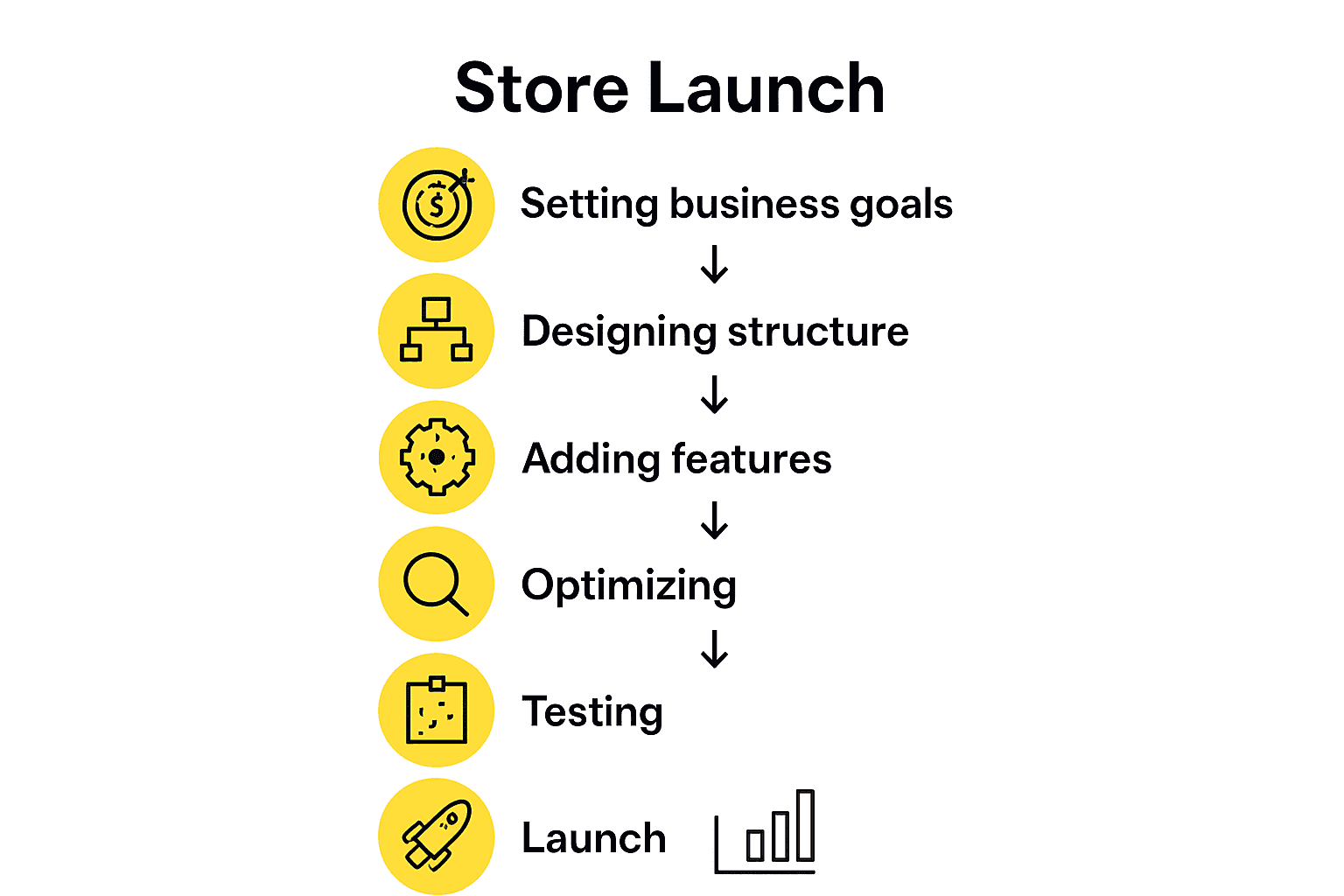
- Step 1: Define Business Goals And Shopify Setup Requirements
- Step 2: Build Your Shopify Store Architecture And Design
- Step 3: Customize Store Features, Apps, And Integrations
- Step 4: Optimize For Conversion, SEO, And Mobile Experience
- Step 5: Test All Store Functions And Verify Readiness
- Step 6: Launch Your Shopify Store And Monitor Performance
Quick Summary
| Key Point | Explanation |
|---|---|
| 1. Set precise business goals | Define specific, measurable objectives to guide your Shopify setup and strategies effectively. |
| 2. Create a user-friendly store design | Focus on intuitive layout and aesthetics that enhance the shopping experience and encourage purchases. |
| 3. Customize with essential apps and integrations | Choose apps that enhance payment processing, inventory management, and customer support for efficiency. |
| 4. Optimize for SEO and conversions | Implement strategies to improve search visibility and simplify the purchasing process for better customer engagement. |
| 5. Systematically test store functions | Conduct thorough tests on all aspects before launch to ensure smooth operation and a positive user experience. |
Step 1: Define business goals and Shopify setup requirements
Successfully launching a Shopify store starts with crystal clear business goals and strategic setup requirements. This crucial first step transforms your entrepreneurial vision into a structured roadmap for online retail success.
According to Shopify, setting actionable business goals that align with your company mission is fundamental to informed decision making. Begin by outlining specific objectives such as monthly revenue targets, customer acquisition numbers, or product line expansion goals. These goals should be precise and measurable – for example, “Increase online sales by 25% within the first quarter” rather than vague statements like “grow the business.”
Your Shopify setup requirements will directly stem from these initial goals. Determine key elements like your target market, product catalog, pricing strategy, and shipping approach. Shopify’s Help Center recommends starting with short term goals that allow you to quickly assess marketing tactics and make rapid adjustments.
Pro Tip: Always connect your business goals to specific actions. If your goal is increasing social media engagement, outline concrete steps like posting frequency, content types, and engagement metrics you will track.
With clear goals established, you are now ready to move into the technical setup and design phases of your Shopify store launch.
Step 2: Build your Shopify store architecture and design
Building a compelling Shopify store architecture requires strategic planning and thoughtful design that transforms your digital storefront into an engaging shopping experience. This step is about creating a user friendly interface that not only looks professional but also drives conversions.
According to Shopify’s Engineering blog, implementing a server-driven UI architecture enables merchants to personalize their stores and create tailored shopping experiences for buyers. When designing your store, focus on creating a clean, intuitive layout that guides customers seamlessly through their purchasing journey. This means organizing your product categories logically, ensuring clear navigation menus, and designing product pages that provide comprehensive information.
Choose a theme that aligns with your brand identity and product offerings. Customize your Shopify theme to reflect your unique style while maintaining a professional look. Pay special attention to critical design elements such as color scheme, typography, product image quality, and mobile responsiveness. Your goal is to create a visually appealing and functional store that builds customer trust and encourages purchases.
Pro Tip: Always preview your store design on multiple devices to ensure a consistent and smooth user experience across desktop, tablet, and mobile platforms.
With your store architecture and design in place, you are now ready to populate your store with products and prepare for launch.
Step 3: Customize store features, apps, and integrations
Customizing your Shopify store with the right features, apps, and integrations is crucial for creating a powerful and efficient online shopping experience. This step transforms your basic store into a sophisticated ecommerce platform tailored to your specific business needs.
According to Shopify’s Engineering blog, advanced store customization allows merchants to create server-driven UI architectures that enable flexible and dynamic shopping experiences. When selecting apps and integrations, focus on solutions that enhance core business functions like payment processing, inventory management, customer support, and marketing automation. Look for apps that integrate seamlessly with Shopify and provide robust functionality without overwhelming your store’s performance.
Begin by exploring the Shopify App Store and reviewing checkout customization options that can improve user experience and conversion rates. Prioritize apps that offer scalability and match your specific industry requirements. Consider essential categories such as shipping tools, email marketing platforms, analytics trackers, customer review systems, and social media integration.
Pro Tip: Always test apps in a development environment before full implementation and carefully review their performance impact on your store’s loading speed and overall user experience.
With your store features and integrations strategically selected, you are now prepared to configure your payment and shipping settings and move closer to your official launch.

Step 4: Optimize for conversion, SEO, and mobile experience
Optimizing your Shopify store for conversion, search engine visibility, and mobile performance is critical to attracting and retaining customers in the competitive digital marketplace. This step transforms your online store from a simple website into a high-performing sales machine that delivers exceptional user experiences across all devices.
According to Shopify’s Engineering blog, advanced UI architectures enable merchants to create personalized shopping experiences and run targeted experiments to engage buyers. When optimizing your store, focus on three key areas: conversion rate optimization (CRO), search engine optimization (SEO), and mobile responsiveness. Implement conversion optimization strategies that reduce friction in the purchasing process, such as simplifying checkout, adding trust signals, and creating compelling product descriptions.
For SEO, conduct comprehensive keyword research, optimize product page metadata, create high-quality content, and ensure fast page loading speeds. Mobile optimization requires a responsive design that adapts seamlessly to different screen sizes, with touch-friendly interfaces, compressed images, and streamlined navigation. Prioritize page speed by minimizing large file uploads, leveraging browser caching, and using compressed image formats.
Pro Tip: Use Google PageSpeed Insights to regularly test and improve your mobile and desktop performance, addressing any technical issues that could impact user experience and search rankings.
With your store optimized for conversion, search visibility, and mobile experience, you are now ready to launch and begin attracting your first customers.
Step 5: Test all store functions and verify readiness
Verifying your Shopify store’s complete functionality is the critical final checkpoint before launching your online business. This comprehensive testing phase ensures every aspect of your digital storefront works flawlessly and provides a smooth customer experience.
According to Shopify’s Engineering blog, implementing a server-driven UI architecture allows merchants to test and update store functions dynamically without releasing entirely new app versions. Begin your testing process by systematically checking each core store function. This includes thoroughly testing the shopping cart, payment processing, product page interactions, checkout workflow, and all integrated apps.
Create a detailed testing checklist that covers every potential customer interaction. Verify that product images load correctly, pricing displays accurately, inventory tracking functions properly, and shipping calculations work as expected. Test your store across multiple devices and browsers to ensure consistent performance. Pay special attention to mobile responsiveness, load times, and the smoothness of the purchasing journey from product selection to final checkout.
Pro Tip: Use both automated testing tools and manual walkthroughs to identify potential issues. Recruit friends or colleagues to perform real purchase simulations and provide honest feedback about their experience.
With all store functions rigorously tested and verified, you are now prepared to officially launch your Shopify store and welcome your first customers.
Step 6: Launch your Shopify store and monitor performance
Launching your Shopify store marks the exciting transition from preparation to real world business operation. This final step transforms your carefully crafted digital storefront from a project into a live platform ready to engage customers and generate revenue.
According to Shopify’s Engineering blog, modern server-driven UI architecture enables merchants to launch and update stores efficiently while monitoring performance dynamically. Begin your launch by removing password protection from your store and making it publicly accessible. Implement performance tracking solutions that provide comprehensive insights into customer behavior, sales metrics, and website traffic.
Focus on key performance indicators such as conversion rates, average order value, traffic sources, and customer acquisition costs. Use Shopify Analytics and integrate additional tools to gain deeper understanding of your store’s performance. Monitor customer interactions, identify potential bottlenecks in the purchasing process, and be prepared to make swift adjustments based on real time data.
Pro Tip: Set up Google Analytics and Shopify conversion tracking to get a holistic view of your store performance and customer journey from the very first day.
With your store launched and performance monitoring systems in place, you are now ready to grow and scale your online business strategically.
Launch Your Shopify Store with Confidence and Expert Support
Launching a Shopify store can feel overwhelming with so many critical steps like defining clear business goals, designing a conversion-driven store, and optimizing for SEO and mobile. You may worry about technical setup, app selections, or testing every function before going live. Blackbelt Commerce understands these challenges and delivers tailored Shopify development solutions that transform your vision into a powerful, scalable store. Their expertise in custom Shopify themes, advanced eCommerce capabilities, and optimization strategies directly addresses your needs to increase traffic, boost revenue, and ensure seamless customer experiences.
Ready to take your Shopify store launch to the next level? Visit Blackbelt Commerce to explore their proven process from consultation through ongoing support. Dive deeper into how their custom theme development and Shopify Plus solutions can build a personalized storefront designed for high conversion and long-term growth. Don’t leave your launch to chance. Connect now to secure expert guidance that turns your business goals into real results.
Frequently Asked Questions
What are the key business goals to set before launching my Shopify store?
Setting specific business goals is crucial for a successful Shopify store launch. Aim to outline measurable objectives, such as increasing online sales by 25% within the first quarter or acquiring 100 new customers monthly.
How should I design my Shopify store for optimal customer experience?
To enhance customer experience, focus on creating a clean and intuitive layout for your Shopify store. Organize product categories logically and ensure navigation is straightforward to guide customers seamlessly through their purchasing journey.
What features and apps should I consider integrating into my Shopify store?
Integrate features and apps that enhance critical functions like payment processing, customer support, and marketing automation. Start by exploring essential categories such as shipping tools and email marketing platforms to streamline your operations.
How can I optimize my Shopify store for conversion and SEO?
To optimize for conversion and SEO, implement strategies that reduce friction in the purchasing process, such as simplifying checkout. Also, conduct keyword research and optimize product page metadata to improve visibility in search engines, aiming to increase organic traffic.
What should I include in my testing checklist before launching my Shopify store?
Create a detailed testing checklist that verifies all core store functions, such as the shopping cart, payment processing, and product page interactions. Ensure every element works correctly through manual testing and automated tools to deliver a flawless customer experience.
How can I monitor my Shopify store’s performance after launch?
After launching your Shopify store, implement performance tracking solutions to gain insights into customer behavior and sales metrics. Focus on key performance indicators like conversion rates and average order value to identify areas for improvement and make data-driven adjustments.
Recommended
- Building a Website on Shopify: 10 Easy Steps for Success
- How to build Shopify? Easy Success 2025
- Comprehensive Guide to Shopify Store Setup for Entrepreneurs – Shopify Experts: Grow Your eCommerce Revenue
- 7 Essential Shopify Marketing Tips for Store Growth Success – Shopify Experts: Grow Your eCommerce Revenue
- 2024 eCommerce Strategies: 13 Handy Tips for Retailers
- Performance Marketing Process for Maximizing ROI Results – Click Thrive Marketing
Quick Answer: How to launch my shopify store
Launching a Shopify store requires more than turning on a theme; merchants need product structure, navigation, content, payments, shipping, analytics, SEO basics, QA, and a clear conversion path. A strong launch checklist protects the customer experience before traffic arrives and helps the store start with fewer avoidable errors.
Want a sharper Shopify growth plan?
If this article connects to a current store decision, use the calendar to book a strategy call and turn the idea into a practical plan.
Key Takeaways
- A Shopify launch should cover products, collections, navigation, payments, shipping, tax settings, analytics, SEO basics, and QA.
- The store should be tested on mobile and desktop before traffic is sent to it.
- Merchants should fix clarity, trust, and checkout problems before increasing marketing spend.
- Internal links should connect launch planning to Shopify experts, Shopify CRO, custom development, and ecommerce solution pages.
- The same-page Calendly CTA should give merchants a practical next step when they want expert launch review.
How this connects to your Shopify growth strategy
This article should remain useful for readers researching How to launch my shopify store, but it also needs to show when the topic becomes a business decision. For the Shopify Growth, CRO, and Store Optimization cluster, the commercial bridge is practical: once the reader understands the concept, the next step is deciding whether their current Shopify setup can support the desired experience, conversion path, and operational workflow. That is where expert planning, design, development, CRO, and SEO support can turn the idea into measurable store improvements.
Want a sharper Shopify growth plan?
Use this guide as a decision tool. Then book a strategy call when you want a practical roadmap for your store.
Related Shopify resources
These internal resources support the Shopify Growth, CRO, and Store Optimization topic cluster and help connect this guide to stronger commercial next steps:
- Shopify CRO
- Shopify experts
- Shopify Plus agencies
- Shopify CRO — Parent service page for the reader’s next commercial step
- Blackbelt Commerce — Home-page authority link for brand and core Shopify expertise
- Shopify experts — Money-page link requested for expert-hiring intent
- Shopify Plus agencies — Money-page link requested for high-growth and Plus-agency intent
- Shopify custom development — Development service page for implementation and technical help
- Shopify checkout optimization — Related conversion article
- Shopify conversion optimization — Related CRO article
Questions store owners ask before taking action
Why does How to launch my shopify store matter for Shopify merchants?
How to launch my shopify store matters when it affects customer trust, store performance, conversion, operations, or the ability to grow without avoidable rework.
What should the reader do first?
They should identify the business goal, review the current customer journey, and decide which improvement would have the clearest impact.
How do internal links help this article?
Internal links connect the educational topic to related service pages, Shopify experts, Shopify Plus agency support, and deeper resources.
When is expert help useful?
Expert help is useful when the decision affects revenue, SEO, conversion, integrations, technical implementation, or a high-risk store change.
How does this article support lead generation?
It educates first, then gives qualified readers a same-page option to book a strategy call when they need help applying the advice.
Future articles needed for topical dominance
To build deeper topical authority around this cluster, these supporting topics should be created later and linked back into this article:
- How To Launch My Shopify Store Checklist for Shopify Store Owners: Creates a practical support article that turns the Shopify Growth, CRO, and Store Optimization topic into an actionable review tool.
- Common How To Launch My Shopify Store Mistakes and How to Avoid Them: Captures problem-aware searches and gives BBC a natural place to explain implementation risks without hard selling.
- When to Hire Shopify Experts for How To Launch My Shopify Store: Connects informational demand to the expert-hiring money page while preserving educational intent.
Want a sharper Shopify growth plan?
Ready to turn the advice in this article into an action plan? Open the calendar here and choose a time that works for you.

