

Blog updated with the most recent Shopify and eCommerce strategies on 05/02/2026.
Mastering Shopify Security: Fortifying Your Customer and Payment Data
In the fast-paced world of e-commerce, threats are constant: over 43% of cyberattacks target small to medium-sized businesses, putting sensitive customer and payment details at risk. For ambitious store owners, understanding Shopify’s security framework is non-negotiable for protecting personal information, maintaining PCI DSS compliance, and cultivating unwavering customer trust. This comprehensive guide dives deep into Shopify’s built-in protections, your role in compliance, smart fraud prevention tactics, GDPR and privacy tools, admin account security, a balanced view of risks and rewards, the shared responsibility model, advanced security upgrades, and clear answers to your pressing security questions. Partner with BlackBelt Commerce—your go-to specialists for secure Shopify development and compliance assurance—to unlock actionable strategies that will bulletproof your store and simplify regulatory readiness.
What Are Shopify’s Core Security Features for Customer and Payment Data Protection?
Shopify employs a sophisticated, multi-layered security architecture to safeguard customer and payment information. This robust system combines industry-leading encryption, stringent access controls, and vigilant, ongoing monitoring to thwart unauthorized access and prevent data breaches. These integrated measures ensure your store maintains PCI DSS Level 1 certification, offering paramount protection for credit card details and personal records.
How Does Shopify Ensure PCI DSS Level 1 Compliance?

Shopify operates as a fully PCI DSS Level 1 compliant service provider, undergoing rigorous annual audits and vulnerability scans. This certification encompasses all transaction pathways and data storage environments, meaning merchants benefit from a secure, compliant infrastructure without the burden of handling raw cardholder data themselves.
Shopify’s PCI DSS Compliance
Shopify holds Level 1 PCI DSS certification, the highest standard available. This means Shopify undergoes annual audits and vulnerability assessments to guarantee the platform’s security and the protection of customer payment data.
This certification is a cornerstone of Shopify’s security, confirming adherence to the highest payment data security benchmarks, which is critical for safeguarding customer and payment information.
What Encryption Methods Does Shopify Use to Secure Data?
Shopify utilizes AES-256 encryption for data at rest and TLS 1.2+ protocols for data in transit. This dual-layer encryption strategy prevents unauthorized interception and decryption, ensuring that sensitive details like credit card numbers and personal identifiers remain unreadable if compromised.
How Does Shopify Protect Customer Personal Information?
Shopify employs a segmented database architecture to isolate customer records, enforcing role-based access controls and IP-restricted admin sessions. Personal data, including names, addresses, and contact details, is masked within logs, minimizing exposure while still enabling essential operational functions.
What Payment Security Protocols Are Built into Shopify Payments?
Shopify Payments natively integrates 3D Secure authentication, Address Verification Service (AVS), and CVV verification. These protocols rigorously confirm cardholder identity and billing information during checkout, significantly reducing the likelihood of fraudulent transactions and unauthorized charges.
This powerful combination of certified infrastructure, advanced encryption, and dynamic payment verification establishes a robust foundation for comprehensive data protection across your entire Shopify store.
How Can Merchants Achieve and Maintain PCI DSS Compliance on Shopify?
Achieving and maintaining PCI DSS compliance on Shopify hinges on a collaborative strategy: leverage Shopify’s certified environment while diligently fulfilling your merchant responsibilities, such as completing Self-Assessment Questionnaires (SAQs) and conducting regular vulnerability tests. This shared responsibility model ensures both the platform and the merchant actively contribute to robust transaction security.
What Are the Merchant Responsibilities for PCI DSS Compliance?
Merchants are responsible for:
- Completing the relevant SAQ (Self-Assessment Questionnaire) annually to confirm proper handling of cardholder data.
- Maintaining a secure cardholder data environment by carefully managing permissions for third-party applications.
- Implementing strong access controls and consistently updating staff credentials.
These actions demonstrate due diligence and uphold PCI standards beyond Shopify’s inherent platform security.
How Does Shopify Support PCI DSS Compliance for Store Owners?
Shopify provides automatic SSL for checkout, tokenizes card data, and facilitates quarterly vulnerability scans through an Approved Scanning Vendor (ASV). This support streamlines the merchant’s reporting obligations and ensures critical infrastructure remains continuously certified.
What Are the Steps to Prepare for a PCI DSS Security Audit on Shopify?
To gear up for an audit:
- Compile a list of all payment-related apps and verify their PCI compliance.
- Confirm SSL/TLS certificate validity and renew them as necessary.
- Complete and submit the correct SAQ tailored for Shopify stores.
- Initiate an internal penetration test or an external ASV scan.
- Review staff access logs and enforce the principle of least privilege.
Adhering to these steps ensures a smoother audit process and sustained compliance.
By harmonizing Shopify’s certified platform capabilities with merchant-driven security measures, store owners can achieve full alignment with PCI DSS requirements without incurring excessive infrastructure costs.
What Are the Best Fraud Prevention Strategies for Shopify Stores?
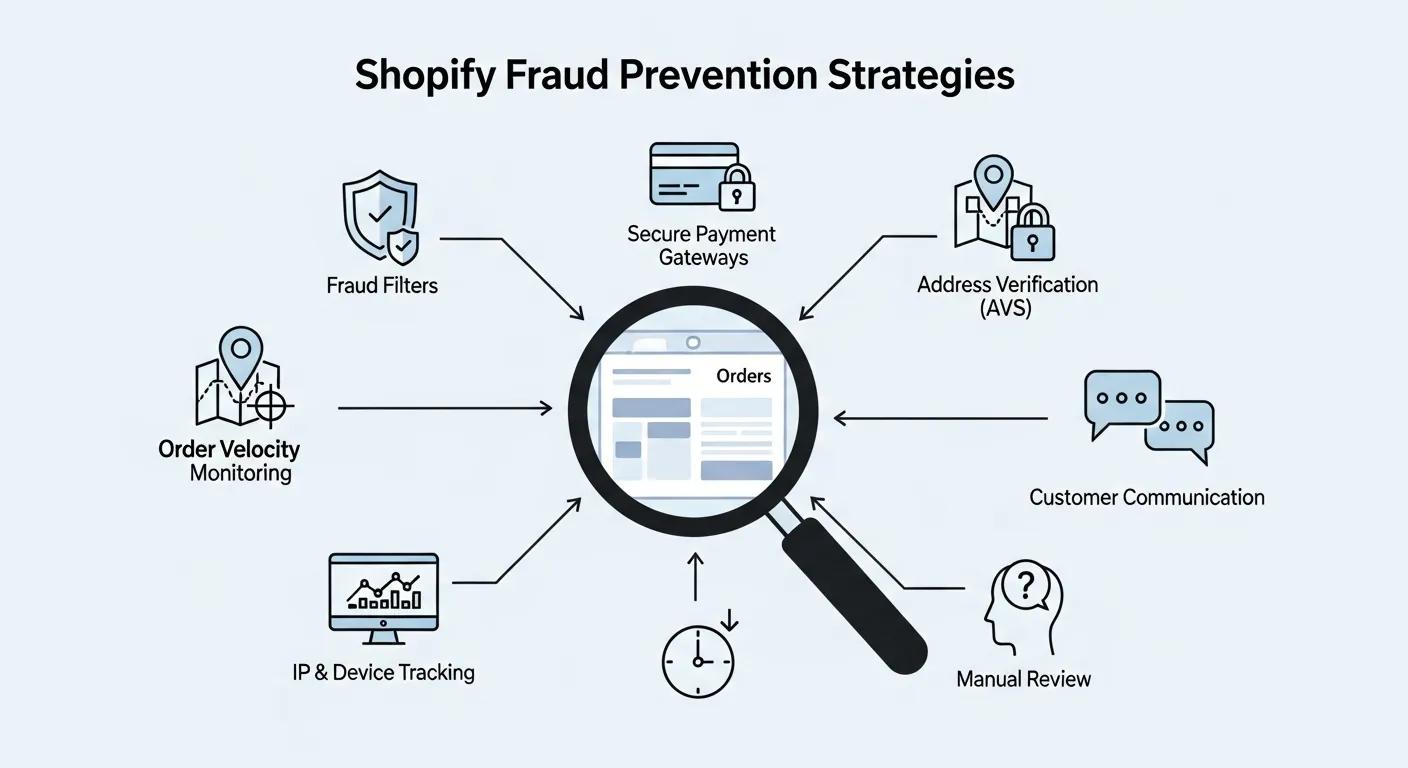
Combating e-commerce fraud requires a proactive, multi-pronged approach, incorporating built-in analytics, specialized third-party tools, and robust chargeback protections. A layered defense strategy is key to identifying suspicious patterns, automating risk assessment, and minimizing financial exposure.
Before diving into specific solutions, consider this overview of prevention strategies:
Shopify’s Fraud Prevention Strategies
Shopify offers integrated fraud analysis tools that leverage machine learning to assign a risk score to every order. Additionally, merchants can integrate third-party fraud prevention applications and activate chargeback protection to mitigate fraud risks and financial exposure.
These strategies are crucial for preventing fraudulent transactions and safeguarding customer and payment information, forming a vital component of a secure e-commerce operation.
How Do Shopify’s Built-In Fraud Analysis Tools Work?
Shopify’s native fraud detection system analyzes factors like purchase velocity, discrepancies between IP addresses and billing locations, and proxy usage to assign a risk score to each order. Orders exceeding a set threshold are flagged for manual review prior to fulfillment.
Which Third-Party Fraud Prevention Apps Integrate Best with Shopify?
Leading third-party applications, including Riskified, NoFraud, and Signifyd, offer seamless API integration to provide advanced rule customization, chargeback guarantees, and in-depth device fingerprinting analytics. Merchants typically select these solutions based on their order volume and risk tolerance.
How Can Chargeback Protection and 3D Secure Reduce Fraud Risks?
Activating Shopify’s Chargeback Protection transfers the liability for unauthorized chargebacks to Shopify, while mandatory 3D Secure authentication verifies the cardholder’s identity during the checkout process. Together, these protocols significantly decrease fraud rates and minimize financial risk.
By strategically combining built-in analytics, specialized applications, and liability safeguards, merchants can establish a formidable defense against the ever-evolving landscape of e-commerce threats.
How Does Shopify Support GDPR and Customer Data Privacy Compliance?
Shopify provides merchants with essential tools to uphold consumer data rights under GDPR, ensuring transparent processing and secure handling of personal information from EU residents. These features simplify compliance efforts and bolster customer confidence.
What GDPR Features Does Shopify Provide for Store Owners?
Shopify offers a Data Processing Addendum (DPA), automatic data encryption, and comprehensive audit logs to track access to personal data. These capabilities fulfill GDPR’s accountability requirements and provide documented evidence of processing activities for regulatory purposes.
Shopify’s GDPR Compliance Tools
Shopify equips merchants with tools and guidance to facilitate compliance with the General Data Protection Regulation (GDPR). These resources include a Data Processing Addendum (DPA), automatic encryption, and audit logs for tracking personal data access, aiding merchants in managing customer consent and data requests effectively.
These features are indispensable for merchants aiming for transparent processing and secure handling of EU personal information, which is vital for building customer trust and adhering to data privacy regulations.
How Can Merchants Manage Customer Consent and Data Requests on Shopify?
Merchants can easily implement consent management banners, record opt-in preferences, and automate data subject requests directly through the Shopify admin interface. Built-in request forms and data export tools streamline compliance with rights-to-access and deletion mandates.
What Are Best Practices for Shopify Privacy Policies to Ensure compliance?
A compliant privacy policy must clearly state the purposes for data collection, the legal bases for processing, and data retention periods. By utilizing Shopify’s policy generator and consistently updating disclosures to reflect new integrations, merchants can maintain transparency and regulatory alignment.
These GDPR-centric controls empower merchants to respect customer privacy while operating effectively within the global e-commerce landscape.
How Can Shopify Store Owners Secure Their Admin Accounts and Access?
Beyond data encryption and fraud prevention tools, securing the Shopify admin interface is paramount. Implementing strict access controls, robust multifactor authentication, and disciplined password management prevents unauthorized modifications and account takeovers.
How to Implement Two-Factor Authentication (2FA) on Shopify?
To enable 2FA, navigate to Settings → Users and Permissions, select the desired user, and activate either an authenticator app or SMS method. Every administrator must configure 2FA before accessing the dashboard, adding a critical layer of security.
Implementing Two-Factor Authentication on Shopify
Shopify store owners can significantly bolster the security of their admin accounts by enabling two-factor authentication (2FA). This process involves navigating to Settings → Users and Permissions and activating an authenticator app or SMS method, introducing a vital second defense against unauthorized access.
Implementing 2FA is a crucial step in fortifying the Shopify admin interface, essential for preventing unauthorized changes and account takeovers, thereby safeguarding customer data.
What Are Best Practices for Staff Permissions and Access Control?
Define precise staff roles—such as Marketing, Fulfillment, or Finance—to restrict data access strictly to necessary areas. Regularly audit permissions, promptly revoke access for inactive accounts, and utilize IP whitelisting to limit login locations.
How to Enforce Strong Password Policies for Shopify Admin Users?
Mandate the use of complex passwords, at least 12 characters long, incorporating a mix of letters, numbers, and symbols. Enforce periodic password rotation and discourage password reuse through clear internal policies to mitigate risks associated with brute-force attacks and credential stuffing.
By layering multifactor authentication, stringent role management, and robust password standards, store owners can effectively lock down administrative access and minimize internal security vulnerabilities.
What Are the Key Benefits and Risks of Using Shopify’s Security Features?
Shopify’s integrated security suite offers substantial advantages, yet no platform can entirely eliminate merchant responsibilities. A clear understanding of both aspects is crucial for informed strategic decision-making.
How Do Shopify’s Security Features Reduce Fraud and Data Breaches?
Shopify’s certified infrastructure, advanced encryption protocols, and real-time fraud scoring capabilities effectively mitigate unauthorized access, fraudulent transactions, and data leakage. These integrated controls lead to fewer security incidents and reinforce customer trust.
What Are the Consequences of Neglecting Shopify Security Best Practices?
Overlooking critical practices—such as disabling unused apps, skipping 2FA, or neglecting compliance questionnaires—leaves stores vulnerable to data breaches, chargeback losses, and regulatory penalties. Such failures can severely damage brand reputation and result in significant financial repercussions.
How Does Compliance Build Customer Trust and Business Reputation?
Demonstrating adherence to PCI DSS standards, GDPR alignment, and proactive fraud prevention signals professionalism and reliability to customers. This transparency encourages repeat business, positive reviews, and valuable word-of-mouth referrals.
Balancing the platform’s inherent strengths with diligent merchant practices amplifies security benefits while minimizing overall risk exposure.
How Does the Shared Responsibility Model Affect Shopify Security?
Effective e-commerce security relies on a clear division of duties: Shopify is responsible for securing the platform itself, while merchants are accountable for configuring settings, managing access, and overseeing third-party integrations. Understanding these distinct roles ensures accountability and reduces potential vulnerabilities.
What Security Responsibilities Does Shopify Handle?
Shopify manages infrastructure hardening, network firewalls, application patching, PCI DSS audits, and default encryption standards. This foundational security layer supports every store operating on the platform.
What Security Measures Are Merchants Responsible For?
Merchants must secure admin access, carefully vet all installed applications, configure fraud detection rules, complete compliance self-assessments, and maintain up-to-date privacy policies. These tasks extend the platform’s security defenses into the unique operational environment of each store.
How Can Merchants Collaborate with Shopify to Maximize Security?
By consistently reviewing Shopify’s status updates, subscribing to security bulletins, and utilizing the platform’s vulnerability disclosure program, merchants can stay informed and react swiftly to emerging threats.
Clarity regarding shared responsibilities fosters a unified security posture that effectively bridges the efforts of the platform provider and the store owner.
What Advanced Security Tools and Services Can Enhance Shopify Store Protection?
Beyond Shopify’s native security features, specialized tools and expert services offer enhanced protection and streamlined monitoring for high-risk merchants seeking enterprise-level security solutions.
How to Integrate Advanced Encryption and SSL/TLS Certificates on Shopify?
While Shopify provides automatic SSL, merchants can opt for Extended Validation (EV) certificates through CDN integrations or custom domains. EV certificates, which display a green address bar, significantly boost customer trust for premium brands.
Which Security Audit and Monitoring Services Does BlackBelt Commerce Offer?
BlackBelt Commerce provides comprehensive security audits, including penetration testing, code reviews, and continuous vulnerability monitoring. These services identify hidden risks, offer remediation recommendations, and verify compliance through detailed reporting.
How Can Interactive Security Checklists Help Maintain Shopify Store Safety?
Interactive checklists covering access control, app vetting, compliance tasks, and incident response planning guide merchants through regular self-assessments. This structured approach automates readiness checks and highlights areas requiring immediate attention.
Implementing advanced encryption options, engaging expert audit services, and utilizing dynamic assessment tools transforms security from a reactive measure to a proactive strategy.
What Are Common Questions About Shopify Security Features?
This section offers direct, expert-backed answers to frequently asked questions, reinforcing confidence in Shopify’s security measures and guiding merchants toward optimal practices.
Is Shopify Secure for Credit Card Payments?
Absolutely. Shopify is exceptionally secure for credit card payments, holding PCI DSS Level 1 certification and employing TLS encryption alongside tokenization to protect cardholder data throughout the entire transaction lifecycle.
How Does Shopify Protect Customer Data from Cyber Attacks?
Shopify employs robust defenses for customer data, including AES-256 encryption for data at rest, TLS 1.2+ for data in transit, role-based access controls, continuous intrusion detection systems, and regular quarterly vulnerability scans to proactively identify and address threats.
Can Shopify Stores Achieve Full PCI DSS Compliance?
Shopify’s infrastructure inherently meets PCI DSS Level 1 requirements. Merchants achieve full compliance by completing the appropriate SAQ, enforcing stringent admin controls, and carefully managing app permissions within their store configuration.
What Steps Should I Take to Prevent Fraud on Shopify?
To prevent fraud, enable Shopify Fraud Analysis, integrate a trusted third-party fraud prevention app, enforce 3D Secure authentication, and activate Chargeback Protection to minimize risk and financial exposure.
How Do I Enable Two-Factor Authentication on Shopify?
Navigate to Settings → Users and Permissions, select your user account, and choose “Require two-step authentication” to configure an authenticator app or SMS-based 2FA before accessing your admin dashboard.
Shopify’s comprehensive security ecosystem—encompassing platform-level certifications, advanced encryption protocols, stringent compliance frameworks, and customizable fraud defenses—empowers merchants to effectively protect customer and payment information. By diligently fulfilling merchant responsibilities, leveraging cutting-edge tools, and partnering with experts like BlackBelt Commerce for audits and monitoring, store owners can cultivate a secure, dependable e-commerce presence that fosters customer loyalty and drives sustained business growth.
Quick Answer: how secure is Shopify for online payments
Shopify provides a managed commerce foundation for secure online payments, but merchants still need proper payment setup, app discipline, account controls, privacy practices, and operational safeguards. Security should be treated as a shared responsibility across platform settings, payment providers, integrations, staff access, and ongoing store maintenance.
Key Takeaways
- Shopify payment security should be framed as a managed platform foundation plus merchant responsibilities around setup, apps, access, and operations.
- The article should stay high-level and avoid legal or compliance guarantees while encouraging qualified professional review where needed.
- Internal links should connect payment security to Cost of Shopify website, Shopify experts, Shopify Plus agencies, CRO, and ecommerce solutions.
- The commercial bridge should show when payment, checkout, or integration security deserves expert implementation support.
- Use the same-page Calendly CTA so qualified merchants can book a strategy call without being pushed into a long form.
How this connects to your Shopify growth strategy
This article should remain useful for readers researching how secure is Shopify for online payments, but it also needs to show when the topic becomes a business decision. For the Shopify Cost & Payments cluster, the commercial bridge is practical: once the reader understands the concept, the next step is deciding whether their current Shopify setup can support the desired experience, conversion path, and operational workflow. That is where expert planning, design, development, CRO, and SEO support can turn the idea into measurable store improvements.
Related Shopify resources
These internal resources support the Shopify Cost & Payments topic cluster and help connect this guide to stronger commercial next steps:
- Shopify Cost & Payments
- Shopify experts
- Shopify Plus agencies
- Shopify Cost & Payments — Parent service page for the reader’s next commercial step
- Blackbelt Commerce — Home-page authority link for brand and core Shopify expertise
- Shopify experts — Money-page link requested for expert-hiring intent
- Shopify Plus agencies — Money-page link requested for high-growth and Plus-agency intent
- Shopify custom development — Development service page for implementation and technical help
- Shopify CRO — Conversion service page for readers focused on revenue and lead generation
- Shopify Plus checkout customization — Related Shopify Plus implementation guide for readers evaluating advanced Plus costs and capabilities
Questions store owners ask before taking action
How secure is Shopify for online payments?
Shopify provides a managed commerce foundation, but merchants still need proper payment setup, access controls, app discipline, and operational safeguards.
Does Shopify security remove merchant responsibility?
No. Merchants remain responsible for how they configure the store, manage staff access, choose apps, handle customer data, and maintain operations.
Can payment security affect conversion?
Yes. Clear payment options, trustworthy checkout behavior, visible policies, and reliable payment setup can improve customer confidence.
When should payment security involve Shopify experts?
Expert help is useful when payments, checkout, apps, integrations, international selling, or operational controls are complex.
How should this article generate leads?
It should educate without making compliance guarantees, then invite merchants to book a strategy call for implementation guidance.
Future articles needed for topical dominance
To build deeper topical authority around this cluster, these supporting topics should be created later and linked back into this article:
- Shopify Payment Security Checklist for Store Owners: Creates a practical support article while avoiding unsupported compliance guarantees.
- Shopify Checkout Trust Signals That Improve Buyer Confidence: Links payment security, checkout UX, and CRO for commercial-intent readers.
- When to Hire Shopify Experts for Payment and Checkout Setup: Connects security and payment concerns to expert implementation support.

