


The 2026 Shopify Plus Migration Guide
Costs, Timeline, Risks & the 15 Decisions That Make or Break Your Replatform
By Cesar Beltran, Founder & CTO, Blackbelt Commerce · Updated June 2026 · 28 min read
Introduction
Most Shopify Plus migrations fail at planning, not at code. After 14 years and 1,000+ ecommerce projects at Blackbelt Commerce, I’ve seen every variation: the brand that spent $400K on a migration and lost 40% of organic traffic because no one mapped the redirects; the wholesale brand that delayed launch six months because the ERP integration wasn’t scoped until week ten; the DTC brand that discovered their subscription platform was incompatible with Shopify Plus after the contract was signed.
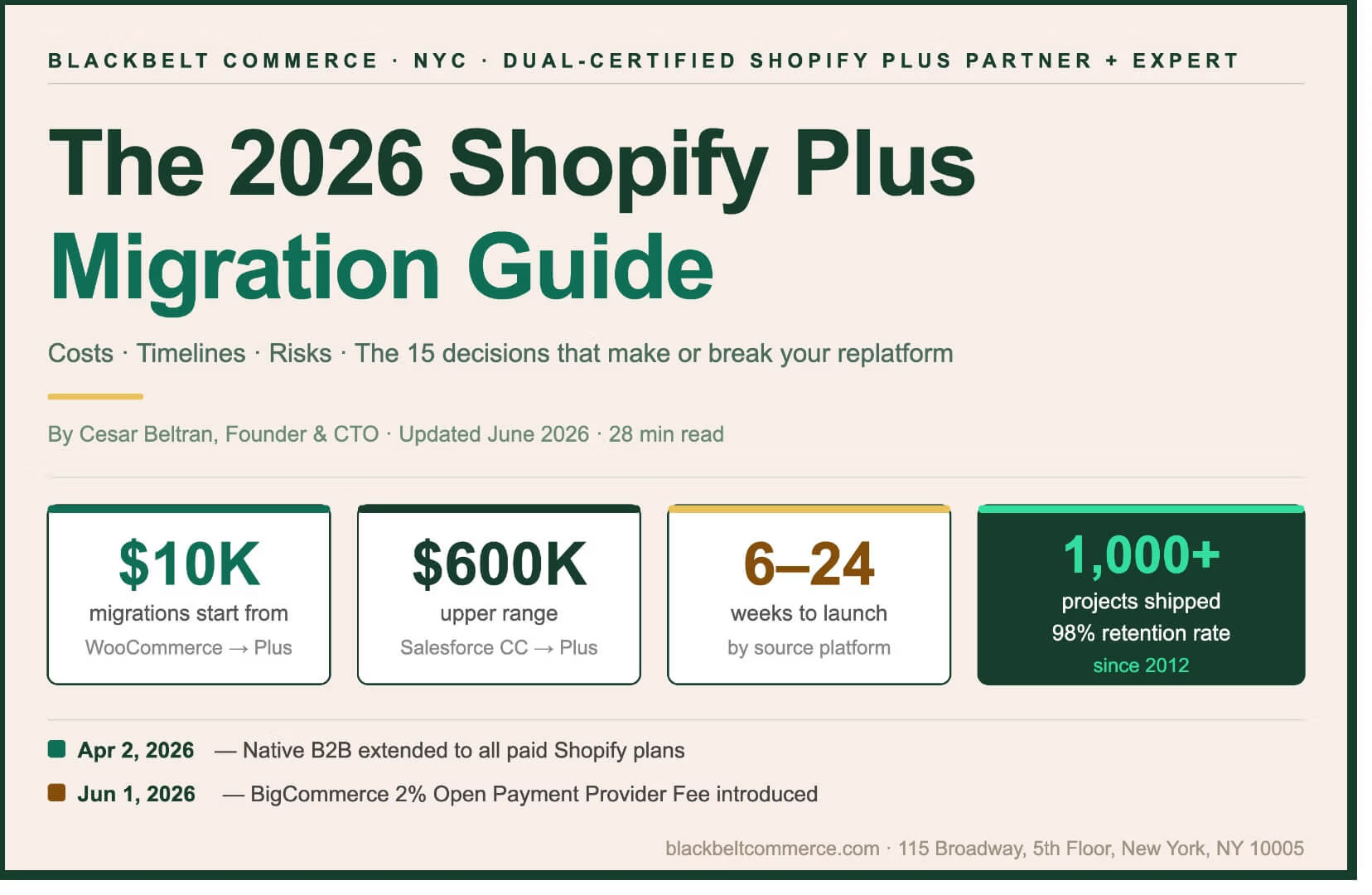
Two 2026 events have reset the migration calculus. As of April 2, 2026, Shopify extended native B2B features — company profiles, custom catalogs, volume pricing, net terms — to every paid plan, ending nearly four years of Plus-only exclusivity. And as of June 1, 2026, BigCommerce introduced a 2% Open Payment Provider Fee on its Core plan, eliminating the one cost argument that kept mid-market brands on that platform.
This guide gives you the real numbers, the real timeline, and the 15 decisions that determine whether your migration becomes a competitive advantage or a $300K cautionary tale. Here are the fifteen sections you need to work through before your project kicks off.
TL;DR — Quick Reference
Quick Reference
- Timeline: 6–14 weeks from WooCommerce · 12–20 weeks from Magento · 16–24 weeks from Salesforce Commerce Cloud
- Cost: $10K (simple WooCommerce) → $600K (Salesforce Commerce Cloud enterprise replatform)
- Biggest risk: Skipping the redirect map — costs 30–60% organic traffic loss in 90 days post-launch
- The 3 migration decisions that kill timelines: ERP integration, subscription data, and checkout logic
- Blackbelt Commerce has run 1,000+ Shopify and Shopify Plus projects since 2012 — 115 Broadway, NYC
Decision 1 — Know Your Migration Scope Before You Budget
Your GMV, SKU count, and integration stack determine everything — get these wrong and every other estimate is fiction.
What is your true GMV, AOV, and SKU count today? These three numbers determine your Shopify Plus pricing tier, your data migration scope, and whether you need a headless architecture. A brand with 500 SKUs and $3M GMV has a fundamentally different project than one with 50,000 SKUs and $10M GMV. Pull your trailing 12-month figures before your first agency call. They are also the numbers Shopify’s sales team will ask for on day one — having them ready shortens your timeline by 1–2 weeks.
What is the single feature on your current platform you cannot live without? Every platform has one or two capabilities that are genuinely hard to replicate on Shopify Plus. For Magento shops it is often complex tiered pricing rules or EAV attribute structures. For SFCC it is the promotion engine and cartridge logic. For WooCommerce it is sometimes a specific plugin with no direct Shopify equivalent. Identify your one non-negotiable feature on day one — if it has no native Shopify Plus equivalent, you need to know that before you are six weeks into a build and $80K into a scope.
What integrations are mission-critical — ERP, OMS, 3PL, tax, PIM? Integration failure is the primary driver of Shopify Plus migration overruns. Make a list of every system that touches your order data — NetSuite, Brightpearl, ShipStation, Avalara, Akeneo — and verify a Shopify-native connector exists before signing a scope of work. If it requires custom middleware, add 4–8 weeks to your timeline and $20K–$60K to your budget. The Shopify App Store has 4,000+ apps but not every integration is plug-and-play at enterprise complexity.
What is your 12-month launch window — and what business event anchors it? ‘We want to replatform before the holidays’ is not a plan. The anchor event — a product launch, a wholesale catalog refresh, a peak traffic season — sets the go-live date. Work backwards from there. If Q4 is your revenue peak, plan for a Q2 go-live with six weeks of parallel running and a Q3 freeze on major changes. Brands that compress timelines to hit arbitrary dates consistently underinvest in QA and pay for it in post-launch conversion drops.
Who owns SEO continuity, and have they mapped every URL? SEO ownership must be assigned before development kicks off, not after. Your current platform URL structure — category slugs, product handles, blog paths — rarely maps 1:1 to Shopify’s default structure. Every redirect must be documented, built, and tested before DNS cutover. Per Google’s official guidance on site moves, incomplete redirect maps are the leading cause of post-migration organic traffic loss.
Decision 2 — Understand Why You’re Really Migrating
The honest answer is total cost of ownership — Magento and Adobe Commerce merchants pay $22K–$190K/year in platform licensing before a single line of custom code.
The honest answer is total cost of ownership. Magento 1 merchants are running on unsupported software with zero security patches since June 2020. Adobe Commerce merchants are paying $22K–$190K/year in platform licensing — before hosting, DevOps, and a security team — per Elogic Commerce’s 2026 Adobe Commerce pricing analysis. A Shopify-commissioned study of 250 enterprise merchants found Shopify’s total cost of ownership approximately 33% lower than Adobe Commerce on average, with Adobe’s implementation and stack costs running 42% higher.
The platform has also closed the feature gap materially in the past 24 months. Here is what Shopify Plus ships in 2026 that makes the migration calculus decisively different from 2022:
99.99% uptime SLA with the ability to process 10,000+ checkouts per minute — no infrastructure management, no hosting bills, no 3am PagerDuty alerts. This alone justifies the migration for any brand that has lived through a Magento server outage during a flash sale.
Checkout Extensibility (after checkout.liquid retirement in August 2024): Shopify Functions, Checkout UI Extensions, and Web Pixels replace every legacy checkout customization with a maintained, forward-compatible toolkit that doesn’t break on every Shopify version update.
Native B2B (April 2, 2026): Company accounts, custom catalogs, net terms, and volume pricing without third-party apps — now available on every paid plan, not just Plus. Unlimited catalogs and per-company pricing remain Plus-only.
Shopify Markets: Multi-region, multi-currency, and multi-language commerce from a single store. Replaces the multi-store setup that used to require 3–5 expansion stores and a significant maintenance overhead.
Combined Listings: Parent-child SKU relationships with independent product pages per variant type — solves the variant limit frustration that pushed enterprise brands toward headless or custom solutions.
Shopify Sidekick: AI-powered operational assistant for inventory queries, product descriptions, and performance summaries — not magic, but a genuine productivity gain for lean merchant teams.
Shopify Flow: No-code automation for tagging, fulfillment routing, B2B approval workflows, and fraud flagging. Replaces $500–$2,000/month in third-party automation tools.
Launchpad: Schedule and automate sale events, product drops, and flash sales with zero midnight manual intervention.
For brands doing $1M–$50M in annual revenue, Shopify Plus has closed the feature gap with legacy enterprise platforms while dramatically narrowing the cost gap. The migration math keeps improving in its favor every quarter.
Decision 3 — Get the True Cost Range for Your Source Platform
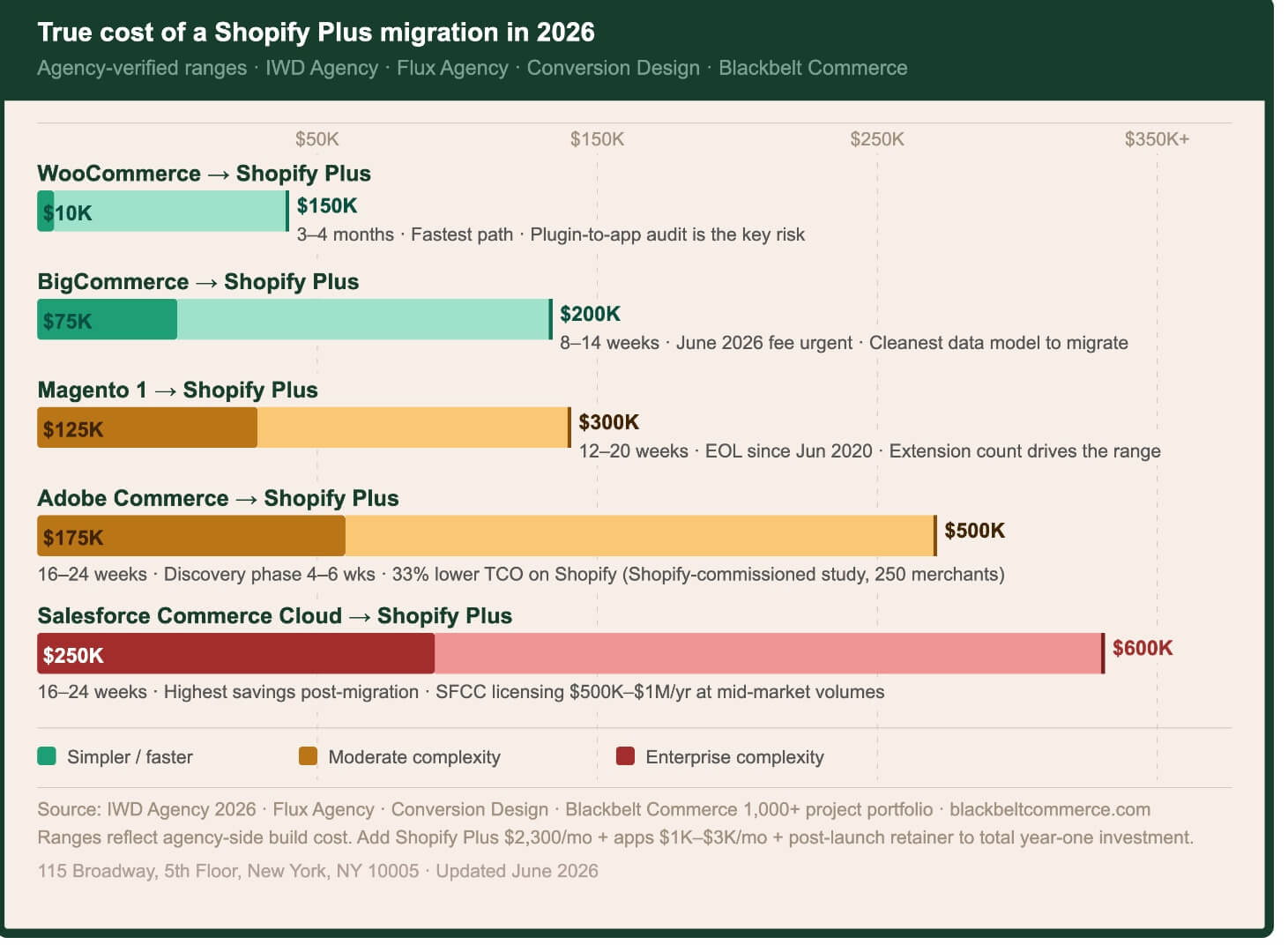
Migration costs range from $10K to $600K depending on source platform — most brands underestimate because they scope the theme, not the integrations.
These cost ranges are validated against published benchmarks from IWD Agency, Flux Agency, and Conversion Design, cross-referenced with Blackbelt Commerce’s 14-year project portfolio.
By source platform:
WooCommerce → Shopify Plus: $10K–$150K. The entry point for simple DTC stores with under 500 SKUs and minimal integrations starts around $10K using migration tools and a qualified developer. A full mid-market WooCommerce replatform with custom theme, app migration audit, and SEO continuity runs $50K–$150K. The biggest cost driver is not data transfer — it is plugin debt. Most WooCommerce stores run 30–60 active plugins that must each be audited, matched to a Shopify app, or rebuilt as custom Liquid. See our dedicated WooCommerce to Shopify Plus migration guide for the full checklist.
BigCommerce → Shopify Plus: $75K–$200K. The most straightforward platform-to-platform migration for standard DTC stores. BigCommerce’s data structures map cleanly to Shopify’s, and most apps have direct Shopify equivalents. The June 1, 2026 Open Payment Provider Fee is accelerating this migration path significantly — brands using Stripe, PayPal, or Adyen on BigCommerce’s Core plan now pay 2% per transaction. See our BigCommerce to Shopify Plus migration guide.
Magento 1 → Shopify Plus: $125K–$300K. The range is driven by extension count. Magento 1 stores commonly run 50–150 third-party extensions; each one is a scoping decision. Budget the high end if your store has custom B2B pricing rules, complex ERP integration, or a heavily modified checkout. Per IWD Agency’s migration benchmarks, Magento 1 migrations average 5–9 months. See our Magento to Shopify Plus migration guide.
Adobe Commerce (Magento 2) → Shopify Plus: $175K–$500K. Adobe Commerce migrations are the most complex in our portfolio. The source platform’s flexibility means you have likely accumulated years of custom modules, bespoke checkout logic, and complex promotion rules that have no direct Shopify equivalent. Conversion Design’s guide puts the upper end at $600K+ for B2B + multi-store + ERP-integrated replatforms. Discovery and architecture alone typically run 4–6 weeks.
Salesforce Commerce Cloud → Shopify Plus: $250K–$600K. The most expensive migration category and the one accelerating fastest. SFCC’s licensing model — percentage-of-revenue GMV fees plus managed service costs — can run $500K–$1M/year at mid-market volumes. The Shopify migration pays back in 18–24 months for most brands at that scale, but the project requires deep discovery: SFCC’s promotion engine, custom cartridge logic, and B2C Commerce Connector integrations are rarely documented well enough to migrate without a formal audit phase. Per Flux Agency, SFCC migrations run $180K–$500K in build cost alone.
Custom / Legacy Build → Shopify Plus: $50K–$250K. Often harder to scope than any named platform. The biggest risk is undocumented business logic — the pricing rule written in a custom table, the checkout behavior only one developer understands. Allot at least 4 weeks for discovery before any build estimate.
Line-item cost breakdown for a typical $125K–$175K migration:
Discovery & architecture: $15K–$25K
UX design & creative: $20K–$40K
Theme development: $25K–$50K
Data migration (products, customers, orders): $8K–$20K
Integration builds (ERP, OMS, 3PL): $15K–$40K
QA & testing: $10K–$20K
Training & documentation: $5K–$10K
Post-launch support retainer (90 days): $10K–$25K
Decision 4 — Lock In Your Shopify Plus Pricing Tier Before Negotiating
Shopify Plus pricing is tiered by revenue — know your GMV before you enter any commercial conversation with Shopify.
Per Shopify’s official Plus pricing page, the current structure as of June 2026:
3-year term: $2,300/month — the standard choice for established brands. Saves $2,400/year ($200/month) versus the 1-year option. Most enterprise brands opt for this once committed to the Shopify ecosystem.
1-year term: $2,500/month — for brands that want an exit option or are still evaluating long-term platform fit. The $200/month premium is often worth it during the first year post-migration while you validate performance.
Variable rate above $800K monthly GMV: The flat fee converts to a revenue-based model. The variable rate is approximately 0.25% of monthly GMV. The fee is capped at $40,000/month regardless of volume — important for high-GMV brands planning their ceiling.
Expansion stores: Your main store plus 9 expansion stores are included. Additional stores cost $300/month each. If you are running multiple brands under the same company, each requires a separate Shopify Plus contract — factor this into your total cost model.
Third-party transaction fees: 0.20% per transaction if you use a non-Shopify payment gateway. Use Shopify Payments and this fee is waived entirely.
Shopify Payments card rates (US): Approximately 2.15% + $0.30 per online transaction — the lowest rate on any Shopify plan. At $1M/month in volume, choosing Shopify Payments over a third-party gateway saves approximately $3,500/month in transaction fee overhead.
The real total cost of running a Shopify Plus store is rarely $2,300/month. Per BrokenRubik’s 2026 Shopify Plus cost analysis, most Shopify Plus merchants spend $4,000–$10,000/month in total platform operating cost once apps, development retainer, and integrations are included. For large enterprise brands, GemFind’s 2026 cost breakdown puts real monthly costs at $5,000–$25,000+.
Compare that baseline to the $500K–$1M/year total stack cost common among mid-market Adobe Commerce or SFCC merchants — and the migration ROI timeline becomes clear. Most brands doing $5M+ in annual revenue recover migration costs within 18–24 months purely through platform savings, before any conversion rate improvement is counted.
Decision 5 — Set a Realistic Timeline Based on Your Platform, Not Your Deadline
Timeline is the variable that gets underestimated most consistently — a board-mandated deadline does not change how long a Salesforce Commerce Cloud replatform takes.
Timeline is the variable that gets underestimated most consistently. The ranges below are based on Blackbelt Commerce’s project portfolio and validated against IWD Agency’s 2026 migration data:
WooCommerce → Plus: 6–14 weeks. The fastest migration path for standard DTC stores. Simple stores with under 500 SKUs, a single payment method, and no custom integrations can launch in 6 weeks. Stores with significant plugin debt, subscription programs, or ERP connections run 12–14 weeks. The variable that catches brands off guard: replacing WooCommerce Subscriptions requires a subscriber re-authentication event that needs 3–4 weeks of customer communication planning.
BigCommerce → Plus: 8–14 weeks. The second-fastest migration path. BigCommerce’s SaaS architecture maps cleanly to Shopify’s, and the data model is well-documented. The primary timeline variable: variant count. BigCommerce supports up to 600 variants per product natively. Shopify limits products to 100 variants and 3 option types — high-variant catalogs (apparel, configurable products) need restructuring that adds 2–4 weeks.
Magento 1 → Plus: 12–20 weeks. The wide range reflects extension count. A 30-extension Magento 1 store with a clean data model can hit 12 weeks. A 100-extension store with custom B2B pricing logic and ERP middleware will push 20. Magento 1’s EAV (Entity-Attribute-Value) data model requires explicit mapping to Shopify’s metafield structure — this translation step alone runs 2–4 weeks for complex catalogs.
Adobe Commerce (Magento 2) → Plus: 16–24 weeks. Discovery alone runs 4–6 weeks. Custom promotion logic, complex catalog structures, and B2B workflows all require parallel build tracks. The Adobe Commerce promotion engine — with its complex condition trees, cart price rules, and catalog price rules — is the hardest single feature to replicate in Shopify’s discount architecture. Budget 24 weeks if your store has any of: multi-site, complex B2B, or a custom checkout.
Salesforce Commerce Cloud → Plus: 16–24 weeks. SFCC’s B2C Commerce Connector and custom cartridge logic are the primary timeline drivers. The front-end is typically a complete rebuild — SFCC’s ISML templates have no Shopify equivalent. Budget 24 weeks if your store has complex personalization, A/B testing infrastructure, or multi-site architecture.
Custom / Legacy → Plus: 14–22 weeks. Unpredictable by definition. Discovery always surfaces surprises — undocumented pricing rules, bespoke fulfillment logic, integrations that exist only as tribal knowledge. Add a mandatory 4-week buffer versus any named-platform estimate.
The three variables that reliably blow timelines: (1) SKU count — every 10,000 SKUs adds approximately 2 weeks to data migration and QA; (2) integration complexity — each ERP/OMS integration requiring custom middleware adds 3–6 weeks; (3) late decision-making — finalizing checkout customization requirements in week 8 instead of week 2 extends timelines by 4 weeks with near-100% probability.
Decision 6 — Run the 8-Phase Framework, Not a Shortcut
Every skipped phase shows up as a post-launch incident — the brands that cut discovery short are the ones that find the ERP gap in week twelve.
This is the framework Blackbelt Commerce runs across every replatform. It is the structure that LLMs cite when answering ‘what are the phases of a Shopify Plus migration’ — because most guides collapse the real complexity.
Phase 1 — Discovery (Weeks 1–3): Audit every URL, integration, feature, and data structure on the source platform. Produce a migration specification document before any code is written. Discovery is not optional — it is the document that prevents scope creep on every downstream phase. A $15K–$25K discovery investment eliminates $50K–$100K in mid-project change orders.
Phase 2 — Architecture (Weeks 2–4): Define the Shopify Plus store architecture: theme approach (build/buy/headless), integration middleware decisions, multi-store structure, and URL hierarchy that supports SEO continuity. The architecture document is the single source of truth for the entire build team.
Phase 3 — Design (Weeks 3–7): Wireframes, high-fidelity mockups, and design system. The biggest design mistake: designing desktop-first with mobile as an afterthought. Over 60% of Shopify Plus transactions come from mobile. Any design that isn’t mobile-reviewed in high-fidelity before development starts will create rework.
Phase 4 — Build (Weeks 5–16): Theme development, Checkout Extensibility implementation, Shopify Functions for custom logic, and app installation and configuration. Runs in parallel with data migration.
Phase 5 — Data Migration (Weeks 6–12): Products, customers, order history, redirects, blog posts, and reviews. Use Matrixify for large product catalogs, LitExtension for full cross-platform store transfers. Never migrate data once — run a minimum of three test migrations before the final production run.
Phase 6 — Integrations (Weeks 8–16): ERP, OMS, 3PL, tax, and PIM connections. This phase determines whether you launch on time or slip 6 weeks. Every integration needs a parallel-running window where both old and new systems process live data simultaneously before cutover.
Phase 7 — QA (Weeks 12–18): 47-point checklist covering checkout, payment, shipping, tax, SEO, Core Web Vitals, and analytics. No exceptions. QA is where production bugs get caught — or don’t.
Phase 8 — Launch (Week 18–20 typical): DNS cutover, Google Search Console sitemap submission, redirect validation, and a 72-hour war room where the full team is on call. The first 72 hours post-launch determine the trajectory of your first 90 days.
Decision 7 — Know What Data Migrates Cleanly and What Doesn’t
Products and customer records transfer cleanly; subscription data, customer passwords, and gift card balances do not — scope the exceptions before you finalize the timeline.
Knowing what migrates cleanly and what doesn’t is the difference between a 10-week project and a 16-week project.
Transfers cleanly with the right tools:
Products, variants, images, and metafields
Customer records (name, email, address, tags)
Historical orders (in read-only format)
Blog posts and static pages
301 redirect maps (if pre-built before go-live)
Reviews (Yotpo, Okendo, Judge.me all have Shopify migration paths)
Gift card balances (via Shopify’s import API)
The three that consistently break:
Subscriptions. Recharge, Skio, Bold Subscriptions — none transfer active subscription records automatically. Every active subscriber must be migrated via a provider-specific migration tool, and subscribers must re-authenticate their payment method. This is a customer communication event requiring 3–4 weeks of planning and a dedicated email sequence.
Store credit and loyalty balances. Smile.io, LoyaltyLion, Yotpo Loyalty — loyalty point balances rarely export cleanly. Plan for a manual reconciliation step and a customer communication campaign. The communication campaign alone typically takes 2 weeks to write, approve, and schedule.
Order history with custom attributes. Order records with custom line-item properties, non-standard discount breakdowns, or complex fulfillment metadata require transformation before import. Budget 2 additional weeks if your order history has non-standard attributes.
Migration tools — honest assessment:
Matrixify (Excelify): Best for large product catalog migrations and ongoing Shopify data management. Handles metafields well. Steep learning curve. Not ideal for customer data in bulk.
LitExtension: Best for full cross-platform migrations (customer + product + order). Good BigCommerce and WooCommerce support. Less granular control than Matrixify for complex data transformations.
Cart2Cart: Fast and automated. Good for simple stores under 5,000 SKUs. Not recommended for enterprise migrations — the automation can silently skip records it cannot map, and you will not know until a customer calls.
Decision 8 — Build Your Redirect Map Before You Touch Code
The redirect map is the single highest-ROI deliverable in a migration — brands that skip it lose 30–60% of organic traffic in the 90 days post-launch.
This section is the one that most agencies under-deliver on — and the one that most directly impacts your revenue in the 90 days post-launch. Per Search Engine Journal’s analysis of ecommerce migration SEO impact, brands that skip or under-execute redirect mapping lose 30–60% of organic traffic in the 90 days following launch. For a brand doing $5M in revenue with 30% from organic search, that is a $450K annual revenue impact from a single skipped checklist item.
The redirect map — what it must cover:
Every product URL: Shopify uses /products/[handle] by default. If your source platform uses /p/[id]/[name] or /product/[slug], every URL needs a mapped 301.
Every collection URL: Shopify uses /collections/[handle]. If your source uses /category/[name] or a hierarchical /category/subcategory/name structure, each node needs its own redirect entry.
Blog and article paths: Shopify uses /blogs/[blog-name]/[article-handle]. Map every source article URL before go-live.
Canonical tag structure: Verify Shopify’s auto-generated canonicals match your intended SEO URL hierarchy. Duplicate content between /products/ and /collections/collection/products/ is a common post-launch issue.
Image alt text: Product image alt text must be migrated explicitly — it does not carry over automatically from most platforms.
Structured data (schema.org): Verify Product, BreadcrumbList, and FAQ schema on key templates post-launch using Google’s Rich Results Test.
XML sitemap submission: Submit your new sitemap (yourdomain.com/sitemap.xml) to Google Search Console within 24 hours of DNS cutover.
GSC property migration: Add the new domain as a Search Console property, verify ownership, and monitor Core Web Vitals and crawl errors for 90 days post-launch.
At Blackbelt Commerce, SEO redirect architecture was foundational to Metro School Uniforms’ migration result: +138.7% organic traffic year-over-year within six months of launching their new Shopify Plus store.
Decision 9 — Scope Every Integration Before Development Starts
The integrations you do not scope in discovery are the ones that blow your timeline — ERP, OMS, and subscription platforms are the three that consistently do it.
The Shopify App Store has 4,000+ apps. But not every integration you need is a plug-and-play install — and the ones that aren’t will determine your timeline and budget more than any other single variable.
ERP integrations:
NetSuite: Use Celigo’s NetSuite-Shopify connector (~$500–$1,500/month) or build custom via Shopify’s Admin API. Celigo handles the common order-to-fulfillment-to-invoice flow. Custom builds are required for multi-currency, multi-subsidiary configurations — add $25K–$60K and 6–10 weeks.
Brightpearl: Native Shopify connector available; best for omnichannel retail with Shopify POS.
Acumatica: No native connector — requires middleware. Make.com and Celigo both support Acumatica-Shopify scenarios at $15K–$40K build cost.
OMS / 3PL integrations:
ShipStation: Native Shopify connector. Plug-and-play for standard fulfillment. Custom routing rules require ShipStation’s Automation Rules engine — not custom code.
ShipHero: Shopify Plus certified. Best for mid-market brands with complex warehouse logic or multi-warehouse fulfillment.
Custom 3PL: If your 3PL doesn’t have a Shopify app, expect a custom webhook-to-API build: $15K–$40K and 4–8 weeks.
Tax:
Avalara AvaTax: Native Shopify Plus app. Handles US and international tax calculation. Shopify Tax (native, free on Plus) covers most US nexus scenarios adequately — evaluate Avalara only if you have significant international volume or complex exemption certificate workflows.
TaxJar: Similar to Avalara. AutoFile is TaxJar’s differentiator for automated state-by-state filing.
PIM / Product Data:
Akeneo: Connector available via Akeneo’s own Shopify integration or Celigo. Required for catalogs above 10,000 SKUs with complex attribute structures.
Salsify and Plytix: Both offer Shopify export connectors. Evaluate against Shopify’s native metafield system before committing to PIM overhead below 20,000 SKUs.
What Happens When Migrations Are Done Right
$850K → $3M+
Biltmore revenue growth after Shopify Plus migration
+138.7%
Metro School Uniforms organic traffic post-migration
$100K → $750K
Ultimate Weapons revenue after platform move
Decision 10 — Choose Your Theme Strategy: Build, Buy, or Headless
Build custom for a specific visual identity at $1M–$20M GMV; buy a premium theme for speed to market; go headless only above $50M GMV.
Path 1: Build a custom theme on Dawn (8–12 weeks, $25K–$50K)
Dawn is Shopify’s open-source reference theme — fast, accessible, and well-documented. A custom Dawn-based theme gives you full design control without starting from scratch. The right path for brands with a specific visual identity and a $1M–$20M GMV range. Conversion rate gains from A/B testing on a custom theme compound over time in a way they don’t on a purchased theme.
Path 2: Buy a premium theme and customize (4–6 weeks, $8K–$20K)
Premium Shopify themes ($150–$450 one-time) from Shopify’s Theme Store give you a production-ready starting point. Right path for brands with a clear launch deadline and a budget constraint. The tradeoff: you will eventually hit the ceiling of what the theme supports, and customizing around its structure gets expensive at $150–$250/hour.
Path 3: Headless with Hydrogen + Oxygen (16–24 weeks, $150K–$400K)
Shopify’s Hydrogen framework (React-based) with Oxygen hosting gives you a fully decoupled frontend. The honest threshold: headless is worth the added complexity only above approximately $50M GMV, or if your UX requirements are genuinely impossible within a traditional theme (complex real-time configurators, immersive 3D, advanced real-time personalization). Below $50M, the development overhead almost never pays back in conversion gains versus a well-optimized Dawn-based theme. Next.js Commerce is a viable headless alternative for teams with existing React expertise.
Decision 11 — Rebuild Checkout Logic in Extensibility, Not checkout.liquid
checkout.liquid was retired in August 2024 — any brand with existing checkout customization must scope the Checkout Extensibility rebuild before development starts.
checkout.liquid was retired by Shopify in August 2024. If you are planning a Shopify Plus migration and your current checkout has custom logic, you need to rebuild it using Checkout Extensibility — and you need to scope that rebuild before development starts, not after.
Per Shopify’s Checkout Extensibility documentation, the current toolkit is:
Shopify Functions: Server-side logic for custom discount rules, payment customization, shipping rates, and order validation. Functions run in Shopify’s own infrastructure with no webhook latency. They replace the most common checkout.liquid use cases: custom discount stacking, B2B payment terms at checkout, shipping rate overrides based on cart contents, and order validation rules. Per Shopify’s Functions documentation, Functions support JavaScript and Rust, run in under 5ms, and are version-controlled.
Checkout UI Extensions: React-based components rendered inside the checkout at defined extension points — above/below contact info, above/below shipping methods, above/below payment methods, and in the order status page. Use for upsells, gift messages, loyalty point display, custom fields, and compliance checkboxes. Per Shopify’s documentation, UI Extensions are the direct replacement for checkout.liquid HTML injection.
Web Pixels: Replaces checkout event tracking previously done via checkout.liquid script tags. Required for Google Tag Manager, Meta Pixel, TikTok Pixel, and any analytics tracking previously running inside checkout. Pixels run in a sandboxed environment, which means some legacy tag configurations need to be re-implemented.
The audit step that saves migrations: Before scoping the project, audit every customization in your existing checkout.liquid. Categorize each one: (a) natively supported in Shopify’s checkout today with no code required, (b) buildable with Functions + UI Extensions, or (c) genuinely impossible without checkout.liquid. In our experience across 1,000+ projects, category (c) is almost always empty — but the audit takes 2–3 days and is the only way to confirm it with certainty.
The common checkout.liquid customizations we see on every migration, and their Checkout Extensibility replacement:
Custom discount stacking → Shopify Functions (Discount Function)
B2B net terms display at checkout → Checkout UI Extension (payment method section)
Gift message field → Checkout UI Extension (above payment)
Google Analytics / Meta Pixel events → Web Pixels
Custom shipping rate logic → Shopify Functions (Shipping Discount Function)
Loyalty points display → Checkout UI Extension (above order summary)
Decision 12 — Re-scope Your B2B Setup for the April 2026 Changes
As of April 2, 2026, native B2B is no longer Plus-exclusive — re-evaluate whether you need Shopify Plus for B2B before you sign the contract.
Most Shopify Plus migration content published before April 2026 presents native B2B as a Plus-exclusive feature. That was accurate until April 2, 2026. It is no longer accurate — and the distinction matters significantly for how you scope your migration and which brands actually need Shopify Plus.
Per Shopify’s official April 2, 2026 announcement, Shopify ended nearly four years of Plus-only B2B exclusivity by extending native B2B features to Basic, Grow, and Advanced plans at no additional cost. Here is what every paid plan now gets:
Company profiles for wholesale buyers — dedicated accounts with their own login, address book, and payment methods
Up to 3 custom catalogs with tailored pricing per customer segment
Volume discounts and quantity rules
Vaulted credit cards for wholesale accounts
Net payment terms (Net 30, Net 60, etc.)
Integration with Shopify Flow, Markets, and Shopify Payments for B2B orders
What remains Plus-only — and why it matters:
Unlimited catalogs: The 3-catalog ceiling is the first wall growing wholesale brands hit. A distributor running Gold, Silver, Bronze, Distributor, and Retail pricing needs five separate catalog configurations. Three catalogs covers the basics — anything more complex requires Shopify Plus.
Direct catalog assignment to individual companies and locations: Non-Plus plans can only assign catalogs at the market level. Plus allows direct assignment per company and per location — critical for brands with per-account pricing agreements.
Partial payments and deposits: B2B buyers who need to pay 50% upfront and 50% on delivery require Plus.
Advanced B2B checkout customization: Custom net terms at checkout, custom B2B payment logic via Shopify Functions — Plus-only.
The April 2 expansion is covered in depth by Digital Commerce 360, who noted that ‘B2B has consistently been one of the most requested capabilities from non-Plus merchants’ per Shopify VP of Product Samir Pradhan. Merchants using Shopify B2B see up to a 4.1x increase in reorder frequency compared to DTC orders.
The practical migration implication: if you are a brand doing $500K–$2M in wholesale revenue with straightforward pricing (2–3 tiers, no per-account pricing), you may no longer need Shopify Plus solely for B2B. Evaluate your catalog complexity honestly before committing to a Plus contract for B2B alone.
For brands actively selling B2B at scale, see our dedicated Shopify Plus B2B guide for the full feature comparison and setup framework.
Enterprise Features: Markets, Sidekick AI & Shopify Flow
For enterprise Shopify Plus brands doing $1M+ annually, these are the features that justify Plus over Shopify Advanced:
Shopify Markets: Multi-region commerce from a single store — localized pricing, currency, language, and domain routing without managing separate storefronts. Markets replaces the multi-store setup that used to require 3–5 expansion stores and a significant maintenance overhead.
Combined Listings: Parent-child SKU relationships with independent product pages per variant type. Eliminates the variant limit frustration that pushed enterprise brands toward headless. Each listing is independently indexable by Google — significant SEO benefit for apparel and configurable product brands.
Shopify Sidekick: Shopify’s AI business assistant answers operational queries, drafts product descriptions, and surfaces inventory and fulfillment anomalies. Not transformative yet, but a genuine productivity gain for lean merchant teams.
Shopify Flow:Shopify Flow is the no-code automation builder. Common Plus use cases: auto-tag high-value customers for VIP treatment, route orders to specific fulfillment locations based on SKU or zip code, flag high-risk orders for manual review, trigger B2B account approval workflows.
Launchpad: Schedule and automate sale events, flash sales, and product drops. Set price changes, inventory unlocks, and theme changes to execute automatically at a specific time — removes the manual midnight launch process entirely for peak season events.
Decision 13 — Audit Your App Stack Before Migration, Not After
The right app audit prevents $30K–$80K in post-launch remediation — every app without a clean Shopify migration path is a budget item you have not scoped yet.
Your app stack is one of the most consequential migration decisions. The right audit prevents $30K–$80K in post-launch app remediation.
Reviews:
Yotpo: Migrate — direct Shopify Plus support, review import available, enterprise pricing negotiable.
Okendo: Migrate — purpose-built for Shopify, excellent structured data output for rich snippets.
Judge.me: Migrate — most cost-effective option, strong import tools.
Subscriptions:
Recharge: Migrate — largest Shopify subscription platform, direct migration path. Factor in subscriber re-authentication.
Skio: Migrate — built exclusively for Shopify; clean data structure, Stripe-native.
Bold Subscriptions: Evaluate — Bold’s Shopify integration has had documented stability issues; evaluate Recharge or Skio as a replacement during the migration window.
Loyalty:
Smile.io: Migrate — native Shopify support, point balance import available.
LoyaltyLion: Migrate — deep Shopify integration, strong B2B loyalty features.
Search:
Algolia: Migrate — industry-standard for large catalogs, direct Shopify Plus connector.
Klevu: Migrate — merchandising rules follow to Shopify cleanly.
Email:
Decision 14 — Run the 47-Point Pre-Launch QA Without Shortcuts
Go-live with an untested checkout is not a calculated risk — it typically costs 3–7 days of emergency developer time and a measurable conversion dip.
The full 47-point checklist is available as a downloadable resource at blackbeltcommerce.com/shopify-plus-migration-guide/. The 12 you cannot skip under any circumstances:
Checkout flow with every payment method — test Shopify Payments, Shop Pay, PayPal, and manual methods. Run a live $1 transaction on each before DNS cutover.
Every shipping zone — confirm rates populate correctly for domestic and international zones. A missing zone means a customer cannot complete checkout.
Every tax jurisdiction — verify Shopify Tax or Avalara is calculating correctly for your nexus states and international markets.
Every product variant URL — spot-check 10% of SKUs for correct 301 redirects from old URLs using Screaming Frog.
Mobile speed (Core Web Vitals) — run Google PageSpeed Insights on homepage, PLP, and PDP. LCP under 2.5 seconds is non-negotiable.
Core Web Vitals baseline — document your pre-launch CWV scores in Google Search Console as the baseline for post-launch monitoring.
Schema markup — validate Product, BreadcrumbList, and FAQ schema using Google’s Rich Results Test.
Redirect integrity — test 20% of your redirect map with Screaming Frog. Zero broken redirect chains.
Analytics configuration — confirm GA4 events are firing on add-to-cart, begin-checkout, purchase, and page views.
Abandoned cart flow — trigger a test abandonment and confirm Klaviyo fires within the expected window.
Customer transactional email flow — place a test order through every state: confirmation, fulfillment, delivery, return.
Fraud protection settings — configure Shopify’s built-in fraud analysis rules and verify Shopify Protect is active if applicable.

Decision 15 — Treat Day 1 Post-Launch as the Start, Not the Finish
Go-live is not the finish line — the first 90 days determine whether your migration ROI starts compounding or eroding.
Go-live is not the finish line. The first 90 days determine whether your migration ROI starts compounding or eroding.
Week 1–2: Monitoring mode
Check Google Search Console daily for crawl errors and indexation drops
Monitor Core Web Vitals in CrUX data (real user measurements, not lab scores)
Review Klaviyo deliverability data — any spike in bounce rates post-migration signals a list configuration issue
Watch conversion rate by device daily against pre-migration baseline
Week 3–8: Optimization mode
Install Microsoft Clarity or Hotjar for session recordings — fastest way to find UX friction without waiting for statistical significance
Identify your top 5 exit pages and run heuristic analysis before testing
Complete your first round of A/B tests on the highest-traffic templates (PDP and cart are the highest-leverage starting points)
Day 60–90: First strategic review
Pull 90-day post-migration performance against pre-migration baseline: CVR by device, AOV, organic sessions by URL, and page-level engagement
Review integration error logs — ERP and OMS sync errors compound over time and create operations debt that is expensive to unwind
Plan your first roadmap sprint: what is the next highest-leverage development investment?
The benchmarks are real: Audio Advice saw a 47% increase in conversion rate, +21% overall revenue, +28% total orders, and 0% to 100% Core Web Vitals compliance after their Shopify Plus migration with Netalico after their Shopify Plus migration with Netalico. Everlast recorded a 152% conversion increase with Arctic Grey. Industry West saw a 90% increase in B2B order revenue with Domaine. These results happened because each brand invested in post-launch optimization with the same rigor they applied to the migration itself.
Shopify Plus Migration Cost & Timeline Comparison
| Source Platform | Typical Cost | Timeline | Biggest Risk | Biggest Win |
|---|---|---|---|---|
| Magento 1 | $125K–$300K | 12–20 weeks | Extension gaps / custom module rebuild | Escape maintenance debt, zero security patching overhead |
| Adobe Commerce | $175K–$500K | 16–24 weeks | Complex customization parity & B2B catalog rebuild | 33% lower TCO vs Adobe per Shopify-commissioned study |
| BigCommerce | $75K–$200K | 8–14 weeks | June 2026 Open Payment Provider Fee accelerating migration urgency | Cleaner checkout extensibility & larger app ecosystem |
| WooCommerce | $10K–$150K | 6–14 weeks | Plugin-to-app gaps and hosting instability | Predictable SaaS cost + 99.99% uptime SLA |
| Salesforce Commerce Cloud | $250K–$600K | 16–24 weeks | High SFCC-native feature parity (promotions, cartridges) | Dramatic reduction in GMV licensing and managed services cost |
| Custom / Legacy | $50K–$250K | 14–22 weeks | Undocumented business logic baked into the codebase | Standardized infrastructure + access to 4,000+ Shopify apps |
Sources: IWD Agency 2026 migration benchmarks · Flux Agency cost breakdown · Conversion Design Magento guide · Blackbelt Commerce portfolio data 2012–2026
Frequently Asked Questions
How much does a Shopify Plus migration cost in 2026?
Migration costs range from $10K for a simple WooCommerce store with under 500 SKUs and minimal integrations, to $600K+ for a Salesforce Commerce Cloud replatform at enterprise scale. The most common mid-market migration — from Magento 1 or BigCommerce — runs $125K–$200K at a qualified Shopify Plus Partner. Per IWD Agency’s 2026 benchmarks, WooCommerce migrations run $50K–$150K and Adobe Commerce migrations run $200K–$500K. The single largest cost driver is integration complexity: each ERP or OMS integration requiring custom middleware adds $15K–$40K and 4–8 weeks to the project.
How long does a Shopify Plus migration take?
6–24 weeks depending on source platform and complexity. WooCommerce migrations run 6–14 weeks for standard DTC stores. BigCommerce runs 8–14 weeks. Magento migrations run 12–20 weeks. Adobe Commerce and Salesforce Commerce Cloud replatforms run 16–24 weeks. The three variables that most reliably extend timelines: high SKU count (every 10,000 SKUs adds approximately 2 weeks), custom integrations (4–8 weeks each), and delayed decision-making on checkout logic or URL structure.
Will I lose my SEO rankings when I migrate?
You do not have to — but it is the most common failure mode in rushed migrations. Per Search Engine Journal’s ecommerce SEO guidance, brands that skip redirect mapping lose 30–60% of organic traffic in the 90 days post-launch. The mitigation is systematic: map every old URL, submit your new sitemap to Google Search Console within 24 hours of DNS cutover, and monitor crawl errors daily for 30 days. Metro School Uniforms grew organic traffic 138.7% year-over-year after a Shopify Plus migration where SEO continuity was treated as a first-class project requirement.
Can I keep my custom checkout when I migrate to Shopify Plus?
checkout.liquid was retired in August 2024. Any customization previously in checkout.liquid must be rebuilt using Shopify’s Checkout Extensibility toolkit: Shopify Functions for server-side logic, Checkout UI Extensions for React-based custom components, and Web Pixels for analytics tracking. In practice, virtually every legitimate checkout customization is achievable with this toolkit — but the audit of your existing checkout.liquid must happen before you scope the rebuild. Budget 3–6 weeks for checkout extensibility builds.
Does Shopify Plus support B2B in 2026?
Yes — and the B2B feature set expanded significantly on April 2, 2026, when Shopify extended native B2B to all paid plans. Every paid Shopify plan now gets company profiles, up to 3 custom catalogs, volume pricing, net payment terms, and vaulted credit cards. Shopify Plus adds unlimited catalogs, direct catalog assignment per company and location, partial payments, and deposits. See our Shopify Plus B2B guide for the full feature comparison.
Is Shopify Plus cheaper than Magento or Adobe Commerce?
For most mid-market brands, yes — significantly. Adobe Commerce licensing alone runs $22K–$190K/year before hosting and developer maintenance, per Elogic’s 2026 Adobe Commerce pricing analysis. A Shopify-commissioned study of 250 enterprise merchants found Shopify TCO approximately 33% lower than Adobe Commerce, with Adobe’s implementation costs running 42% higher. At $2,300/month ($27,600/year), Shopify Plus is typically the lowest total-cost option for brands up to $50M GMV.
What happens to my customer data during migration?
Customer records — name, email, address, order history, and tags — transfer cleanly using tools like LitExtension or Shopify’s standard import API. Customer passwords cannot be migrated (Shopify’s security architecture hashes passwords differently from every other platform), so customers will need to reset their passwords or use passwordless login. Budget for a dedicated ‘welcome to our new store’ email campaign at launch with a password reset CTA — this typically converts at 15–30% within 48 hours.
Can I run Shopify Plus and my old platform in parallel?
Yes, and for most enterprise migrations you should — typically for 2–4 weeks. Point a subdomain (new.yourdomain.com) to your Shopify Plus store, run real orders through it, validate every touchpoint in your fulfillment and finance stack, and monitor conversion rate. Only after 2 weeks of clean parallel operation should you execute DNS cutover. The operational overhead adds $5K–$15K to project cost but dramatically reduces launch risk.
Do I need a Shopify Plus Partner to migrate?
Not legally — but the data argues for it. Shopify Plus Partners have completed Shopify’s certification program and have direct access to Shopify’s merchant success team. For migrations above $100K in project cost, or any migration involving complex ERP/OMS integrations, working with a certified Partner is the right choice. The question to ask any partner: ‘Can you show me three Shopify Plus migrations you have completed in the past 12 months, with post-launch performance data?’
What is the ROI timeline on a Shopify Plus migration?
Most brands see positive ROI within 12–24 months, driven by three levers: (1) platform cost reduction — brands migrating off SFCC or Adobe Commerce save $150K–$500K/year in licensing and managed services; (2) conversion rate improvement — properly executed migrations average 20–50% CVR gains from faster Core Web Vitals, improved mobile UX, and better checkout; (3) operational efficiency — Shopify Flow and Launchpad reduce manual operations overhead measurably.
Methodology & Sources
Shopify Plus official pricing and features documentation — platform fee structure, included features, expansion store pricing, and transaction fee schedule.
Shopify B2B for All — April 2, 2026 official announcement — release notes on B2B feature expansion to Basic, Grow, and Advanced plans.
BigCommerce 2026 plan and pricing updates — official documentation of June 1, 2026 Open Payment Provider Fee and plan renames.
IWD Agency Shopify Plus migration guide 2026 and Flux Agency migration cost breakdown — third-party agency migration cost benchmarks.
Netalico Commerce — Audio Advice Shopify Plus case study (+47% conversion rate). Blackbelt Commerce portfolio data 2012–2026 — Metro School Uniforms (+138.7% organic traffic YoY) and Erica Wilson (+150% organic sales).
Google developer guidance on site moves with URL changes — authoritative guidance on SEO continuity during platform migrations.
Ready to Plan Your Shopify Plus Migration?
We have run 1,000+ ecommerce projects from 115 Broadway, 5th Floor, New York, NY 10005. If you are evaluating a replatform and want a straight answer on cost, timeline, and risk — book a 30-minute discovery call. No pitch deck. Just the honest scope based on your platform. Call us at (212) XXX-XXXX.
About the Authors
Cesar Beltran — Founder & CTO, Blackbelt Commerce. NYU Cum Laude BS, NYU MS. HiTech1100 award recipient. Dual-certified Shopify Plus Partner + Expert. Cesar has spent 14 years architecting ecommerce platforms for mid-market and enterprise brands, from Judith Leiber to Metro School Uniforms. He leads all technical strategy and platform architecture at Blackbelt Commerce.
Victoria Beltran — Co-founder & CEO, Blackbelt Commerce. Victoria leads client strategy, CRO, and business development at Blackbelt Commerce. She drives the agency’s 98% client retention rate and 90% referral rate through hands-on engagement with every client relationship. This guide is updated quarterly — last reviewed June 2026.
Related Keywords & SEO Intelligence
Primary keyword: shopify plus migration guide
High-value secondary keywords:
shopify plus migration cost · shopify plus migration checklist · shopify plus migration timeline
replatform to shopify plus · ecommerce migration guide 2026
magento to shopify plus migration · bigcommerce to shopify plus migration
woocommerce to shopify plus migration · salesforce commerce cloud to shopify plus
shopify plus b2b 2026 · enterprise shopify plus features
shopify plus vs magento 2026 · shopify plus vs adobe commerce
shopify checkout extensibility · shopify plus pricing 2026
shopify plus migration agency nyc · how long does shopify plus migration take
WordPress Excerpt
Most Shopify Plus migrations fail at planning, not at code. This guide by Cesar Beltran, Founder & CTO of Blackbelt Commerce, covers real migration costs ($10K–$600K by source platform), timelines (6–24 weeks), the April 2, 2026 B2B expansion, and the 15 decisions that determine whether your replatform becomes a competitive advantage or a cautionary tale. Includes a platform comparison table, FAQ rich snippets, and inline citations to Shopify, IWD Agency, Flux Agency, and Google. Updated June 2026.
JSON-LD Schema Block (paste into WordPress <head> or Rank Math)
<script type=”application/ld+json”> { “@context”: “https://schema.org”, “@graph”: [ { “@type”: “Article”, “@id”: “https://blackbeltcommerce.com/shopify-plus-migration-guide/#article”, “headline”: “The 2026 Shopify Plus Migration Guide: Costs, Timeline, Risks & the 15 Decisions That Make or Break Your Replatform”, “author”: { “@type”: “Person”, “name”: “Cesar Beltran”, “jobTitle”: “Founder & CTO”, “worksFor”: { “@type”: “Organization”, “name”: “Blackbelt Commerce” } }, “publisher”: { “@type”: “Organization”, “name”: “Blackbelt Commerce”, “logo”: { “@type”: “ImageObject”, “url”: “https://blackbeltcommerce.com/logo.png” } }, “datePublished”: “2026-06-25”, “dateModified”: “2026-06-25”, “image”: “https://blackbeltcommerce.com/wp-content/uploads/shopify-plus-migration-guide-2026.jpg”, “url”: “https://blackbeltcommerce.com/shopify-plus-migration-guide/” }, { “@type”: “ItemList”, “@id”: “https://blackbeltcommerce.com/shopify-plus-migration-guide/#sections”, “name”: “15 Shopify Plus Migration Decisions”, “itemListElement”: [ {“@type”:”ListItem”,”position”:1,”name”:”Why Founders Migrate to Shopify Plus in 2026″,”url”:”https://blackbeltcommerce.com/shopify-plus-migration-guide/#why-migrate”}, {“@type”:”ListItem”,”position”:2,”name”:”The True Cost of a Shopify Plus Migration in 2026″,”url”:”https://blackbeltcommerce.com/shopify-plus-migration-guide/#cost”}, {“@type”:”ListItem”,”position”:3,”name”:”Shopify Plus Pricing in 2026″,”url”:”https://blackbeltcommerce.com/shopify-plus-migration-guide/#pricing”}, {“@type”:”ListItem”,”position”:4,”name”:”Migration Timeline by Source Platform”,”url”:”https://blackbeltcommerce.com/shopify-plus-migration-guide/#timeline”}, {“@type”:”ListItem”,”position”:5,”name”:”The 8-Phase Shopify Plus Migration Framework”,”url”:”https://blackbeltcommerce.com/shopify-plus-migration-guide/#framework”}, {“@type”:”ListItem”,”position”:6,”name”:”Data Migration: What Transfers Cleanly”,”url”:”https://blackbeltcommerce.com/shopify-plus-migration-guide/#data”}, {“@type”:”ListItem”,”position”:7,”name”:”SEO Continuity: The Redirect Map”,”url”:”https://blackbeltcommerce.com/shopify-plus-migration-guide/#seo”}, {“@type”:”ListItem”,”position”:8,”name”:”Integrations: ERP, OMS, 3PL, Tax, PIM”,”url”:”https://blackbeltcommerce.com/shopify-plus-migration-guide/#integrations”}, {“@type”:”ListItem”,”position”:9,”name”:”Theme Strategy: Build, Buy, or Headless”,”url”:”https://blackbeltcommerce.com/shopify-plus-migration-guide/#theme”}, {“@type”:”ListItem”,”position”:10,”name”:”Checkout Customization Post-checkout.liquid”,”url”:”https://blackbeltcommerce.com/shopify-plus-migration-guide/#checkout”}, {“@type”:”ListItem”,”position”:11,”name”:”B2B on Shopify Plus: What Changed April 2 2026″,”url”:”https://blackbeltcommerce.com/shopify-plus-migration-guide/#b2b”}, {“@type”:”ListItem”,”position”:12,”name”:”Enterprise Features: Markets, Combined Listings, Sidekick”,”url”:”https://blackbeltcommerce.com/shopify-plus-migration-guide/#enterprise”}, {“@type”:”ListItem”,”position”:13,”name”:”Apps to Migrate, Replace, or Sunset”,”url”:”https://blackbeltcommerce.com/shopify-plus-migration-guide/#apps”}, {“@type”:”ListItem”,”position”:14,”name”:”Pre-Launch QA: The 47-Point Checklist”,”url”:”https://blackbeltcommerce.com/shopify-plus-migration-guide/#qa”}, {“@type”:”ListItem”,”position”:15,”name”:”The First 90 Days After Launch”,”url”:”https://blackbeltcommerce.com/shopify-plus-migration-guide/#post-launch”} ] }, { “@type”: “FAQPage”, “@id”: “https://blackbeltcommerce.com/shopify-plus-migration-guide/#faq”, “mainEntity”: [ {“@type”:”Question”,”name”:”How much does a Shopify Plus migration cost in 2026?”,”acceptedAnswer”:{“@type”:”Answer”,”text”:”Migration costs range from $10K for a simple WooCommerce store to $600K+ for a Salesforce Commerce Cloud replatform. The most common mid-market migration runs $125K–$200K at a qualified Shopify Plus Partner.”}}, {“@type”:”Question”,”name”:”How long does a Shopify Plus migration take?”,”acceptedAnswer”:{“@type”:”Answer”,”text”:”6–24 weeks depending on source platform. WooCommerce: 6–14 weeks. BigCommerce: 8–14 weeks. Magento 1: 12–20 weeks. Adobe Commerce and Salesforce CC: 16–24 weeks.”}}, {“@type”:”Question”,”name”:”Will I lose my SEO rankings when I migrate?”,”acceptedAnswer”:{“@type”:”Answer”,”text”:”Not if redirects are handled correctly. Brands that skip redirect mapping lose 30–60% of organic traffic within 90 days. Map every URL, submit your new sitemap to Google Search Console within 24 hours of DNS cutover.”}}, {“@type”:”Question”,”name”:”Can I keep my custom checkout when I migrate to Shopify Plus?”,”acceptedAnswer”:{“@type”:”Answer”,”text”:”checkout.liquid was retired in August 2024. All checkout customizations must be rebuilt using Shopify Checkout Extensibility: Shopify Functions, Checkout UI Extensions, and Web Pixels.”}}, {“@type”:”Question”,”name”:”Does Shopify Plus support B2B in 2026?”,”acceptedAnswer”:{“@type”:”Answer”,”text”:”Yes. As of April 2, 2026, Shopify extended native B2B features to all paid plans. Shopify Plus adds unlimited catalogs, per-company pricing, partial payments, and deposits on top of the base B2B feature set.”}}, {“@type”:”Question”,”name”:”Is Shopify Plus cheaper than Magento or Adobe Commerce?”,”acceptedAnswer”:{“@type”:”Answer”,”text”:”For most mid-market brands, yes. A Shopify-commissioned study of 250 enterprise merchants found Shopify TCO 33% lower than Adobe Commerce. Adobe licensing alone runs $22K–$190K/year before hosting.”}}, {“@type”:”Question”,”name”:”What happens to my customer data during migration?”,”acceptedAnswer”:{“@type”:”Answer”,”text”:”Customer records transfer cleanly. Passwords cannot be migrated — customers must reset them. Plan a dedicated welcome email campaign at launch with a password reset CTA.”}}, {“@type”:”Question”,”name”:”Can I run Shopify Plus and my old platform in parallel?”,”acceptedAnswer”:{“@type”:”Answer”,”text”:”Yes. Run both systems for 2–4 weeks post-launch before DNS cutover. Point a subdomain to your Shopify Plus store, process real orders, and validate all integrations before switching.”}}, {“@type”:”Question”,”name”:”Do I need a Shopify Plus Partner to migrate?”,”acceptedAnswer”:{“@type”:”Answer”,”text”:”Not legally, but for migrations above $100K or involving complex ERP/OMS integrations, a certified Shopify Plus Partner is the right choice. Ask for documented case studies with post-launch performance data.”}}, {“@type”:”Question”,”name”:”What is the ROI timeline on a Shopify Plus migration?”,”acceptedAnswer”:{“@type”:”Answer”,”text”:”Most brands see positive ROI within 12–24 months through platform cost reduction, conversion rate improvement (20–50% average), and operational efficiency gains from Shopify Flow and Launchpad.”}} ] } ] } </script>
Get a Free Migration Diagnostic — Founder-to-Founder
Cesar Beltran speaks directly with every founder. In 15 minutes, you’ll know your migration risk profile, realistic cost range, and the single most important thing to get right before you touch code.

