

Blog updated with the most recent Shopify and eCommerce strategies on 05/02/2026.
Shopify Plus Integration: Your Blueprint for Seamless E-commerce Operations
When your online store is hitting hundreds of thousands in monthly revenue, integrating Shopify Plus becomes the engine for serious growth, driving efficiency and making your operations sing in harmony. This guide will show you how enterprise-level Shopify Plus connects with your ERP, CRM, PIM, OMS, and WMS systems. We’ll cover how to automate workflows, sync data in real-time, and elevate your customer experience. You’ll get the lowdown on what each integration entails, the smartest ways to implement them, common roadblocks, and expert strategies from Blackbelt Commerce – Shopify Experts: Grow Your eCommerce Revenue to ensure your migration, custom builds, and ongoing support deliver maximum bang for your buck.
Inside this guide:
- What Shopify Plus integration really is and why it’s a game-changer
- A deep dive into connecting with ERP, PIM, OMS, WMS, and CRM
- How to conquer integration challenges with smart tactics
- Planning your migration and unlocking Shopify Plus’s custom power
What Exactly Is Shopify Plus Integration and Why Does Your Business Need It?
Shopify Plus integration is all about linking your high-volume online store to your other critical business systems. It ensures data flows seamlessly in both directions, keeping your operations running on autopilot. Think instant synchronization of inventory, order statuses, and customer details – slashing errors and freeing up your team to focus on big-picture strategy instead of getting bogged down in repetitive tasks.
Why is integrating Shopify Plus a must-have?
- It automates order processing and fulfillment across all your channels.
- It keeps your inventory and product information perfectly up-to-date.
- It lets you deliver personalized marketing by unifying customer profiles.
- It supports your global ambitions with multi-store and multi-currency capabilities.
By achieving these efficiencies, ambitious e-commerce businesses can scale rapidly, all while keeping customers thrilled and overheads in check.
What’s Involved in Shopify Plus Integration?
Shopify Plus integration means connecting APIs, middleware, or iPaaS platforms to bridge the gap between Shopify’s data models and your backend systems. Here’s the typical breakdown:
- Discovery Phase – We’ll dig into your current systems and pinpoint exactly where integrations need to happen.
- Connector Build – We’ll craft or configure the middleware, API calls (REST/GraphQL), and webhooks.
- Data Mapping – We’ll align all your data fields (like SKUs, order statuses) between systems.
- Testing & Validation – We’ll run test transactions and meticulously check data accuracy.
- Go-Live & Monitoring – We’ll deploy to production and keep a close eye on performance.
This structured approach guarantees smooth data flow without ever compromising system stability or user experience.
How Does Shopify Plus Integration Supercharge Your E-commerce Operations?
Integrating Shopify Plus transforms your operations by ditching manual data entry, cutting down fulfillment delays, and giving managers a clear, unified view of key performance indicators. Real-time synchronization means inventory levels update the second a sale is made, preventing overselling. Automated order workflows kick off packing, shipping, and invoicing without a single human touch. These efficiencies slash labor costs and speed up deliveries, directly boosting customer loyalty and driving revenue growth.
What Business Systems Play Nicely with Shopify Plus?
Shopify Plus can connect natively or through middleware with a wide array of business platforms:
Each integration category tackles specific operational pain points, forming the bedrock of a nimble, data-driven e-commerce powerhouse.
What Are the Big Wins from Shopify Plus Integration Services?
Shopify Plus integration services deliver:
- Automation: Say goodbye to repetitive tasks across finance, inventory, and fulfillment.
- Real-Time Sync: Keep your orders, stock levels, and customer data spot-on.
- Scalability: Handle peak traffic with rock-solid backend performance.
- Elevated CX: Give customers accurate tracking, real-time stock info, and personalized communication.
These advantages cut through operational friction, speed up decision-making, and drive higher lifetime value from every customer interaction.
How Does Shopify Plus ERP Integration Work and What Are Its Advantages?
Shopify Plus ERP integration connects your online storefront directly to your enterprise planning systems. This automates financial entries, inventory updates, and order management, ensuring you can handle high-volume sales without breaking a sweat.
What Are the Key Benefits of Linking ERP with Shopify Plus?
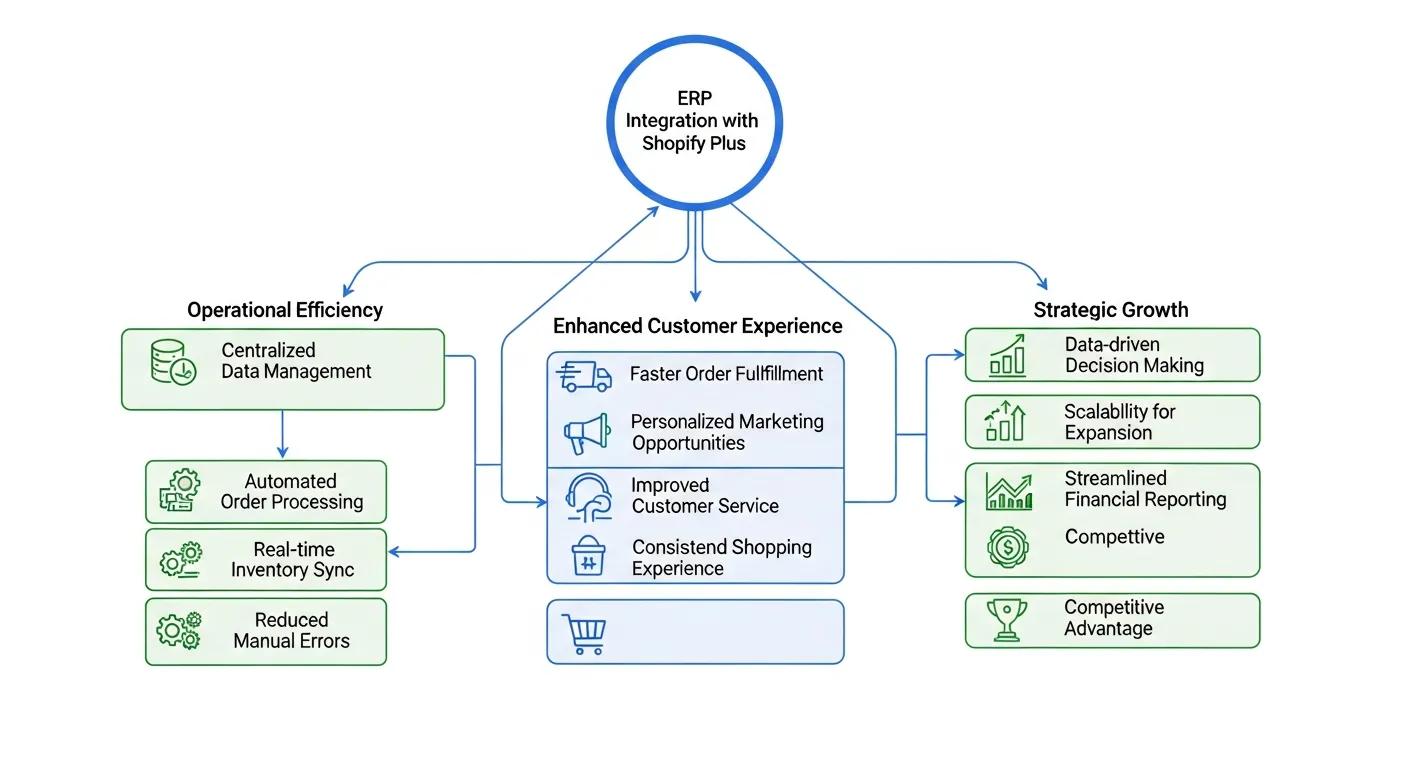
Integrating your ERP with Shopify Plus streamlines operations by:
- Automating Order Processing – Orders placed in Shopify automatically trigger invoices and purchase orders in your ERP.
- Maintaining Accurate Inventory – Real-time stock adjustments in your ERP instantly update your Shopify storefront.
- Synchronizing Financial Data – Sales and returns flow directly into your accounting ledgers, no manual entry needed.
These capabilities boost back-office efficiency and eliminate discrepancies between sales and finance, enabling smarter, proactive decisions.
The Power of ERP Integration in E-commerce
Connecting Enterprise Resource Planning (ERP) systems with e-commerce platforms is a major leap forward for operational efficiency and customer happiness. Studies show these integrations can boost conversion rates by 21%, increase returning customers by 11%, and cut order errors by 16%. Real-time ERP integration has also been proven to slash order processing times by 30% and reduce stockouts by 25%.
This research powerfully backs up our points about how integrating ERP systems with Shopify Plus revolutionizes order processing, inventory accuracy, and financial data synchronization.
What Hurdles Might You Face During Shopify Plus ERP Integration?
ERP integration can present a few challenges:
- Data Migration Complexities – Mapping your old data structures to Shopify’s schema can be a significant undertaking.
- System Compatibility Issues – API rate limits or unique workflows in your ERP might require custom connectors.
- Customization Needs – Unique business processes often demand bespoke development beyond standard templates.
Overcoming these requires meticulous planning, expert middleware configuration, and rigorous testing before you go live.
What’s the Step-by-Step Process for Shopify Plus ERP Integration?
Implementing an ERP connection typically involves these four key phases:
- Discovery & PlanningWe’ll audit your existing ERP and Shopify data models.We’ll define the project scope, data fields, and business logic.
- Development & ConfigurationWe’ll build or adapt your middleware connectors.We’ll configure webhooks, API endpoints, and authentication.
- Testing & DeploymentWe’ll run end-to-end test orders and inventory updates.We’ll validate data accuracy and error handling protocols.
- Post-Launch Optimization & SupportWe’ll monitor performance and error logs closely.We’ll refine mapping rules and provide user training.
Each phase is crucial for ensuring system stability and maintaining data integrity across all your platforms.
Which ERP Systems Are the Best Fit for Shopify Plus Integration?
The ideal ERP depends on your scale, industry, and budget:
Choosing the right ERP hinges on your product complexity, transaction volume, and long-term growth aspirations.
Mastering Shopify Plus PIM Integration for Superior Product Management

Integrating Shopify Plus with a PIM system centralizes your product information, ensuring consistent, rich data across all channels and slashing manual catalog updates.
Why Is PIM Essential for Managing Product Data on Shopify Plus?
A PIM system acts as your single source of truth for product descriptions, images, and attributes. This eliminates inconsistencies across sales channels, boosts SEO with robust metadata, and speeds up new product launches by automating data distribution.
How Do You Pick the Right PIM Solution for Shopify Plus?
When selecting a PIM, consider these factors:
- Integration Capabilities – Does it offer native APIs or middleware compatibility with Shopify Plus?
- Scalability – Can it handle your extensive catalog, manage variants, and store digital assets?
- User Experience – Is the interface intuitive for your catalog managers and marketing teams?
Top contenders include Salsify for complex catalogs, Akeneo for open-source flexibility, and Plytix for mid-market ease of use.
What Are the Steps to Implement PIM Integration with Shopify Plus?
Implementing PIM integration follows a clear path:
- Planning – Define your product taxonomy, workflows, and metadata needs.
- Configuration – Map PIM attributes to Shopify product fields and set up API access.
- Data Import & Enrichment – Upload product records in bulk and enrich them with descriptions, videos, and translations.
- Testing & Validation – Confirm your catalog displays perfectly on your Shopify storefront.
- Launch & Maintenance – Train your content teams and schedule regular data audits.
This methodology ensures your product data is consistent and gets to market faster.
Optimize Your Order Management with Shopify Plus OMS Integration
Integrating Shopify Plus with an Order Management System (OMS) automates your entire order lifecycle, giving you end-to-end visibility and drastically reducing fulfillment errors.
What Advantages Does OMS Integration Bring to Shopify Plus Stores?
Connecting an OMS unlocks:
- Real-Time Order Tracking – Full visibility for your team and your customers.
- Automated Routing – Smart routing of orders to the right warehouse or dropshipper based on location and stock.
- Returns Management – Streamlined RMA processes with automated refunds or replacements.
These features slash fulfillment times, improve accuracy, and lead to faster shipping and fewer returns.
How Does OMS Integration Elevate Customer Satisfaction?
An integrated OMS ensures customers receive accurate order status updates, estimated delivery times, and real-time tracking links. This transparency builds trust, cuts down on support queries, and encourages repeat business through a reliable delivery experience.
Boost Warehouse Operations with Shopify Plus WMS Integration
Shopify Plus WMS integration synchronizes picking, packing, and stock adjustments, transforming your warehouse into a high-efficiency fulfillment hub.
What Are the Key Benefits of WMS Integration for Shopify Plus?
A WMS connection provides:
- Precise Inventory Automation – Stock movements in your warehouse instantly update Shopify availability.
- Optimized Picking Paths – System-generated pick lists based on order priority and bin locations.
- Labor Efficiency – Reduced manual scanning and paperwork, freeing up staff for more critical tasks.
These benefits lower fulfillment costs and minimize stockouts or overstock situations.
How Does Real-Time Inventory Sync Work with Shopify Plus WMS Integration?
Real-time sync uses an event-driven approach: barcode scans trigger API calls to Shopify, which updates product availability and notifies the OMS for any subsequent processes. This tight loop maintains data integrity across your front-end, back-end, and warehouse systems.
Enhance Customer Relationships with Shopify Plus CRM Integration
Integrating Shopify Plus with your CRM consolidates customer behavior, purchase history, and engagement data into a single, powerful profile. This empowers you to craft highly personalized marketing and sales strategies.
What Are the Benefits of Linking CRM Systems with Shopify Plus?
A CRM integration offers:
- Personalized Campaigns – Target customers with relevant product recommendations based on their buying habits.
- Unified Customer View – A consolidated record of order history, support interactions, and marketing engagement.
- Boosted Retention – Automated loyalty programs and triggered emails for cart abandonment, re-orders, and VIP outreach.
The Impact of CRM Integration on E-commerce Loyalty and Retention
Integrating Customer Relationship Management (CRM) systems with e-commerce platforms is vital for building customer loyalty and retention. Research shows that CRM integration significantly boosts loyalty, driven by personalization and responsive service. Businesses using CRM solutions have seen up to a 27% improvement in customer retention rates and a 34% increase in sales productivity.
This research strongly supports our discussion on how Shopify Plus CRM integration elevates customer relationships and marketing through personalized campaigns, a unified customer view, and enhanced retention strategies.
How to Integrate Top CRMs Like Salesforce, HubSpot, and Klaviyo with Shopify Plus?
We typically use these methods:
- Native Apps – Klaviyo’s Shopify app, for instance, provides pre-built data flows for seamless email automation.
- Third-Party Connectors – Platforms like Zapier and Tray.io link Shopify with HubSpot or Salesforce using straightforward, low-code workflows.
- Custom APIs – For highly specific logic, we build middleware that translates Shopify webhooks into CRM-specific API calls.
The best approach depends on your data volume, customization needs, and current technology stack.
Navigating Common Shopify Plus Integration Challenges and Solutions
Complex integrations can hit snags if data, compatibility, and support issues aren’t tackled head-on.
How to Master Data Migration and Mapping Complexities?
Successful data migration demands:
- Field Analysis – We’ll meticulously document all data sources, formats, and required transformations.
- Mapping Matrix – We’ll create a detailed spreadsheet mapping legacy fields to Shopify Plus schema, including transformation logic.
- Validation Scripts – We’ll run test imports with checksums or record counts to catch discrepancies early.
This disciplined approach prevents data loss, corruption, and costly launch delays.
What About System Compatibility Issues and Customization Needs?
Older platforms often lack modern APIs or have strict rate limits. We overcome these by:
- Implementing middleware to manage and queue API calls effectively.
- Building custom connectors to replicate missing endpoints.
- Partnering with experts who understand both Shopify and legacy architectures inside out.
These strategies ensure robust data exchange, no matter the age or complexity of your systems.
How to Ensure Smooth Post-Launch Support and Continuous Improvement?
Long-term success hinges on:
- Monitoring & Alerts – Real-time logs and alerts for any sync failures or API errors.
- Performance Audits – Regular reviews of integration throughput, latency, and error rates.
- Continuous Improvement – Quarterly tuning of mapping rules, API configurations, and feature enhancements.
Ongoing support transforms a one-time integration into a strategic, evolving asset for your business.
Planning and Executing a Flawless Shopify Plus Migration with Expert Guidance
Migrating to Shopify Plus involves carefully moving your data, redesigning user experiences, and validating critical functions under pressure.
What Are the Key Stages in the Shopify Plus Migration Process?
A typical migration follows these steps:
- Planning & Audit – We’ll compare your current platform’s features, plugin dependencies, and data models.
- Data Transfer – We’ll export products, customers, and orders, cleanse them, and import them into Shopify.
- Theme & Feature Parity – We’ll recreate or customize themes and apps to match your existing functionality.
- Testing & Load Simulation – We’ll validate checkout, payment, shipping, and resilience under high traffic.
- Launch & Rollback Plan – We’ll coordinate the DNS switch, monitor errors in real-time, and ensure rollback options are in place.
This approach minimizes downtime and protects your revenue during the transition.
What Are the Common Migration Pitfalls and How to Dodge Them?
Common challenges include:
- Downtime Risks – We use parallel environments and strategic DNS cutover windows to limit disruptions.
- Data Integrity – We employ validation checksums and row counts to confirm successful imports.
- Feature Gaps – We identify essential plugins early and secure equivalent or custom Shopify Plus apps.
Proactive testing and contingency planning keep your migration on track and within budget.
What’s the Investment for Shopify Plus Migration Assistance?
Migration costs vary based on complexity:
- Baseline Data Port – Expect $5,000–$10,000 for product/customer imports.
- Custom Theme & Feature Work – $10,000–$30,000, depending on design and app integrations.
- Ongoing Support & Optimization – Retainers typically range from $2,000–$5,000 per month for continuous improvements.
Accurate budgeting ensures you invest wisely for both a successful launch and long-term success.
Unlock Unique Store Functionality with Custom Shopify Plus Development
Custom development on Shopify Plus allows you to create differentiated experiences that standard themes and apps simply can’t match.
What Custom Features Can We Build for Your Shopify Plus Store?
Our custom solutions include:
- Bespoke Checkout Flows – Tailored payment options, dynamic pricing, or B2B-specific forms.
- Headless Commerce Architectures – API-driven front ends for lightning-fast, personalized experiences.
- Advanced Apps & Integrations – Unique middleware for niche workflows or proprietary systems.
These innovations position your brand as a leader in the digital commerce space.
How Does Custom Development Elevate Conversion and User Experience?
By focusing on UX optimization and data-driven design, custom development:
- Boosts cart conversion rates with faster, smoother checkouts.
- Improves site performance by offloading dynamic logic to APIs.
- Enables unique brand storytelling through interactive modules.
This level of customization drives measurable improvements in engagement and revenue.
When Should You Consider Custom Shopify Plus Development Services?
Custom development is the way to go when:
- Standard Themes Aren’t Enough – You need features not available in existing apps.
- High Volume Demands – You require API limits and performance beyond native capabilities.
- Complex Business Logic – Specialized workflows or B2B scenarios demand bespoke solutions.
Partnering with an expert at this stage ensures your unique requirements are translated into scalable, future-proof solutions.
Vendor-agnostic integrations become powerful revenue drivers when executed with proven methodologies and enterprise-grade support. Partnering with a seasoned Shopify Plus expert guarantees your integrations, migrations, and custom developments deliver sustained growth and operational excellence. By following the best practices laid out in this guide, your business can automate core workflows, delight customers with seamless experiences, and unlock new levels of agility in today’s competitive e-commerce landscape.
Quick Answer: Shopify Plus Integration Assistance
Shopify Plus Integration Assistance should reduce operational friction, data errors, and manual work while protecting performance and customer experience. The right integration plan defines the business workflow first, then connects systems with clean ownership, testing, documentation, and fallback planning.
Want a sharper Shopify growth plan?
Need a cleaner plan for Shopify Plus Integration Assistance? Book a strategy call and we will help you identify the safest, highest-impact next step.
Key Takeaways
- Use Shopify Plus Integration Assistance to solve a specific customer, operations, performance, or revenue problem.
- Avoid fragile customizations, app bloat, and unclear ownership that make Shopify Plus harder to maintain.
- Technical decisions should support speed, UX, SEO safety, integrations, analytics, and future iteration.
- Link the article naturally to Blackbelt Commerce, Shopify experts, and Shopify Plus agencies so the post supports lead generation without weakening editorial trust.
- Use the same-page Calendly CTA only after useful guidance has been delivered, so the booking step feels like help rather than interruption.
How this connects to your Shopify growth strategy
Readers researching Shopify Plus Integration Assistance usually have a technical blocker or growth constraint. This article should help them understand the issue, avoid fragile fixes, and see when Blackbelt Commerce can help turn Shopify Plus capabilities into a cleaner, faster, more reliable commerce experience.
Want a sharper Shopify growth plan?
Use this guide as a decision tool. Then book a strategy call when you want a practical roadmap for your store.
Related Shopify resources
These internal resources support the Shopify Plus Support, Pricing, and Agency Strategy topic cluster and help connect this guide to stronger commercial next steps:
- Shopify Plus Support, Pricing, and Agency Strategy
- Shopify experts
- Shopify Plus agencies
- Shopify Plus Support, Pricing, and Agency Strategy — Parent service page for the reader’s next commercial step
- Blackbelt Commerce — Home-page authority link for brand and core Shopify expertise
- Shopify experts — Money-page link requested for expert-hiring intent
- Shopify custom development — Development service page for implementation and technical help
- Shopify CRO — Conversion service page for readers focused on revenue and lead generation
- Cost of Shopify website — Related pricing article that helps readers compare platform, build, and expert investment decisions
- Shopify Plus checkout customization — Related Shopify Plus implementation guide for readers evaluating advanced Plus costs and capabilities
Questions store owners ask before taking action
How should merchants approach Shopify Plus Integration Assistance?
They should start with the business goal, define the customer or operational problem, then choose the simplest technical path that preserves performance, SEO, analytics, and maintainability.
What is a warning sign in Shopify Plus technical work?
A warning sign is custom work that lacks documentation, QA, ownership, rollback planning, performance review, or a clear reason tied to conversion or operations.
When should technical research become a strategy call?
A strategy call makes sense when the issue affects revenue, speed, integrations, checkout experience, customer trust, or the team’s ability to operate the store confidently.
Future articles needed for topical dominance
To build deeper topical authority around this cluster, these supporting topics should be created later and linked back into this article:
- Shopify Plus Integration Assistance Technical Checklist: Builds a practical support asset for complex Shopify Plus implementation decisions.
- Common Shopify Plus Integration Assistance Mistakes: Targets problem-aware merchants and explains technical debt, app bloat, and QA risks.
- When to Hire Shopify Plus Experts for Shopify Plus Integration Assistance: Connects technical research to the Plus agency money page and strategy-call path.
Want a sharper Shopify growth plan?
Ready to turn the advice in this article into an action plan? Open the calendar here and choose a time that works for you.

