

Blog updated with the most recent Shopify and eCommerce strategies on 05/02/2026.
Shopify Plus Migration Checklist: Your Blueprint for a Flawless Ecommerce Store Transition
Making the move to Shopify Plus requires sharp planning, strategic execution, and expert handling to ensure your store scales without a hitch, keeping your data safe and sound. Here at Blackbelt Commerce – E-commerce Development and Optimization Services, we’ve been the trusted guides for ambitious merchants navigating dozens of smooth transitions, preserving those all-important SEO rankings and keeping your data integrity rock-solid. This in-depth Shopify Plus migration checklist dives into the core advantages of upgrading, the crucial pre-migration groundwork, setting up your new environment, moving your data, safeguarding your SEO, integrating apps, rigorous testing, the go-live strategy, and answers to those burning questions—equipping you to master every stage of your ecommerce replatforming journey.
Why Make the Leap to Shopify Plus? Unpacking the Strategic Edge

Shopify Plus is the powerhouse version of Shopify, built for businesses that demand top-tier scalability, advanced automation, and global readiness. When you leverage Shopify Plus, you’re optimizing for peak performance, unlocking potent customization APIs, and gaining access to dedicated support that fuels rapid growth.
The Big Wins with Shopify Plus:
- Unmatched Scalability & Performance – Shopify Plus is engineered to handle thousands of checkouts every minute, flexing its resilient cloud architecture to manage massive traffic spikes.
- Smart Automation & Deep Customization – With built-in Shopify Flow and Script Editor, you can automate complex workflows and tailor the checkout experience like never before.
- Global Reach & Market Expansion – Native support for multiple currencies, languages, and tax rules makes expanding your business internationally a breeze.
- Dedicated Support & Rock-Solid SLAs – Benefit from 24/7 priority support and dedicated launch engineers who minimize risk during your critical transition phases.
These advantages lay the groundwork for a migration that boosts site speed, drives higher conversion rates, and delivers a stronger ROI—setting the stage for a closer look at performance gains in the next section.
Supercharged Scalability and Automation with Shopify Plus
Shopify Plus is meticulously crafted for enterprise-level performance, boasting a scalable infrastructure with exceptional uptime and unlimited bandwidth to effortlessly manage substantial traffic and sales volumes. It integrates cutting-edge automation tools like Shopify Flow and Script Editor, empowering businesses to streamline operations and deliver highly personalized experiences for accelerated growth.
This insight reinforces the article’s points about Shopify Plus’s core strengths in scalability, performance, and automation, crucial for high-volume ecommerce operations.
What Kind of Scalability and Performance Upgrades Does Shopify Plus Deliver?
Shopify Plus elevates scalability by distributing your store’s requests across a robust multi-tenant cloud network that automatically scales to meet demand, eliminating the headaches of server management and performance bottlenecks. This intelligent system guarantees consistent page-load speeds and unwavering uptime, even during your busiest flash sales or seasonal rushes, directly translating to better conversion rates and happier customers.
How Does Shopify Plus Elevate Automation and Customization?
Shopify Plus features Shopify Flow, an intuitive visual automation engine that lets you trigger tasks—like tagging VIP customers or sending inventory alerts—based on custom workflows you define. Combined with the powerful Script Editor, merchants gain the ability to implement dynamic pricing, special promotions, and sophisticated shipping rules right at checkout, streamlining operations and boosting average order value through highly personalized customer experiences.
What Are the Financials and ROI of Moving to Shopify Plus?
Investing in Shopify Plus involves a tiered monthly fee (starting at $2,300) alongside transaction and app-related costs. While the initial platform investment is higher, the long-term ROI shines through reduced maintenance burdens, fewer reliance on third-party apps, and increased revenue driven by optimized performance and powerful automation.
Factual table note: Shopify Plus pricing changes by contract term, region, and business model. Use official Shopify pricing as the source of truth.
Migrating to Shopify Plus often proves its worth within just a few months, thanks to accelerated checkout speeds, streamlined operations, and a significant uplift in global sales—all of which pave the way for detailed pre-migration planning.
Tangible Business Gains from a Shopify Plus Migration
Businesses that have transitioned to Shopify Plus have witnessed remarkable performance improvements, including an average 36% boost in checkout speed and a solid 20% increase in conversion rates. Furthermore, reports indicate an average order value uplift of up to 18%, underscoring the platform’s exceptional return on investment.
This data provides concrete evidence supporting the article’s discussion on the financial considerations and substantial ROI achieved through a Shopify Plus investment.
Mapping Your Shopify Plus Migration: The Crucial Pre-Migration Audit and Goal Setting
Laying down a clear roadmap begins with a thorough audit of your current store, articulating your migration objectives, and meticulously safeguarding your data to prevent any loss. A well-executed pre-migration phase significantly reduces unexpected hurdles and accelerates your readiness for launch.
What Needs to Be Included in Your Current Store Audit?
A comprehensive store audit involves cataloging every single functional element, ensuring that no critical asset is overlooked during the transition:
- Detailed product catalog information (SKUs, variants, metafields)
- Customer database and defined segments
- Order history and any pending transactions
- All installed apps, custom code, and third-party integrations
Mapping these components helps uncover hidden dependencies and informs the prioritization of your data extraction efforts, naturally leading into the definition of your migration goals.
How Do You Pinpoint Clear Migration Goals for Performance and Features?
Establishing specific, measurable goals ensures that your technical execution is perfectly aligned with your desired business outcomes. Common objectives include:
- Page Speed Targets (e.g., achieving load times under 2 seconds)
- Checkout Conversion Benchmarks (e.g., aiming for a 10%+ increase in rate)
- International Expansion Readiness (e.g., successfully launching in two new key markets)
Defining these Key Performance Indicators (KPIs) early on provides a solid performance baseline and drives focused development priorities throughout the migration process.
Why Are Data Cleanup and Backup Absolutely Essential Before Migration?
Ensuring the integrity of your data hinges on meticulously removing outdated records and securing complete, reliable backups. By purging obsolete products, invalid customer emails, and redundant orders, you streamline the transfer process and avoid migrating unnecessary clutter. Establishing point-in-time backups acts as a critical safety net against accidental data loss, allowing for a swift rollback if any issues arise during the import phase.
Essential Steps for Setting Up Your Shopify Plus Environment
Creating a production-ready Shopify Plus store involves configuring global settings, establishing robust development environments, and selecting a theme that perfectly aligns with your brand identity and user experience objectives.
How Do You Configure Shopify Plus Settings, Payments, and Markets?
Start by meticulously setting up your tax regions, preferred payment gateways, and multi-currency support within your Shopify Plus settings. Activate essential sales channels (like POS, Facebook, and Google Shopping) and precisely define your shipping zones. This foundational setup ensures your store is fully compliant and primed for localized customer experiences, forming the bedrock for subsequent staging tests.
What Role Do Staging and Development Stores Play in Migration?
Staging and development stores provide a safe sandbox environment where you can iterate on theme modifications, custom code, and checkout logic without impacting your live, operational site. By mirroring your production data in this controlled sandbox, your teams can thoroughly validate migration processes, conduct rigorous QA checks, and rehearse go-live cutovers—significantly minimizing risk when it’s time to switch your DNS records on launch day.
How Should You Approach Theme Selection and UX/UI Design on Shopify Plus?
Opt for a theme that comes with built-in Shopify Plus optimizations or consider building a custom storefront leveraging the power of Online Store 2.0. Prioritize responsive design, modular sections, and accessibility to guarantee a seamless mobile experience for all users. Ensure your brand consistency is maintained and layouts are conversion-focused—all preparing for a final review that directly ties into the execution of your data migration.
Executing Data Migration: Products, Customers, Orders, and Content
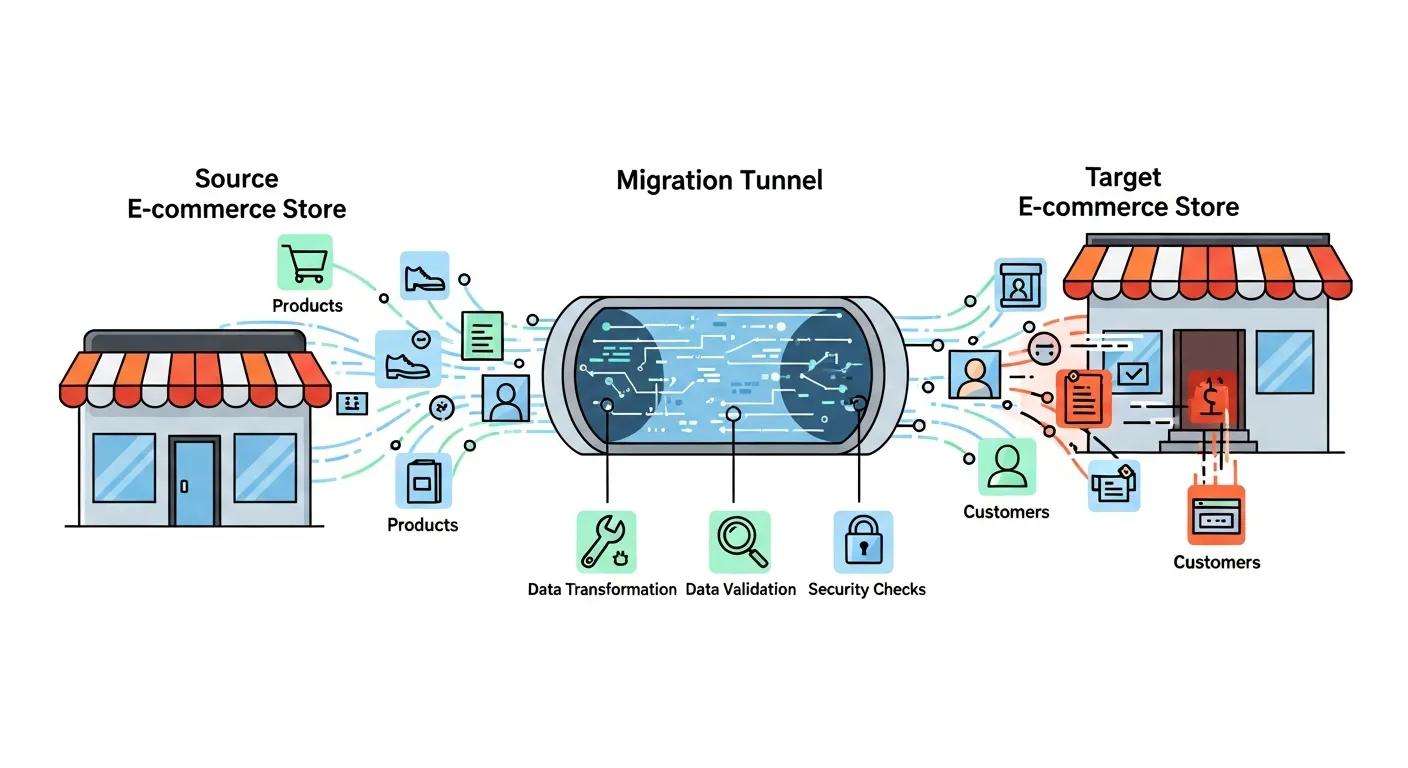
A precise data migration strategy is key to transferring your critical assets—products, customers, orders, and content—while meticulously preserving their relationships and any custom metadata.
What Are the Best Practices for Migrating Product Data, Including Variants and Metafields?
Migrating product data involves carefully mapping your existing SKUs, variant options, images, and custom metafields into Shopify’s structured schema. Utilize CSV imports or powerful tools like LitExtension and Matrixify to automate bulk transfers. Crucially, validate inventory counts and pricing tiers post-import to ensure your storefront displays accurate information.
Selecting the right utility and rigorously validating data integrity significantly reduces manual cleanup efforts and ensures your entire product catalog is fully operational from day one.
How Do You Securely Migrate Customer Accounts and Order Histories?
Securely exporting customer credentials, account notes, and order status details is vital for preserving loyalty program data and valuable past purchase insights. Encrypt sensitive data during the transfer process and strictly enforce GDPR-compliant consent management. After migration, prompt customers to reset their passwords to maintain robust security.
What Is the Process for Migrating Blogs, Pages, and Media Content?
Transferring your content involves exporting your blog posts, CMS pages, and media assets (like images and PDFs) before reimporting them into Shopify’s online store environment. It’s essential to maintain original URL slugs and metadata to preserve your SEO equity. Once migrated, meticulously verify all embedded media links and page formats to ensure a seamless browsing experience for your visitors.
Preserving Your SEO Rankings During the Shopify Plus Migration
Safeguarding your SEO rankings hinges on meticulous URL mapping, ensuring metadata continuity, and implementing structured data markup to protect your valuable organic traffic.
Why Are URL Mapping and 301 Redirect Implementation Absolutely Critical?
Implementing a precise one-to-one URL map and deploying 301 redirects for every legacy path is crucial. This ensures that search engines seamlessly transfer link equity to your new URLs. This vital mechanism prevents frustrating 404 errors, retains your hard-earned PageRank value, and maintains your store’s overall authority in search results.
How Do You Maintain Metadata and Implement Structured Data Markup?
Carry over your page titles, meta descriptions, and OG tags exactly as they appear on your current store, making adjustments only where necessary for keyword optimization. Reinstate structured data markup for products, breadcrumbs, and reviews by utilizing Shopify theme scripts to enhance your visibility with rich results in search engine results pages (SERPs).
What Are the Best Practices for Internal Link Audits and Updates?
Conduct a thorough internal link audit to identify any hard-coded paths, update relative links to reflect your new domain structure, and ensure your navigation menus accurately point to the correct storefront pages. Consistent internal linking is key to preserving crawl efficiency and maintaining a smooth user navigation flow across your replatformed site.
Managing App Integrations and Custom Functionalities on Shopify Plus
Carefully assessing, migrating, and replacing third-party apps is essential to keep critical features operational while fully leveraging Shopify Plus’s powerful native capabilities.
How Do You Audit and Migrate Existing Third-Party Apps?
Create a comprehensive inventory of all installed apps and custom scripts, meticulously documenting their core functions and any dependencies. Determine if any can be effectively replaced by built-in Shopify Plus features (such as Shopify Flow), then coordinate data handoffs or necessary reconfigurations to maintain seamless continuity.
What Are the Options for Replacing or Upgrading Integrations like ERP and CRM?
Evaluate direct API connections or explore middleware platforms designed to bridge Shopify Plus with your existing ERP/CRM systems. Where legacy connectors are no longer viable, consider custom app development or leverage Shopify’s Admin API to synchronize orders, inventory, and customer data in real time.
How Can Shopify Flow Automate Your Store’s Workflows Post-Migration?
Harness the power of Shopify Flow to build automated rules that trigger based on specific events like order creation, inventory level changes, or customer segmentation. By eliminating manual tasks—such as tagging high-value clients or sending custom notifications—you significantly boost operational efficiency and minimize the potential for human error.
Testing and Quality Assurance: Ensuring a Smooth Shopify Plus Launch
Implementing rigorous testing across functionality, performance, and user acceptance is paramount to validating your store’s readiness and mitigating any potential post-launch issues.
How Do You Conduct Functional Testing for Checkout, Payments, and Search?
Simulate complete purchase journeys from start to finish—adding items to the cart, applying discounts, and successfully completing checkouts using all enabled payment methods. Test search filters and product filtering capabilities to confirm that accurate results are displayed across all variants and collections.
What Performance Testing Should Be Done for Site Speed and Load Capacity?
Utilize tools like Lighthouse and GTmetrix to benchmark your page-load times under simulated traffic loads. Confirm that your CDN and caching layers are delivering content rapidly and verify that critical pages (home, collection, product) consistently meet your sub-2-second load time targets.
Why Is User Acceptance Testing (UAT) Crucial Before Going Live?
UAT involves real users—whether they are internal team members or select customers—navigating the new store, reporting any usability issues they encounter, and validating that all workflows function exactly as intended. Addressing these findings before launch significantly reduces friction and ensures a polished, professional customer experience.
Planning Your Go-Live and Post-Migration Optimization for Shopify Plus
Launching during a pre-defined, low-traffic window with clear cutover steps and continuous monitoring is key to ensuring a controlled transition and driving ongoing improvement.
What Constitutes an Effective Launch Plan and Cutover Strategy?
Schedule your DNS switchover during off-peak hours and freeze order entry on the legacy site moments before the cutover begins. Execute a final data sync, update your DNS records, and confirm SSL activation. Clearly assign roles for rollback procedures and post-launch verification tasks.
How Do You Monitor Analytics, Errors, and SEO After Launch?
Immediately review your Google Analytics, Search Console data, and server logs to detect any traffic anomalies, crawl errors, or broken links. Closely track ranking fluctuations for your high-value keywords and make necessary adjustments to redirects or metadata to stabilize performance.
What Ongoing Support and Optimization Should You Expect?
Post-migration optimization encompasses continuous A/B testing, performance audits, seasonal theme updates, and fine-tuning integrations. Partnering with a dedicated expert team ensures your Shopify Plus store evolves with market demands and effectively leverages new platform features as they become available.
Frequently Asked Questions About Shopify Plus Migration
While migration complexity can vary, these answers address common concerns and help set realistic expectations.
How Long Does a Typical Shopify Plus Migration Take?
Most mid-market migrations are completed within a 6–12 week timeframe, covering the audit, environment setup, data transfer, testing, and go-live phases. Factors influencing this timeline include catalog size, the complexity of custom integrations, and the extent of design revisions required.
Will Customer Data, Order History, or SEO Rankings Be Lost?
No—when executed with precision, all customer accounts, order histories, and SEO equity transfer intact through secure export/import processes, robust 301 redirects, and meticulous metadata preservation. Proper backups and validation steps are your guarantee of continuity.
Is Shopify Plus Worth the Investment for My Business?
For high-volume merchants seeking enterprise-grade performance, advanced automation, and global capabilities, Shopify Plus delivers a measurable ROI through reduced downtime, increased conversions, and lower maintenance overhead—frequently recouping the platform fee within just a few months.
What Are the Most Common Challenges in Shopify Plus Migration?
Complex catalog structures, intricate custom integrations, and preserving sophisticated SEO setups are the primary challenges encountered. Addressing these head-on through thorough audits, leveraging automated migration tools, and employing staged testing significantly mitigates risk and ensures a remarkably smooth transition.
Migrating to Shopify Plus is a strategic advancement that positions your ecommerce business for sustained growth and peak operational excellence. By meticulously following this checklist and collaborating with seasoned professionals, you’ll achieve a seamless transition, retain your critical data and rankings, and unlock the full, transformative power of Shopify Plus. For expert guidance on your next migration, connect with our dedicated team at Blackbelt Commerce.
Quick Answer: shopify plus migration timeline
Migrating to Shopify makes sense when a store needs easier operations, stronger checkout performance, better app flexibility, lower maintenance burden, or a cleaner path to growth. The best migrations protect SEO, preserve critical data, map redirects carefully, and improve the customer journey rather than simply copying the old store onto a new platform.
Key Takeaways
- Start with the search intent behind shopify plus migration timeline: the reader needs a clear explanation before they are ready for a service conversation.
- Keep the advice practical and specific so the post feels editorial, useful, and worth sharing.
- Use the topic cluster links to connect the article to related BBC expertise instead of leaving it as a standalone blog post.
- Add a natural commercial bridge only after the article has answered the reader’s main question.
- Use the same-page Calendly CTA so qualified readers can book a strategy call without being sent to a long form.
How this connects to your Shopify growth strategy
This article should remain useful for readers researching shopify plus migration timeline, but it also needs to show when the topic becomes a business decision. For the Shopify Plus Migration Strategy cluster, the commercial bridge is practical: once the reader understands the concept, the next step is deciding whether their current Shopify setup can support the desired experience, conversion path, and operational workflow. That is where expert planning, design, development, CRO, and SEO support can turn the idea into measurable store improvements.
Related Shopify resources
These internal resources support the Shopify Plus Migration Strategy topic cluster and help connect this guide to stronger commercial next steps:
- Shopify Plus Migration Strategy
- Shopify experts
- Shopify Plus agencies
- Shopify Plus Migration Strategy — Parent service page for the reader’s next commercial step
- Blackbelt Commerce — Home-page authority link for brand and core Shopify expertise
- Shopify experts — Money-page link requested for expert-hiring intent
- Shopify Plus agencies — Money-page link requested for high-growth and Plus-agency intent
- Shopify custom development — Development service page for implementation and technical help
- Shopify CRO — Conversion service page for readers focused on revenue and lead generation
- Cost of Shopify website — Related pricing article that helps readers compare platform, build, and expert investment decisions
Questions store owners ask before taking action
What does shopify plus migration timeline mean for a Shopify merchant?
For a Shopify merchant, shopify plus migration timeline is about choosing or improving the store experience in a way that supports traffic, trust, conversion, and long-term operations.
When should a store owner get expert help?
Expert help becomes useful when the decision affects SEO, conversion, theme architecture, integrations, migration risk, or revenue-critical customer journeys.
How should this topic connect to a broader content cluster?
The post should link to a parent service page, related support articles, and money pages so Google and AI systems understand how the article supports a broader area of expertise.
What is the lead-generation goal of this article?
The article should educate first, then guide qualified readers toward booking a strategy call when they need help applying the advice to their own store.
What should be avoided during optimization?
Avoid filler, unrelated phrases, invented statistics, broken formatting, duplicated CTAs, and any edit that makes the article feel less helpful or less polished.
Future articles needed for topical dominance
To build deeper topical authority around this cluster, these supporting topics should be created later and linked back into this article:
- Shopify Plus Migration Timeline Checklist for Shopify Store Owners: Creates a practical support article that turns the Shopify Plus Migration Strategy topic into an actionable review tool.
- Common Shopify Plus Migration Timeline Mistakes and How to Avoid Them: Captures problem-aware searches and gives BBC a natural place to explain implementation risks without hard selling.
- When to Hire Shopify Experts for Shopify Plus Migration Timeline: Connects informational demand to the expert-hiring money page while preserving educational intent.

