


Why Building a Shopify Store is Your Gateway to E-commerce Success
How to build Shopify starts with understanding that you’re joining over 4 million active websites that have collectively generated more than $700 billion in sales through this powerful platform. Whether you’re launching your first online business or scaling an existing one, Shopify offers the tools and flexibility to create a professional e-commerce store without extensive technical knowledge.
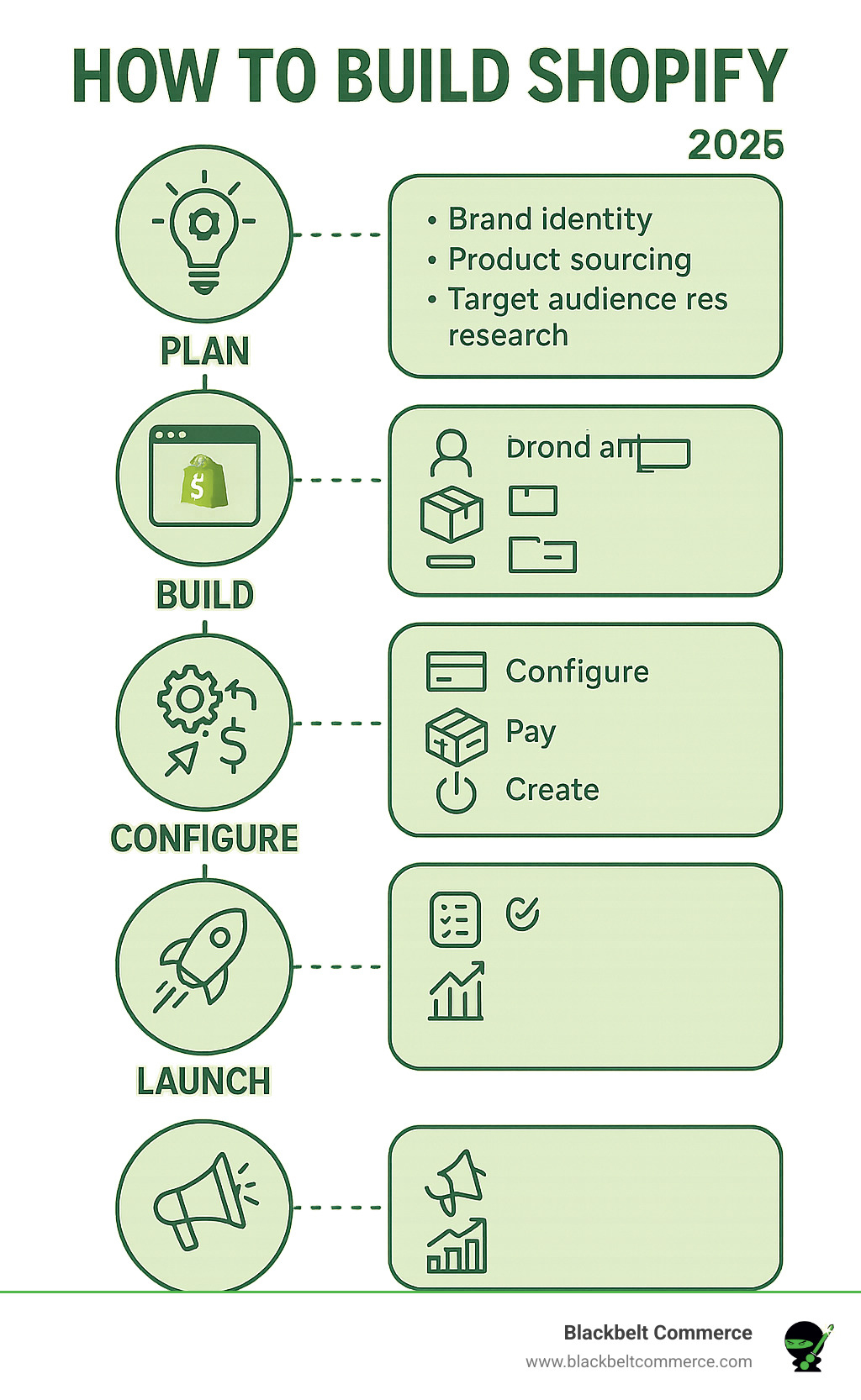
Here’s the essential roadmap for building your Shopify store:
1. Plan Your Foundation
- Define your brand identity and target audience
- Source your products (dropshipping, wholesale, or manufacturing)
- Choose your business name and secure a domain
2. Build Your Store
- Sign up for Shopify’s free trial
- Select and customize your theme
- Add products with compelling descriptions and images
3. Configure Core Settings
- Set up payment processing (Shopify Payments recommended)
- Configure shipping zones and rates
- Create essential pages (About, Contact, Policies)
4. Launch and Optimize
- Test your checkout process thoroughly
- Implement marketing strategies (SEO, social media, email)
- Analyze performance and iterate
The beauty of Shopify lies in its balance of simplicity and power. A basic online store can be completed in as little as 3-4 days, but the platform scales with your business as you grow from startup to enterprise level.
I’m Cesar A Beltran, Founder and CEO of Blackbelt Commerce, and over the past 15+ years, I’ve helped over 1000+ businesses master how to build Shopify stores that convert visitors into customers. My experience as a Shopify Plus partner has shown me that while anyone can create a store, building one that truly drives sales requires strategic planning and execution.
Common How to build Shopify? vocab:
Before You Build: Planning Your E-commerce Empire
Successful Shopify stores are built on a solid plan. Many entrepreneurs skip this step, jumping into themes and products without a clear direction. This planning phase is the blueprint for your e-commerce empire. It’s about defining your brand identity, understanding your customers, and creating a cohesive experience. Stores that know their audience and why they should care consistently outperform those trying to appeal to everyone. This strategic groundwork influences every decision, from your theme to your marketing.
For a deeper dive into the complete e-commerce startup process, I recommend checking out our comprehensive guide: All You Need To Know To Start An E-Commerce Store.
Define Your Brand and Niche
Your brand is your business’s personality, making you memorable. It’s more than a logo; it’s a complete brand style guide with specific typography, colors, and visual identity. You can start with Shopify’s free Hatchful logo maker and invest in a professional designer later. Ensure your typography is readable and your color palette reflects your brand while offering good contrast.
Equally important is defining your target audience. Create detailed buyer personas by understanding their demographics, interests, and pain points. This customer-centric approach informs your site’s design and product presentation. Niche markets often have higher conversion rates because you’re targeting genuinely interested customers. Research your audience in forums, Facebook groups, and Reddit to understand their needs and language, which will make your marketing more effective.
Source Your Products
With your niche defined, it’s time to source products. Shopify supports several product sourcing methods:
- Dropshipping: Low-risk and low-investment. You partner with a supplier who ships products directly to your customers, so you don’t handle inventory. It’s ideal for testing new product ideas.
- Print-on-demand: Similar to dropshipping, but for custom-designed items like t-shirts or mugs. A provider like Printful prints and ships orders as they come in, eliminating inventory management.
- Wholesale: Involves buying products in bulk for better profit margins and quality control. You purchase from manufacturers at wholesale prices and sell at a retail markup.
- Manufacturing: Offers complete control over product quality and branding but is the most complex and resource-intensive option, best for unique product ideas.
Prioritize quality over the cheapest option to encourage repeat business. Prepare high-quality product images and descriptions before launching. Your passion for your products will shine through in your marketing and build customer trust.
The Essential Steps for How to Build a Shopify Store
Now it’s time to transform your vision into an actual online store. How to build Shopify is more intuitive than you might expect, as the platform guides you through each step without overwhelming you with technical jargon.
Step 1: Sign Up and Initial Setup
Begin by clicking Start your free trial. Shopify offers a 3-day free trial and then 3 months for $1, giving you time to build your store. Choose a store name that allows for future growth. Inside the Shopify admin dashboard, familiarize yourself with the left navigation menu, which contains Orders, Products, Analytics, and Online Store settings. Go to the Settings section to configure your store currency and business address.
Step 2: Choosing and Customizing Your Shopify Theme
Your theme defines your store’s look and feel. The Shopify Theme Store offers hundreds of free and premium themes (up to $450). The free Dawn theme is a popular choice, but consider your product count and growth plans when selecting any theme. Prioritize mobile performance, as nearly half of web traffic is mobile. All Shopify themes are optimized for speed and reliability. Use the intuitive, no-code theme editor to customize your store. You can add your logo, change colors, and rearrange sections and blocks with drag-and-drop functionality. You can also change themes later without losing content. Learn more in our guide on How To Customize A Theme For Your Shopify Store.
Step 3: Adding Products and Managing Inventory
Steer to the Products section to add your items. Write compelling product descriptions that focus on benefits, not just features. While Shopify Magic AI can assist, your unique brand voice is key. High-quality product photography is non-negotiable; use consistent lighting and lifestyle shots, and avoid generic manufacturer photos. For pricing, consider costs, competitor rates, and perceived value. Use the “Compare at price” feature for price anchoring. Set up inventory tracking, SKUs, and product variants (e.g., sizes, colors) to manage stock effectively. Organize products into collections like “New Arrivals” or “Best Sellers” to improve navigation and marketing.
Step 4: Setting Up Payments and Shipping
Seamless payments are crucial. Shopify Payments is the recommended option, as it eliminates extra transaction fees (standard credit card rates still apply). Also enable accelerated checkouts like PayPal, Shop Pay, Apple Pay, and Google Pay to reduce cart abandonment. For shipping, configure shipping zones and choose a strategy. Free shipping is a powerful incentive (factor costs into your prices). Other options include flat-rate shipping, real-time calculated rates, or local pickup. Be transparent about all costs and delivery times.
Step 5: Creating Essential Pages and Legal Requirements
Build trust with essential pages. Create a compelling About Us page that tells your brand’s story and values. An effective Contact page and FAQ page build confidence and reduce support requests. Use Shopify’s templates for crucial legal pages: Privacy Policy, Terms of Service, and Shipping Policy. These demonstrate professionalism and provide legal protection. If selling internationally, be aware of regulations like the European Union’s General Data Protection Regulation (GDPR). Finally, configure your tax settings. Shopify assists with calculations, but compliance is your responsibility, so consult a tax professional if needed.
Launch and Growth: From Store to Sales Machine
Building your store is the first step; driving sales is the next. A solid marketing strategy is essential to attract the right audience and optimize for conversions. This requires a shift in mindset from building to generating sales, focusing on customer acquisition and performance analysis. Every successful entrepreneur starts here.

How to Build Shopify Store Traffic with Marketing
Marketing drives sales to your store. Here are key strategies to build traffic:
- SEO Optimization: Use relevant keywords in titles and descriptions, optimize meta tags, and add image alt tags. Balance visuals with fast load times to meet Google’s Core Web Vitals.
- Content Marketing: Create valuable blog posts, guides, or videos to build trust and attract organic traffic.
- Social Media Integration: Focus on one or two platforms (like Facebook or Instagram) where your audience is active. Create consistent, engaging content.
- Email Marketing: Use apps like Klaviyo to build your list from day one. Send welcome emails, abandoned cart reminders (which can recover 55-65% of lost sales), and follow-ups for a high ROI.
- Paid Advertising: Use Google Shopping and Facebook Ads to drive immediate traffic. Start with a small budget, A/B test your ads, and scale gradually. Install the Facebook Pixel for tracking and retargeting.
- Shopify Apps: The Shopify App Store has over 13,000 apps for marketing, loyalty, and more. Use them wisely to avoid slowing down your site.
- Social Proof: Use apps like Yotpo to display customer reviews and recent purchases to build trust.
Analyzing Performance and Placing a Test Order
Before launching, place a test order to ensure everything works, from payments and shipping to notifications. Use Shopify’s bogus gateway or a real, refundable transaction to test different scenarios.
Once live, use Shopify Analytics to monitor traffic, customer behavior, and conversion rates. Use this data to identify and fix issues in your sales funnel. For example, high cart abandonment might indicate issues with shipping costs.
Shopify’s built-in abandoned cart recovery emails can recover 10-15% of lost sales automatically. Finally, actively gather customer feedback through surveys or emails. This feedback is invaluable for continuous improvement.
Understanding the Investment: Costs and Expertise
Understanding the initial and ongoing fees, as well as when to invest in professional help, is crucial for sustainable growth. Knowing where to invest your money wisely can make all the difference between a store that barely survives and one that thrives.
Do I Need Coding Experience to Build a Shopify Website?
No, you do not need coding experience to build a Shopify store. The platform is designed for entrepreneurs, with a user-friendly drag-and-drop theme editor that handles the technical aspects for you.
While coding languages like Shopify Liquid, HTML, and CSS allow for advanced customization, they aren’t necessary for creating a professional store. Shopify’s built-in tools are sufficient for most merchants. However, for highly specific designs, complex integrations, or unique functionality, you may need custom development via the Shopify Developers Platform.
Breakdown of Shopify Costs: Initial and Ongoing Fees
Budgeting properly is key to avoiding future headaches. The costs for running a Shopify store can vary widely depending on your needs.
Factual table note: This table was simplified to remove unsupported exact figures. Confirm final numbers with the official platform, vendor, or project scope.
Beyond the subscription, consider these expenses:
- Domain Name: $10-30 per year (often free for the first year with Shopify).
- Paid Themes: $100-$450, though excellent free themes are available.
- App Subscriptions: Can range from $10 to $250+ monthly per app. Start lean and add apps as needed.
- Marketing Budget: Often the largest expense after inventory, typically 10-30% of revenue.
- Initial Inventory: Varies by business model; dropshipping has low upfront costs, while manufacturing requires significant investment.
New stores often take three to six months to become profitable, so budget conservatively and plan to reinvest early profits.
When to Hire a Professional Shopify Developer
While anyone can build a basic store, professional expertise becomes invaluable for growth. Consider hiring a developer for:
- Complex Customizations: When your vision requires unique designs or features beyond the theme editor’s capabilities.
- Large-Scale Projects: For high-volume businesses or Shopify Plus stores where the stakes are higher.
- Unique Functionality & API Integrations: To connect with third-party systems (like ERPs) or build bespoke features.
- Performance Optimization: To improve site speed, which impacts SEO and conversions.
- Time and Expertise: To free you up to focus on your business while experts build your store correctly.
At Blackbelt Commerce, we create custom, conversion-focused Shopify solutions, specializing in complex projects. A good developer partnership provides ongoing support as you grow. Learn more in our guide on How To Choose A Shopify Developer. This investment often pays for itself through higher conversions.
Frequently Asked Questions about Building a Shopify Store
Here are answers to the most common questions we hear about how to build Shopify stores.
How long does it take to build a basic Shopify store?
A basic store can be built in 3-4 days if your content (products, images, text) is ready. The timeline depends on complexity. A simple store is faster to build than one with many products or custom features. Your experience level also plays a role; allow for a learning curve if you’re new to e-commerce. Customization is the biggest time factor. A basic theme setup is quick, but a fully custom store with unique functionality can take several weeks or months, especially when working with a developer.
Can I use my own domain name with Shopify?
Yes. Using a custom domain is crucial for brand credibility. You can either buy a new domain through Shopify or connect an existing one from a provider like GoDaddy. A custom domain (yourstore.com) appears far more professional than the default yourstore.myshopify.com. Also, set up a professional email address (e.g., support@yourstore.com) to further build trust.
What are the most important apps for a new Shopify store?
You don’t need dozens of apps from the Shopify App Store to start. Focus on these essentials:
- Email Marketing: Use apps like Klaviyo for list building, automated sequences, and abandoned cart recovery. It offers a high ROI.
- Product Reviews: Apps like Yotpo build social proof and trust by collecting and displaying customer reviews.
- SEO Optimization: While Shopify is SEO-friendly, apps can help with advanced features and monitoring.
- Customer Support: Live chat or ticketing systems improve the customer experience.
- Upsell & Cross-sell: These apps increase average order value by suggesting related products.
Start with a few key apps and add more as you grow, but be mindful that too many can slow down your site.
Conclusion
Learning how to build Shopify opens the door to e-commerce success. This guide covered the essential steps, from planning and building to launching and marketing. Shopify’s strength is its blend of simplicity and power, allowing you to launch a basic store in days and scale to an enterprise level.
Building the store is just the start. True success comes from continuous optimization, listening to customers, and adapting to market trends. While Shopify’s no-code tools make it accessible to everyone, professional expertise becomes crucial for advanced growth. For complex customizations, unique functionality, and a conversion-optimized store that stands out, expert help is key.
For over 15 years, Blackbelt Commerce has helped 1,000+ businesses build bespoke Shopify solutions engineered for conversions and long-term success. Our expertise in complex, large-scale projects means we can bring even the most ambitious visions to life.
Ready to transform your e-commerce dream into a sales-generating reality? Get a custom, conversion-focused store with our Shopify Developers and let’s build something extraordinary together.
Quick Answer: How to build Shopify
How To Build Shopify should be explained through the lens of a real Shopify business decision: what the reader is trying to improve, what risks or tradeoffs matter, and what action would move the store forward. For the Shopify Growth, CRO, and Store Optimization cluster, the article should connect practical education to conversion, internal authority, and a clear strategy-call path without using filler or generic SEO copy.
Want a sharper Shopify growth plan?
If this article connects to a current store decision, use the calendar to book a strategy call and turn the idea into a practical plan.
Key Takeaways
- How to build Shopify should answer the reader’s immediate question and then connect the advice to a practical Shopify business decision.
- The article should feel specific, useful, and worth sharing rather than like a generic SEO insert.
- Internal links should reinforce the home page, Shopify experts, Shopify Plus agencies, and the most relevant service pages.
- The commercial bridge should connect the topic to the Shopify Growth, CRO, and Store Optimization cluster without interrupting the educational flow.
- The same-page Calendly CTA should let qualified readers book a strategy call without leaving the article.
How this connects to your Shopify growth strategy
This article should remain useful for readers researching How to build Shopify, but it also needs to show when the topic becomes a business decision. For the Shopify Growth, CRO, and Store Optimization cluster, the commercial bridge is practical: once the reader understands the concept, the next step is deciding whether their current Shopify setup can support the desired experience, conversion path, and operational workflow. That is where expert planning, design, development, CRO, and SEO support can turn the idea into measurable store improvements.
Want a sharper Shopify growth plan?
Use this guide as a decision tool. Then book a strategy call when you want a practical roadmap for your store.
Related Shopify resources
These internal resources support the Shopify Growth, CRO, and Store Optimization topic cluster and help connect this guide to stronger commercial next steps:
- Shopify CRO
- Shopify experts
- Shopify Plus agencies
- Shopify CRO — Parent service page for the reader’s next commercial step
- Blackbelt Commerce — Home-page authority link for brand and core Shopify expertise
- Shopify experts — Money-page link requested for expert-hiring intent
- Shopify Plus agencies — Money-page link requested for high-growth and Plus-agency intent
- Shopify custom development — Development service page for implementation and technical help
- Shopify checkout optimization — Related conversion article
- Shopify conversion optimization — Related CRO article
Questions store owners ask before taking action
Why does How to build Shopify matter for Shopify merchants?
How to build Shopify matters when it affects customer trust, store performance, conversion, operations, or the ability to grow without avoidable rework.
What should the reader do first?
They should identify the business goal, review the current customer journey, and decide which improvement would have the clearest impact.
How do internal links help this article?
Internal links connect the educational topic to related service pages, Shopify experts, Shopify Plus agency support, and deeper resources.
When is expert help useful?
Expert help is useful when the decision affects revenue, SEO, conversion, integrations, technical implementation, or a high-risk store change.
How does this article support lead generation?
It educates first, then gives qualified readers a same-page option to book a strategy call when they need help applying the advice.
Future articles needed for topical dominance
To build deeper topical authority around this cluster, these supporting topics should be created later and linked back into this article:
- How To Build Shopify Checklist for Shopify Store Owners: Creates a practical support article that turns the Shopify Growth, CRO, and Store Optimization topic into an actionable review tool.
- Common How To Build Shopify Mistakes and How to Avoid Them: Captures problem-aware searches and gives BBC a natural place to explain implementation risks without hard selling.
- When to Hire Shopify Experts for How To Build Shopify: Connects informational demand to the expert-hiring money page while preserving educational intent.
Want a sharper Shopify growth plan?
Ready to turn the advice in this article into an action plan? Open the calendar here and choose a time that works for you.

