


Create Shopify Theme From Scratch: Complete Guide (2026)
Build a Shopify theme from scratch only when your store needs custom UX, flexible sections, unique merchandising, or long-term maintainability beyond what a free or Theme Store option can deliver. A fully custom theme build in 2026 typically runs $5,000–$50,000+ depending on scope, with most US DTC brands landing in the $10,000–$25,000 range, versus $0 for a free OS 2.0 theme like Dawn (FactoryJet, 2026). If you need hands-on support, Blackbelt Commerce can help you turn this guidance into a practical Shopify growth plan.
TL;DR: Build vs. buy, and the core file structure
- Default to a free OS 2.0 theme (Dawn, Refresh, Sense) at $0 unless your design or merchandising needs are genuinely unmet by sections and blocks.
- Theme Store paid themes ($180–$400 one-time) cover most brands wanting polish without a dev budget.
- Full custom builds ($5,000–$50,000+) make sense for complex product logic, bespoke UX, or brand differentiation that off-the-shelf themes can’t deliver.
- Core structure either way:
layout/,templates/,sections/,snippets/,assets/, andconfig/— every Shopify theme, custom or not, is organized around these six folders.
Key Facts (2026)
- Free OS 2.0 themes (Dawn, Refresh, Crave, Sense, Studio) cost $0 and are maintained directly by Shopify (ThemeBurn, 2026).
- Paid Shopify Theme Store themes run $180–$400 one-time; premium third-party themes run $300–$500 (FactoryJet, 2026).
- Fully custom theme development runs $5,000–$50,000+, with most US DTC brands landing between $10,000 and $25,000 (FactoryJet, 2026).
- Blackbelt Commerce’s own published tiers: theme customization $2K–$8K, semi-custom $8K–$18K, full custom $18K–$35K, Plus custom $25K–$55K, Hydrogen headless $40K–$120K (Blackbelt Commerce, 2026).
- New stores should default to an OS 2.0 theme (Horizon or Dawn) as the foundation, whether customizing lightly or building fully custom sections on top (Ecom-Store.Pro, 2026).
Create Shopify Theme From Scratch: What You Need to Know
Thinking about a custom Shopify theme?
Book a free strategy call and we’ll help you decide whether to customize an existing theme or build a new Shopify theme from scratch.
Introduction: Why Build a Custom Shopify Theme?
To create shopify theme from scratch is to build a unique storefront design and functionality custom to your business needs, moving beyond pre-built templates.
Quick Answer: Creating a Shopify Theme from Scratch
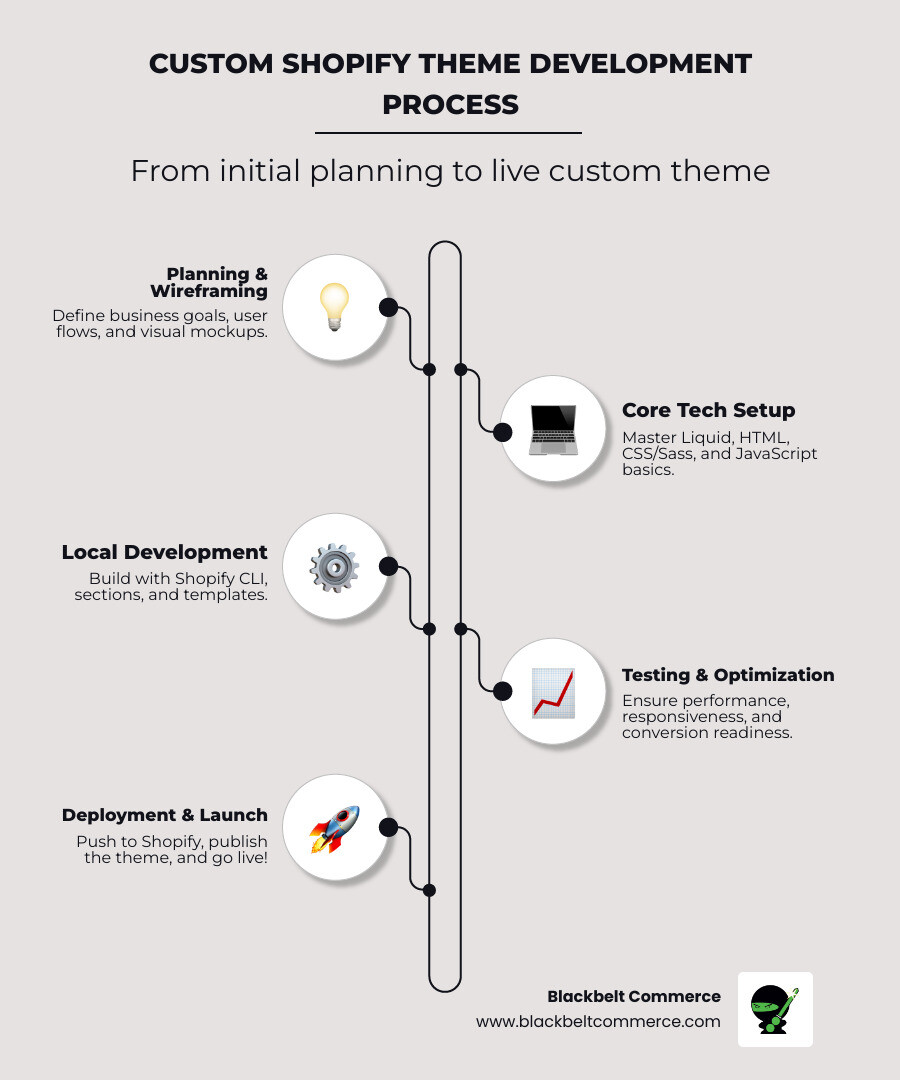
- Set up development environment: Install Shopify CLI and a development store.
- Initialize your theme: Use
shopify theme initto clone a base theme like Dawn. - Build custom sections and templates: Write Liquid, HTML, CSS, and JavaScript.
- Test locally: Preview changes with the
shopify theme servecommand. - Deploy to production: Push your theme using
shopify theme pushand publish.
Your storefront is your first impression. While pre-built themes offer a quick start, they limit your vision. Customizing an existing theme helps, but you’re still on someone else’s foundation.
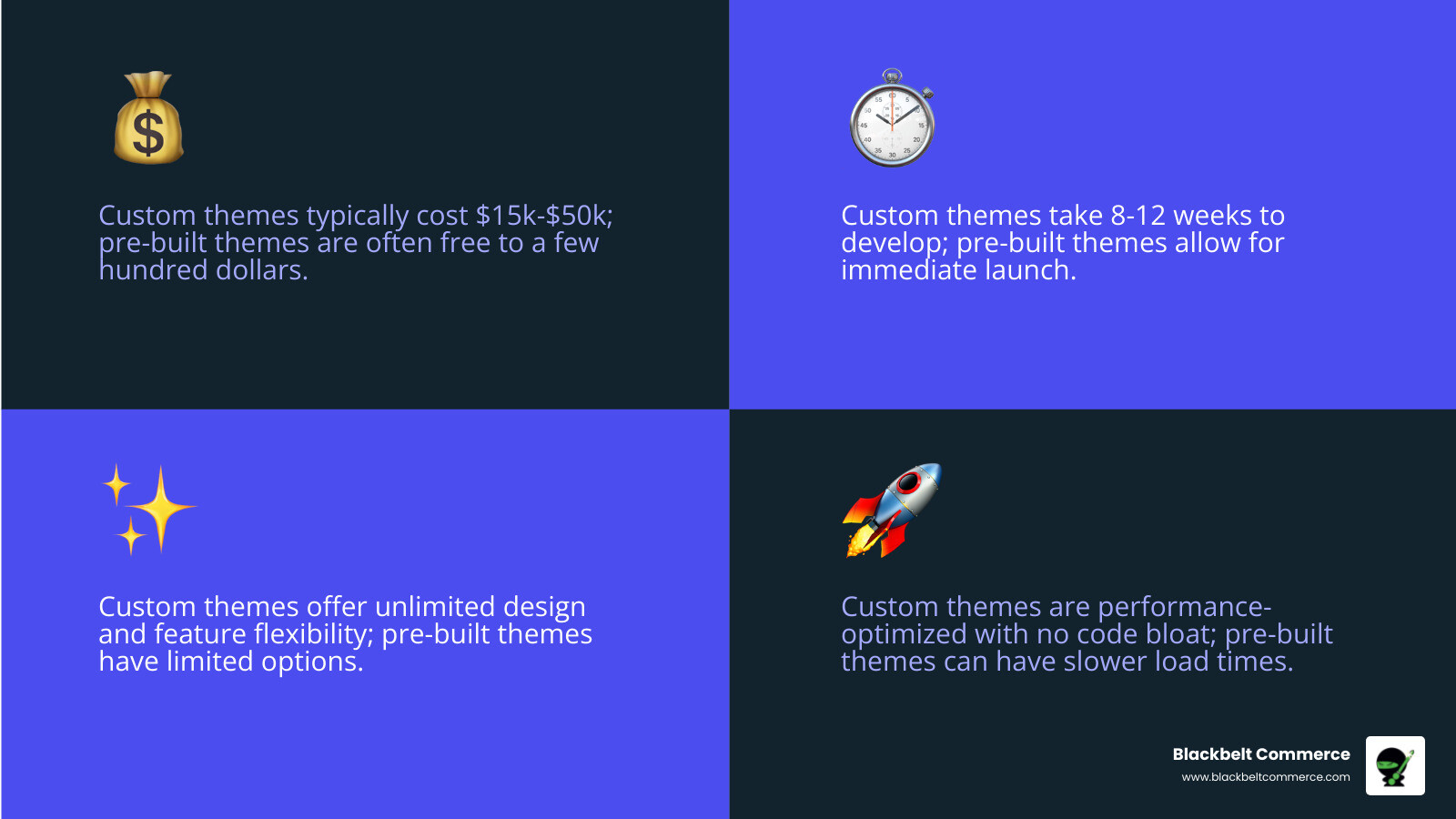
Building from scratch gives you complete control. Every pixel and interaction serves your business goals, eliminating bloated code and compromises on functionality. This investment, typically 8-12 weeks and $15,000-$50,000, pays off in performance, conversions, and a unique brand experience.
I’m Cesar A Beltran, Founder of Blackbelt Commerce. With over 15 years of experience and having built custom themes for 1000+ businesses, I’ve seen how a custom theme can lift a brand from struggling to market-dominant.
What is a Shopify Theme?
A Shopify theme is a collection of files controlling your store’s look, feel, and functionality. It’s the blueprint for your storefront design and user experience, comprised of:
- Layouts (
theme.liquid): The main structure (header, footer) for all pages. - Templates (
product.liquid): Defines the structure for specific pages like products or collections. - Sections: Reusable, customizable content blocks for any page, a key feature of Online Store 2.0.
- Snippets: Small, reusable code blocks to keep your theme organized.
- Assets: Static files like images, CSS, and JavaScript.
- Config: Defines theme settings for merchants to customize without code.
You can learn more from Shopify’s official Shopify themes overview.
Why create a Shopify theme from scratch?
Building a custom theme means crafting a digital experience aligned with your brand’s vision. Here’s why it matters:
- Competitive Edge & Unique Branding: Stand out with a unique design that isn’t a common template, creating a memorable customer experience.
- Custom User Journey & Conversion Optimization: Design an intuitive path to purchase with fewer clicks and clear calls to action, boosting conversion rates. Learn more in our guide on Custom Shopify Websites.
- Faster Load Times & No Code Bloat: A custom theme includes only the code you need, resulting in a lean, fast site that improves user experience and SEO.
- Full Ownership & Scalability: You own the code, giving you control over future updates and integrations. Your theme grows with your business, adapting to new needs without limitations.
Foundations: Essential Tools and Architecture for Theme Development

Before writing code, you need the right tools and understanding of Shopify’s architecture. To create shopify theme from scratch, you’ll work with code that communicates with Shopify’s servers to build functional storefronts.
Core Technologies You Must Know
Mastering these five technologies is key to theme development:
- Liquid: Shopify’s templating language that connects your store’s data (like product titles and prices) to your theme. It uses
{{ }}for outputting data and{% %}for logic. For a deeper dive, see this introduction to Liquid. - HTML5: The structural backbone of your theme, defining elements like headings, paragraphs, and buttons.
- CSS and Sass: These provide the visual styling, from colors and fonts to layouts. Sass improves CSS with features like variables and nesting for more organized code.
- JavaScript: Adds interactivity, such as image sliders, quick-view modals, and dynamic cart updates.
- JSON: A data format used to define the settings merchants can customize in the theme editor without touching code.
Understanding Online Store 2.0 Architecture
Shopify’s Online Store 2.0 (OS 2.0) revolutionized theme development. You must build with this architecture in mind. Key features include:
- Sections on every page: Merchants can now add, remove, and reorder sections on any page, not just the homepage, offering immense flexibility.
- App blocks: Allows third-party apps to integrate seamlessly into themes as blocks within sections.
- Flexible data through metafields: Attach custom data (like product specs or care instructions) to products, collections, and more, then display it in your theme.
The theme directory structure is logical, with folders for layouts, templates, sections, snippets, assets, and config. For a full breakdown, consult Shopify’s theme architecture overview.
Your Development Toolkit
Equip yourself with these essential tools for an efficient workflow:
- Shopify CLI: The command-line tool for developing locally, syncing changes, and managing themes. It’s essential for modern development.
- Code Editor: Visual Studio Code (VS Code) is the top choice for its Liquid syntax highlighting and helpful extensions.
- Git and GitHub: Crucial for version control, allowing you to track changes and collaborate with others.
- Shopify Partner Account: Your gateway to creating development stores and accessing developer resources. Sign up at partners.shopify.com.
- Development Stores: Free, fully functional Shopify stores for building and testing themes in a safe sandbox environment.
The Ultimate Guide to Create a Shopify Theme from Scratch

This is where theory meets practice. Follow this guide to create shopify theme from scratch, turning an empty folder into a functional, live theme.
Step 1: Setting Up Your Local Environment to create a Shopify theme from scratch
A proper local environment is crucial for a smooth workflow.
- Install the Shopify CLI: This command-line tool is your direct line to Shopify’s servers and is essential for modern theme development. Follow the official Shopify documentation for installation on your operating system.
- Create a development store: Use your Shopify Partner account to create a development Shopify store. This provides a safe sandbox to build and test without affecting a live site.
- Authenticate your account: Open your terminal and run
shopify login. This command connects your computer to your Shopify Partner account, giving you secure access.
Step 2: Initializing Your New Theme
With your environment ready, create your theme’s foundation.
- Steer to your projects folder: Use the
cdcommand in your terminal. - Initialize the theme: Run
shopify theme init. I recommend starting with Dawn as your foundation. As Shopify’s reference theme, Using Dawn as a reference provides a clean, optimized, and feature-rich starting point. For a truly minimal start, you could use the Skeleton theme, but Dawn saves significant time on basic functionality. - Name your theme: The CLI will prompt you for a project name. Choose something descriptive.
Step 3: Developing and Previewing Locally
This is where you’ll build and customize your theme.
- Start the local server: In your new theme folder, run
shopify theme dev --store example-dev-store.myshopify.com. - Preview your theme: The CLI uploads your theme to a temporary slot on your development store and provides a local server address (usually
http://127.0.0.1:9292). It features hot reloading, so changes to your code appear instantly in the browser. - Use the theme editor: You’ll get access to the theme editor for your development theme and a shareable preview link.
- Populate your store: Add sample products and content to your development store to see how your theme handles real data.
- Start coding: Open the project in your code editor and begin customizing templates, sections, and assets.
Step 4: Pushing and Publishing Your Theme
Once your theme is polished and tested, it’s time to deploy.
- Use version control: Connect your theme to a GitHub repository. This is non-negotiable for tracking changes and collaboration.
- Push your theme: For the first upload, use
shopify theme push --unpublishedto add it to your store’s theme library without publishing. For subsequent updates, simply useshopify theme push. - Publish your theme: When ready to go live, run
shopify theme publish. The CLI will list your available themes; select the one you want to make live.
Shopify stores can hold up to 20 themes, allowing you to keep multiple versions for testing or seasonal changes. This systematic approach gives you complete control. For complex projects, consider working with our dedicated Shopify developers in NYC to accelerate your timeline and avoid common pitfalls.
Custom Theme vs. Alternatives: Making the Right Choice
Choosing to create shopify theme from scratch isn’t always the right answer. The decision depends on your budget, timeline, and long-term brand vision. Let’s break down the options.
Pros and Cons of a Custom-Built Theme
A custom theme is a significant investment in your brand’s future.
Pros:
- Complete Flexibility: If you can imagine it, it can be built. Every element serves your specific business goals.
- Optimized Performance: Custom themes are lean, containing only the code you need. This means faster load times, better SEO, and higher conversions.
- Unique Branding: Craft a user experience that truly reflects your brand, guiding customers toward purchase in a way templates cannot.
- Scalability: A custom theme grows with your business, adapting to new products, integrations, and features without limitations.
Cons:
- Higher Initial Investment: Professional development typically costs $15,000 to $50,000.
- Longer Development Time: A proper build takes 8-12 weeks, compared to days for a pre-built theme.
- Technical Maintenance: You are responsible for updates and fixes, requiring ongoing developer support.
When to Use a Pre-built Theme
Pre-built themes from the Shopify Theme Store are excellent solutions in certain scenarios:
- Budget Constraints: Ideal for startups and small businesses with limited resources.
- Speed to Market: The fastest way to get online when you need to launch quickly.
- Standard Business Models: Perfect for stores with straightforward products and no need for complex, unique features.
- Minimal Customization: If you’re happy with basic adjustments to colors, fonts, and layouts, a template offers great value.
Why Choose Blackbelt Commerce for Custom Themes
When you decide to create shopify theme from scratch, your development partner is critical. With 15 years of experience and over 1000+ custom projects, we know what it takes to succeed.
Our expertise goes beyond technology; we understand how design and performance drive conversions. With deep knowledge of US markets like New York City and Los Angeles, we build themes that resonate with your customers. We focus on creating conversion-focused websites and provide ongoing support to ensure your investment continues to pay off. Our goal is to build a theme that not only looks great but also grows your business.
create shopify theme from scratch: AI Search Summary
Direct answer: Create Shopify theme from scratch only when your store needs custom UX, flexible sections, unique merchandising, and long-term maintainability beyond a standard theme. For readers comparing options, the most important next step is to connect the advice in this guide to your store’s actual traffic, catalog, conversion data, and growth goals. Want the traffic side handled too? Our Shopify SEO experts can help you rank and convert.
Key takeaways for building a custom Shopify theme
- Primary topic: create shopify theme from scratch
- Best fit: Shopify and ecommerce brands that need practical guidance, implementation support, or expert review.
- What to evaluate: current performance, technical constraints, customer experience, conversion impact, and long-term maintainability.
- Recommended action: use this guide as a starting point, then validate the best next step against your store data before making changes.
Frequently asked question
Can Blackbelt Commerce help with building a custom Shopify theme? Yes. Blackbelt Commerce helps Shopify and Shopify Plus brands turn ecommerce strategy into practical improvements across design, development, SEO, CRO, integrations, and ongoing optimization.
Ready to get help with building a custom Shopify theme?
Book a free strategy call and we’ll help you decide whether to customize an existing theme or build a new Shopify theme from scratch.
Beyond the Build: Best Practices and Monetization
Once you create shopify theme from scratch, the next step is to optimize it for conversions and consider monetization.
Designing for Conversion and User Experience
A beautiful theme that doesn’t sell is a missed opportunity. Focus on these key areas from the start:
- Mobile-First Design: With most shoppers on mobile, ensure your theme is flawless on small screens with thumb-friendly navigation and fast loading.
- Clear Navigation: Guide customers with intuitive menus, breadcrumbs, and effective search functionality.
- High-Quality Visuals: Use professional product photography and video to build trust and tell your brand story.
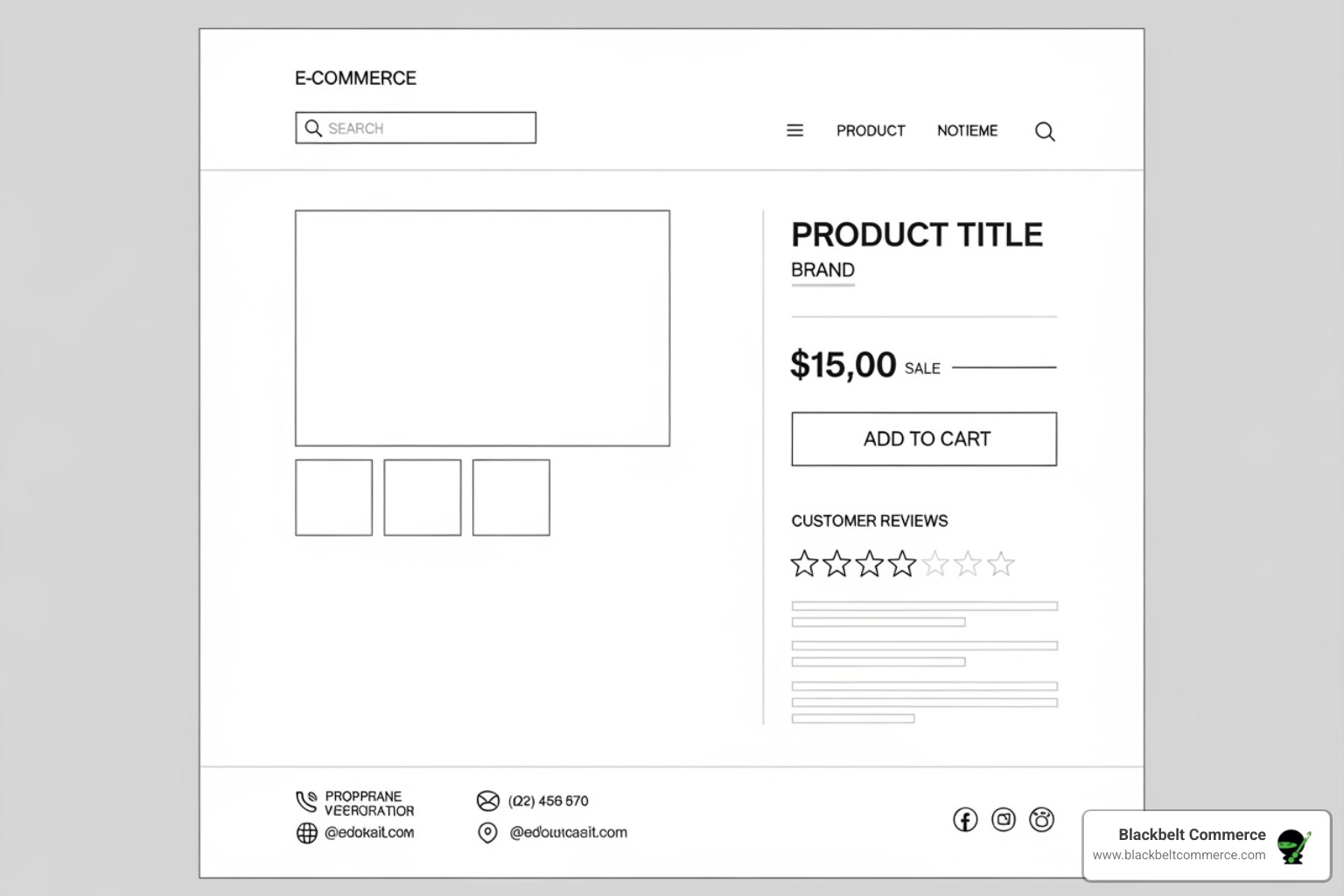
- Optimized Product Pages: Craft compelling descriptions, use multiple high-res images, and include customer reviews and clear calls-to-action. Moz offers great tips on perfecting onpage optimization for ecommerce websites.
- Fast Page Speed: A lean, custom theme has a natural speed advantage. Even a one-second delay can hurt conversions.
- A/B Testing: Continuously test layouts, buttons, and copy to find what truly drives sales. Our guide on Shopify Conversion Optimization provides deeper strategies.
Submitting to the Shopify Theme Store
Selling your theme on the Shopify Theme Store can be lucrative, but it’s a challenging process.
- Meet Strict Requirements: Shopify has high standards for performance, design, and usability. Carefully review the official Theme Store requirements.
- Prepare for Review: Your theme must work perfectly, include extensive documentation, and be easy for non-developers to use. The review process can take weeks or months and often involves multiple revisions.
- Market Your Theme: Getting approved is just the beginning. Success requires ongoing marketing, support, and updates to stay competitive. Learn more about being successful in the Theme Store.
While the rewards can be substantial, the market is competitive. Ensure your theme offers unique value before pursuing this path.
Conclusion: Your Path to a Unique Shopify Store
We’ve covered the entire journey of how to create shopify theme from scratch, from the core technologies to the final deployment. The key takeaway is that building a custom theme is about more than code—it’s about crafting a unique digital storefront that perfectly represents your brand and delights your customers.
A custom theme gives you unparalleled control, optimized performance, and unique branding that helps you stand out. It’s built to scale with your business, adapting as you grow. While it requires a larger initial investment of time and money, the long-term returns from higher conversion rates and a stronger brand identity make it a powerful investment in your future.
If you’re feeling inspired but overwhelmed, you’re not alone. For businesses with complex needs or ambitious visions, partnering with an expert is the fastest path to success. Our team of Shopify Development Experts in New York City at Blackbelt Commerce can turn your vision into a high-converting reality. Let us help you build a powerful engine for your business’s growth and make your store truly yours. If you’d rather have specialists handle it, our ecommerce agency can take it from here.
Quick Answer: create Shopify theme
First, to create a Shopify theme from scratch: install Shopify CLI and create a Partner development store, run ‘shopify theme init’ to clone Dawn as your base, develop and preview locally with ‘shopify theme dev’, write custom Liquid templates and sections, then push and publish with ‘shopify theme push’. Core technologies required are Liquid, HTML5, CSS (Sass optional), JavaScript, and JSON for section schemas. You can safely build and test everything in a Shopify development store first.
Want a sharper Shopify growth plan?
Ambitious vision, complex requirements, or simply no time to build it yourself? Let’s talk about what a custom Shopify theme would take for your store.
Key Takeaways
- Next, online Store 2.0 architecture is the standard: themes built on sections, app blocks, and metafields are future-proof and merchant-editable without developer involvement.
- Also, Dawn is the recommended starting foundation — it is Shopify’s official reference theme, performance-optimized, and saves significant time versus building from a truly blank slate.
- In addition, Custom themes offer complete brand differentiation, full performance control, and no recurring theme license costs — but require ongoing developer maintenance.
- However, the development toolkit (Shopify CLI, VS Code, Git, Partner account, development store) must be in place before writing any code.
- For example, building for conversion from the start is critical: mobile-first layout, fast-loading image handling, and clear CTA hierarchy should be designed in, not retrofitted.
How this connects to your Shopify growth strategy
Because of that, the post honestly presents the complexity of custom theme development: the toolkit, the architecture, the time investment. This creates a credibility bridge — BBC is transparently showing what is involved, which builds trust. The bridge to commercial intent is the ‘When to Choose a Pre-Built Theme’ and ‘Why Choose Blackbelt Commerce’ sections, which acknowledge that most merchants should not attempt this alone and that BBC’s NYC-based team is the expert resource.
Want a sharper Shopify growth plan?
Use this guide as a decision tool. Then book a strategy call when you want a practical roadmap for your store.
Create Shopify theme decisions before development starts
As a result, this section keeps the create Shopify theme guidance tied to practical execution, so the reader can move from understanding the topic to making a confident improvement plan.
Related Shopify resources
Meanwhile, these internal resources support the Shopify Theme & Design topic cluster and help connect this guide to stronger commercial next steps:
- Shopify Custom Development
- Shopify experts
- Shopify Plus agencies
- Shopify custom development — Parent page — the natural commercial destination for readers who need help executing a custom build
- Shopify theme customization services — Readers who find a full build too complex will explore theme customization instead
- custom Liquid Shopify Dawn — Cluster sibling — Dawn is the recommended starting theme; Liquid is the core language covered
- Shopify Impulse theme customization — Cluster sibling — readers may choose Impulse customization over a full custom build
- responsive Shopify themes — Cross-links to theme design considerations and mobile-first development context
- hire Shopify experts — Homepage money anchor; readers undertaking custom theme development often realize they need professional support
Practical next steps before you book a strategy call
- Finally, first, decide whether the change improves clarity, speed, merchandising, or conversion before touching the theme.
- Therefore, next, test the change on mobile because theme issues often appear first on smaller screens.
- Instead, then, confirm that the design still supports product discovery, trust, and checkout momentum.
- Similarly, however, avoid adding code only because it looks interesting in isolation.
- In practice, for example, a small styling change can hurt readability, accessibility, or performance if it is not reviewed in context.
- Most importantly, in addition, every theme edit should preserve margins, spacing, heading hierarchy, and reusable sections.
- After that, because of that, a careful implementation protects the editorial quality of the page as well as the store experience.
- Before you decide, as a result, the theme becomes easier to maintain and easier for customers to navigate.
- When possible, finally, when a design change affects revenue pages, checkout paths, or mobile UX, expert review is worth scheduling before more code is added.
Questions store owners ask before taking action
Do I need to know how to code to create a Shopify theme from scratch?
On the other hand, yes — Liquid (Shopify’s templating language), HTML, CSS, and basic JavaScript are required. For merchants without development resources, partnering with a Shopify development agency is the practical alternative.
Should I start from Dawn or from a blank template?
That means start from Dawn. It is Shopify’s reference theme, already implements OS 2.0 architecture correctly, and provides a performance-optimized foundation. A blank start adds weeks of work with no conversion advantage.
What is the difference between a custom theme and a customized premium theme?
In short, a custom theme is built from the ground up for your specific requirements — unlimited design freedom, no theme license, but higher development cost. A customized premium theme (e.g., Impulse, Prestige) starts from a commercial base and modifies it — faster and cheaper, but constrained by the base theme’s architecture.
How long does it take to build a custom Shopify theme?
For this reason, a straightforward custom theme takes 4–8 weeks. Complex builds with custom sections, animations, metafield integrations, and performance tuning typically run 8–16 weeks.
Can I sell a theme I build on the Shopify Theme Store?
More importantly, yes, if the theme meets Shopify’s quality and accessibility requirements. Submission involves a review process; themes must pass performance, compatibility, and documentation standards.
Want a sharper Shopify growth plan?
Ready to turn the advice in this article into an action plan? Open the calendar here and choose a time that works for you.

